Tagged 'Rendering'

Project Manager

597 votes

After a long stretch of development, Project Manager 4 is officially out — the biggest release in the product's history, and now with full 3ds Max 2027 support.
The headline is AI Asset Classification.
Your library gets sorted automatically — by object type, material, and style — no manual tagging.

Project Manager 4 — What's New Since v3

Changelog · 3ds Max 2016–2027

AI-Powered Asset Classification

  • Automatic categorisation of 3D models and textures by object type, material, form, and style — no manual tagging required
  • Runs entirely on your machine — no cloud, no subscription, your assets never leave your computer
  • GPU-accelerated background processing at low priority — won't interfere with rendering or active work
  • Reclassify specific folders or categories on demand — no need to reprocess the entire library
  • Scale across a team: multiple workstations share the same database and classify in parallel

Colour Tools

  • Find assets by colour — pick from a palette and instantly see matching models or textures
  • Perceptual colour similarity search — finds visually related assets, not just exact hex matches
  • Find Similar by Colour in the right-click menu for models and textures

Find Similar

  • Find similar by content — AI matches 3D models by style, shape, and visual look
  • Find similar by colour palette — matches assets to a reference image or mood board by dominant colour proportions

Smarter Search & Filtering

  • Multi-keyword search: "Chair, Glass" finds a file named Chair.max described as "glass"
  • Category filter correctly includes all subcategories — filtering Furniture also returns Furniture → Chairs → Dining
  • Combine category and material filters: find glass-and-metal tables, or wooden ones, in one click
  • Categorised / Uncategorised quick filters — see which assets still need attention

Gallery & 3D File Browsing

  • Three gallery tabs for .max files: Models, Materials, and External Links
  • Drag materials directly from the gallery into your open 3ds Max scene
  • 3D viewport preview for FBX, 3DS, OBJ, and other formats — inspect geometry before importing
  • Edit external links inline — fix or replace missing textures without opening the .max file
  • Zoom & Pan for images — inspect textures at full resolution inside Project Manager

Migration & Compatibility

  • v3 and v4 share the same database format — point v4 at your existing library and go; no rebuild required
  • Run v3 and v4 side by side on the same team; supported from 3ds Max 2016 through 2027

Performance & Other Fixes

  • Significantly improved overall performance — faster navigation, filtering, search, and file/folder operations
  • Live sync in shared database mode — changes by colleagues appear automatically without reloading
More about new features   Project Manager version 4
 

Batch Camera Render

274 votes

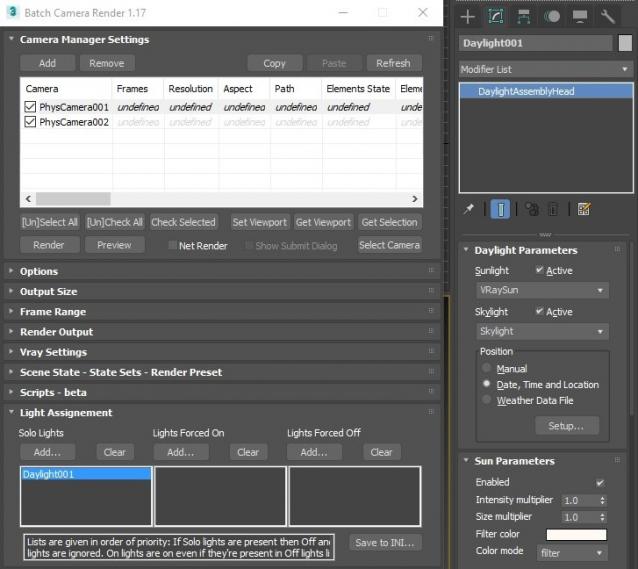
This script aims to replace standard 3dsmax's Batch Render and imitates Houdini Output Node workflow. Using it you can specify rendering parameters - frame size, frame number, output path - directly to camera object, so every camera in scene 'knows' what it intended to render. Additional functionality is Lighting Assignment - you can specify which light will be turn on or off for selected camera during the rendering.

1.19:

  • Support 3ds max 2026

1.18:

  • Support for 3ds max 2023 Update fixed

1.17:

  • Corona and Vray Sun inside Daylight System fixed (thanks to busseynova for reporting)

1.16:

  • CoronaSun supported inside Daylight System

1.15:

  • Don't Save Render Elements Checkbox (Thanks to antomor)
  • Limited support for camera objects in xref scene files (Only root objects in first level xrefs. Cameras in nested xrefs not supported)

1.13 Bugfix:

  • Deadline submission should work now

1.12 New Feature:

  • Deadline support.
    Very basic imlementation, it allows you to submit your jobs on a deadline server. Enter deadline repository address and check "Use Deadline" checkbox. Other checkbox doesn't matter in this case ("Net render", "Show Submit Dialog").
    Probably it requires Deadline 3ds max Submitter installed. I didn't have a chance to check it on a clean machine.

1.11 Features and fixes:

  • State sets support added
  • "projectname" keyword added which resolves to project's folder name
  • other fixes and improvements

1.10.3b Fixes:

  • Crash when vray ir/lcache maps are set to auto-save
  • Region render was not set properly during the rendering

This is major update of the script, so it may not be as stable as before. Backup scenes or cameras at least before running this version. More information can be found here - 1.10b Multiple presets for each camera

Previous updates:

1.10.2b Fixes:

  • Problems with render elements paths
  • Copy/paste of render region settings
  • Properly convert render region values when change resolution

New features:

  • Multiple presets for each camera
  • New keyword %presetname% to support multiple presets
  • Distributed rendering checkbox added to vray common settings
  • Bugfix - Net render not starting after cancelling during local rendering.
  • Improved performance with scenes with lots of cameras
  • Added support of Vray RT as a production renderer
  • Added support of using MFRender script to render scenes through BatchCamera script.
  • Bugfix - Error was popping up sometimes during drag-n-drop
  • Bugfix - Render elements didn't render in certain conditions
  • Bugfix - Pre-render/post-render scripts didn't work on network rendering
  • Bugfix - Select All and Toggle All buttons didn't work properly

Here are some details: http://usakhelo.github.io/batchcam/batchcam-1.9.20.html

SolidRocks

569 votes

SolidRocks V2.4 is out !!  Support for V-Ray 6 (hotfix 2) and  MAX 2013-2023 ! 

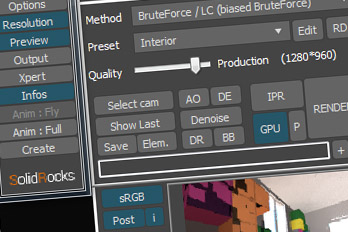
SolidRocks adjusts and optimise all needed Vray parameters to reach the best rendertime/quality ratio.

Learn Vray progressively, see in realtime changes made by SolidRocks when you change resolution/quality.

SolidRocks includes new tools for both VrayMasters and Beginners:

Little Batch Render

33 votes

Vray - LittleBatchRender
Version 0.84

Description:
with the "LittleBatchRender"-script you can easily render multiple cameras in your scene with one Click
Features:


• correct autonaming for Render Elements
• NetRenderSupport
• Spawning can be disabled when rednering with NetRender
• consistent Naming for local and NetRender - no relinking in Compositing necessary
• Turning of and on individual Xrefs for individual Cameras

RenderMask

374 votes

Render different types of masks (Luminance, RGB, Reflection, Lights/Shadows, ObjectsID, SSS, Texture, AO, ZDepth, Specular, Refraction). The script don't affect the scene materials, lights and render settings.
(this version support only V-Ray render engine)


Reindeer Free

4 votes

Reindeer the node based render manager for 3dsMax is FREE to use during 2022 and probably longer.

Reindeer has been used for many years on lots of projects. It's a flexible tool not just for rendering. Use it for automating rendering or simulations or storing scene specific scripts in the scene file. Check out videos at the following link:

https://vimeo.com/channels/1054454/videos

It is free for the time being (possibly forever), due to the costs of making it commercial being higher than the revenue (classic lose-lose).

renderStacks

4 votes

Render Pass Manager for 3dsMax

We offer a free non-commercial version.

It is a render pass/generic task manager for 3dsMax. If you have used RPManager, LPass Manager, Prism, StateSet, Scene State. It is something like that. But, it is aiming to be a lot smarter, faster and more stable.

Render Node Monitor

3 votes

Batch Camera Render 2

10 votes

RenderGuy

1 vote

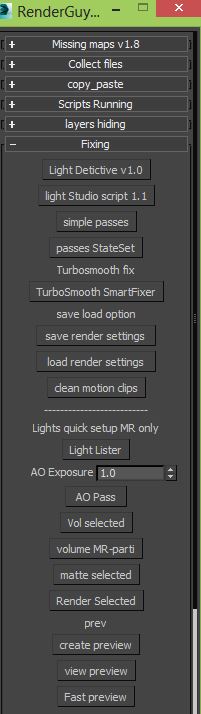
RenderGuy is Rendering/lighting/fixing tools you can Fix your missing maps ,collect your maps or archive it ,copy paste objects materials lights between different files , mange complex lighting setups with Light detictive ,quick mr studio and quick passes.
IF you do alot of rendering you will need this, All in one.

Syndicate content