
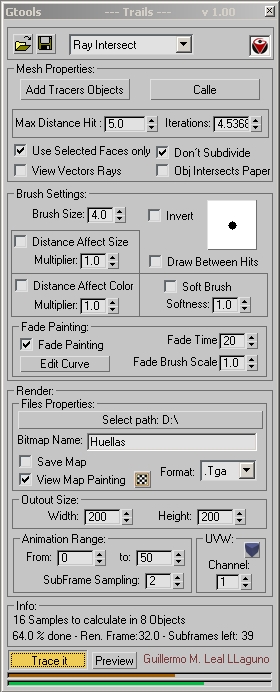
GTools_Huellas
Version:
1.00
Date Updated:
04/23/2008 this scripts paints a texture as the pen objects move across the paper object, it can be use to paint car trails,objects falling, grass been crush, etc.

Version Requirement:
3DStudio Max 8 - 2009 | Attachment | Size |
|---|---|
| Trail_ui.jpg | 137.09 KB |
Comments
The only possible reason is
The only possible reason is that you are not setting the right distance hit, try using the tape tool to measure the actual distance from you object to the surface you want to paint on.
Yes once I get some free time I will make a small video tutorial.
Guillermo Leal.
I cant see any vector rays
I cant see any vector rays in my view port and I have set it from 5 - 20. My shpere is 30 radius and sligthly intersects the ground (I have tried turning Obj intersects paper too. Ill send you the file.
Maybe a tutorial would be handy on your site. BTW the discription of the perameters on your site is Awesome!
Jordan, That is strange,
Jordan,
That is strange, it’s all working here.
Yes you can send it if you want.
[email protected]
Can you tell me what your problem is?
If you click view vector rays do you see the actual hits on the viewport? If not then you have not set a proper Max Distance hit.
That parameter is used to control how far you want the script to look for surface hits, so you don’t end looking at all the scene. It’s very possible that this number it’s too short right now.
Guillermo Leal.
Great Looking tool!!! Looks
Great Looking tool!!! Looks very powerfull and VERY useful!!!
But I havent been able to get it to work on a scene yet. I can send you the scene im trying to get it to work on if you want. Just a sphere rolling down a hill in max 2009.