3ds Max | All

FS Scene Converter (FStorm)

6 votes

FS Converter is a scene convertor to come back from FStorm renderer or to only convert some objects.

This converter allow to convert all the Fstorm renderer feature to Vray or Corona and Redshift.

It's not a simplicity converter, it's keep all the compatible settings...
Compatible: Fstorm Camera, Fstorm materials, Fstorm proxie, Fstorm Lights (including SunLight), Fstorm Displacement...

Convert all the scene or only selected Object... See how many instance it's necessary to convert...

Real time informations for the convertion state.

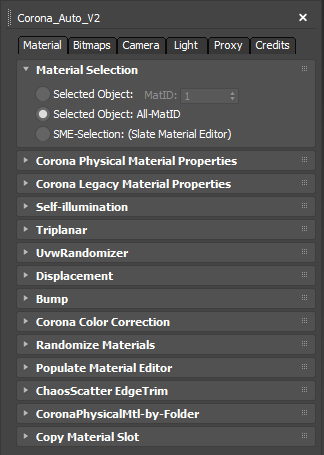
Corona Material Automator

4 votes


Get Materials (one click!)

4 votes

A very simple but EXTREMLY USEFUL script you will use all the time!

With just one click it opens the Slate Material Editor and displays all the materials for the selected objects well organized in a clean view.

Forget about the annoying material picker tool. Add this simple button to your toolbar and every time you want to see the material/s for your current selected object/s just click the button and... Voila!

It will save you a lot of time!

ChaosScatter Toolbox

4 votes

This script let you change any properties of multiple ChaosScatter at once.

Update 0.2: the loaded maps are now loaded in raw color profile, a new additional tool that can convert forestPack to ChaosScatter (you need to have ForestPack Lite or Pro installed), density maps loading was missing.

Update 0.3: A button to Convert all selected Chaos Scatter to geometry instances has been added. New buttons in additional tools tab has also been added, you can now add some distribution objects to existing ChaosScatter, and you can select either Scattered Objects or distribution objects.

miauu's Folder Bookmarks

1 vote

Batch Camera Render

274 votes

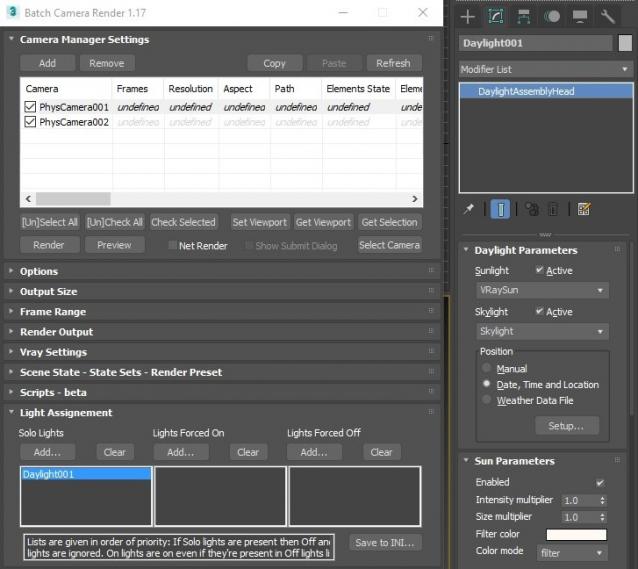
This script aims to replace standard 3dsmax's Batch Render and imitates Houdini Output Node workflow. Using it you can specify rendering parameters - frame size, frame number, output path - directly to camera object, so every camera in scene 'knows' what it intended to render. Additional functionality is Lighting Assignment - you can specify which light will be turn on or off for selected camera during the rendering.

1.19:

  • Support 3ds max 2026

1.18:

  • Support for 3ds max 2023 Update fixed

1.17:

  • Corona and Vray Sun inside Daylight System fixed (thanks to busseynova for reporting)

1.16:

  • CoronaSun supported inside Daylight System

1.15:

  • Don't Save Render Elements Checkbox (Thanks to antomor)
  • Limited support for camera objects in xref scene files (Only root objects in first level xrefs. Cameras in nested xrefs not supported)

1.13 Bugfix:

  • Deadline submission should work now

1.12 New Feature:

  • Deadline support.
    Very basic imlementation, it allows you to submit your jobs on a deadline server. Enter deadline repository address and check "Use Deadline" checkbox. Other checkbox doesn't matter in this case ("Net render", "Show Submit Dialog").
    Probably it requires Deadline 3ds max Submitter installed. I didn't have a chance to check it on a clean machine.

1.11 Features and fixes:

  • State sets support added
  • "projectname" keyword added which resolves to project's folder name
  • other fixes and improvements

1.10.3b Fixes:

  • Crash when vray ir/lcache maps are set to auto-save
  • Region render was not set properly during the rendering

This is major update of the script, so it may not be as stable as before. Backup scenes or cameras at least before running this version. More information can be found here - 1.10b Multiple presets for each camera

Previous updates:

1.10.2b Fixes:

  • Problems with render elements paths
  • Copy/paste of render region settings
  • Properly convert render region values when change resolution

New features:

  • Multiple presets for each camera
  • New keyword %presetname% to support multiple presets
  • Distributed rendering checkbox added to vray common settings
  • Bugfix - Net render not starting after cancelling during local rendering.
  • Improved performance with scenes with lots of cameras
  • Added support of Vray RT as a production renderer
  • Added support of using MFRender script to render scenes through BatchCamera script.
  • Bugfix - Error was popping up sometimes during drag-n-drop
  • Bugfix - Render elements didn't render in certain conditions
  • Bugfix - Pre-render/post-render scripts didn't work on network rendering
  • Bugfix - Select All and Toggle All buttons didn't work properly

Here are some details: http://usakhelo.github.io/batchcam/batchcam-1.9.20.html

Move Points

1 vote

This tool moves points to a source very quickly. It uses the 3ds MAX SDK for heavy-duty tasks like moving mesh points. The destination source can be points or SpLines. When the source is SpLines, you can move points along a direction (perpendicular to the selected point) or can move by edges.

Extended Timeline

15 votes


This free script allows you to easily navigate in timeline. You can change the active time segment by dragging the slider, or zooming with your mouse wheel.

Bug report: [email protected]

Version info:
1.6.1 (2013. Apr 7.) Error in new scene fixed, callback event error fixed, zoom to selected keyframes works with biped objects.
1.6 (2013. Mar 19.) Available to Zoom to selected keyframes.

ImportObj

1 vote

This script, will import one or multiple *.obj files, if the meshes have some vertex colors they will be imported aswell . there is options to "normalize" scale of imported objects, if checked, each imported object will fit into a 100 unit box (as i work mostly in cm, it makes a 1m box) i'll try to implement this function better for other units. There is also an option to evently space imported objects.

EvgScripts Master Thread

0 votes


Smart Symmetry

Welcome to the EvgScripts Master Thread – a central place where I publish new scripts, updates, and tools for 3ds Max. My commercial scripts on Gumroad: https://evgscripts.gumroad.com/

Feel free to contact me if you need particular 3ds Max version or if you have any questions: [email protected]

Last Updated: 25 October 2025

Syndicate content