MaxScript Release 0.2 Beta Encrypted FOR MAX 2.5+ (11/14/1998)
Copyright (c) 1998 by Borislav Petrov, Bobo's Rendert**ls.
SHORT DESCRIPTION
CameraFaceCounter (CFC) is a little scripted utility
for MAX R2.5+ that lets you count the visible faces in a camera's cone. It should help Game Developers keep face counts low.
HOW DOES IT WORK?
CFC checks every face of every mesh in the
scene and counts all faces that are even partially visible. Options let
you include/exclude BackFaces (Faces facing away from the camera), and
select and delete Invisible Faces.
FEATURES
Version 0.2 BETA (11/14/98)
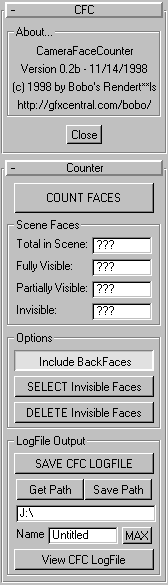
Make sure a Camera viewport is active.
Press the [COUNT FACES] button to count faces
in the currently active camera.
By default, the "Include BackFaces" checkbutton
is active. This will let the utility count all faces that are in the view
cone without respect of normal direction.
If you deactivate the "Include BackFaces"
checkbutton, only faces that are facing the camera will be counted.
The utility DOES NOT skip faces that are hidden behind other faces,
since they are usually still being drawn by the Realtime engine.
You can check the "SELECT Invisible Faces"
checkbutton to add a MeshSelect modifier and select all faces that are
NOT visible to the camera. BUGFIX in Version 0.2: Both BackFaces and Out-of-Sight Faces will be selected.
You can check the "DELETE Invisible Faces"
checkbutton to add a DeleteMesh modifier and remove all faces that are
NOT visible to the camera. This function will work only if the "SELECT..." button
is checked, too.
All changes to all meshes are Undoable with
a single Undo click.
All count results will be reported in the
MAXScript Listener window. The total count will be also reported in the
utility pannel.
When Clipping Planes are set to Clip Manually,
the Far Clipping range is used. When Clipping is Automatic, a Far Clipping
range of 10 Million units is used.
The Near Clipping Range is NOT used.
Check the [SAVE CFC LOGFILE] checkbutton to generate a LogFile.
Press the [Get Path] button to browse for an exisitng path.
Press the [Save Path] button to save the Path and Filename settings as defaults.
They will be used next time you start the utility.
You can enter an exisitng path by hand in the text field.
Enter a Name for the LogFile. Press the [MAX] button to set the current MAX Scene File Name as LogFile Name.
Press [View CFC LogFile] to open an existing file for viewing/editing.
BUGS REPORT:
In Version 0.1 Beta, only BackFaces have been selected. In 0.2 Beta, both BackFaces and Faces outside of the Camera Cone will be selected.
FUTURE FEATURES
Animation support (print out checks for every frame)