Q:
Hi !
I wonder if u could do tutorial on a match, that would ignite and burn. :)
I need it to burn the fuse of my bomb.
Thank you !
A:
This is not a complete Tutorial, only a sketch describing the most basic steps to create the scene bellow. Please download the sample MAX file and explore it in detail.
To redo this tutorial, you will need MAX 1.1 and higher, or MAX 1.0 with the freeware plug-in Combustion installed.
The Tutorial for the Bomb Fuse is here.
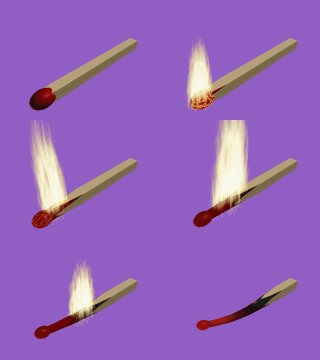
Let's create the geometry first
Create a Box with following Parameters:
Length:40,0
Width:40,0
Height:500,0
Length Segs: 4
Width Segs: 4
Height Segs: 40
This will be the body of the match. The high Segment settings are because we are going to do Boolean Substraction and we need more detail to get better results.
Apply a Material Modifier and set Mat.ID to 1
Create a Sphere with Radius 30 and use Scale to make it look like an ellipsoid.
Cretate a second Box (Cube) with size 600
Create a Cylinder with Radius 10, Height 800
Apply a Material Modifier to the Cylinder and set Mat.ID to 2.
Apply a Taper Modifier to the Cylinder with following Parameters:
Amount:3,0
Curve:-5,0
Primary:Z
Effect:XY
Create a Boolean Compound Object and substract the Cylinder from the Cube.
We have a box with a cylindrical hole now. This hole will carve the match as it burns.
Create a second Boolean Compound Object and substract the first Boolean from the first Box.
Animate the Position of the first Boolean Compound Object to "burn out" the Box.
Select the Sphere and the Box, and apply a Bend Modifier to both objects with following Parameters:
Angle:0,0
Direction:90,0
Axis: Y
Limit Effect: ON
Upper Limit: 400,0
Lower Limit:0,0
Animate the Bend Angle settings from 0 to 40 to bend the match as it burns out.
Now for some materials:
Create a Multi/Sub Material.
In slot 1, create the wood material for the match.
In slot 2, create a black material. You can use a gradient map and a red map in a Mask to simulate the glow.
As the Boolean moves, the "burning" part of the match receives Mat.ID 2 and shows the second material.
Create a new Material for the match head. Use a Noise Procedural shader in the Diffuse channel for the burning phase, and animate the Diffuse color.
Light my Fire!
Create a Combustion Atmospheric Apparatus with Hemi turned ON.
Animate Position, Rotation and Scale of the Apparatus for the Flame to move.
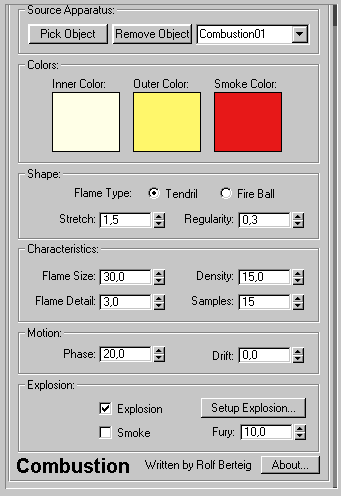
Open "Environment..." and add a Combustion Effect to the list.
Set the Combustion as bellow:
What else?
Be sure to explore the animation settings for every object in the scene using the TrackView. There are many parameters that can be animated, and there is not enough place in this tutorial to describe all of them...
All 3 objects should be linked together so you can animate the whole match as one.