Q:
Does anybody know if it is possible to create an object that will
refract other objects? Something like a magnifying glass! I'm
desperatly trying and don't seem to be able to do it!!!!
HELP PLEASE!
(This Question was asked for 3DSr4 a long time ago. Here is the MAX version of the Answer)
A:
This Tutorial can be redone with any Version of MAX.
The technique will also work in 3DS DOS.
You can change some scene details, motion etc. The Tutorial gives just the basic technique for Flat Faked Refraction Maps.
 You can download the MAX scene to play with.
Note that since I use a German version of MAX, some object and viewport names on the screenshots and in the sample scene might look strange.
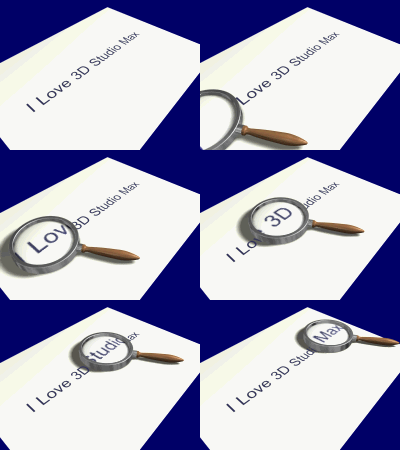
Let's create the Magnifying Glass object first
Start a new MAX scene.
Turn Snap on.
In the Top Viewport, create a Donut Shape with
Steps: 12
Radius 1: 148,0
Radius 2: 162,0
Apply a Bevel Modifier with following parameters:
Level 1
Height: 2,0
Offset: 2,0
Level 2
Height: 45,0
Offset: 0,0
Level 2
Height: 2,0
Offset: -2,0
Create a Sphere with
Radius: 150,0
Segments: 32
Hemisphere: 0,5
Center the Sphere to the Ring.
Switch to the Front Viewport, select the Scale icon  , right-click the Scale icon to open the Transformation window. Enter 10 % in the (left-bottom) "Absolute: Z" field.
Apply a Planar UVW-Map Modifier to the Sphere.
Activate Sub-Object and rotate the Gizmo - the upper side of the map should point up.
, right-click the Scale icon to open the Transformation window. Enter 10 % in the (left-bottom) "Absolute: Z" field.
Apply a Planar UVW-Map Modifier to the Sphere.
Activate Sub-Object and rotate the Gizmo - the upper side of the map should point up.
This will be the magnifying glass object.
In the Top Viewport, create a spline for the Handle, apply an EditSpline Modifier and adjust the shape.
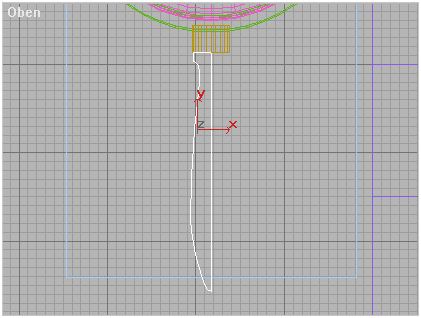
Apply a Lathe Modifier to create a surface of revolution.
Apply a Cylindrical UVW-Map Modifier to the Handle.
In the Front Viewport, Align the Middle X,Y of the Handle to the Middle of the Ring.
Create a Cylinder between the Ring and the Handle.
Open Material Editor, create or load a Chrome Material and assign to the Ring and to the Cylinder.
Create or load a Wooden Material and assign to the Handle.
Create a Material for the Glass and assign it to the Hemisphere. We will go back to it later.
Select all objects and Group them.
Now let's create the sheet & text
Create a QuadPatch for the paper sheet.
Align the Patch to the bottom of the Ring.
Create a Text Shape of your choice.
Apply Extrude Modifier to the Text Shape.
Align the Text to the Sheet.
Turn Snap OFF and move the Text slightly up in order not to fall IN the sheet.
Right-click the Text Shape, go to Properties, and uncheck Cast & Receive Shadows.
In the Material Editor, create a white material for the Paper, and a black material for the letters. Assign them accordingly.
Instead of using a Text Shape, you can also use a texture map of the text.
Now for the Faked Refraction Map.
Create a Free Camera in the Top Viewport just in the middle of the Hemi-Sphere.
Set FOV to 120 degrees.
Align the Camera to the Middle of the Sphere.
In the Front Viewport, move the Camera up to let the cone pass at the edges of the Hemi-Sphere.
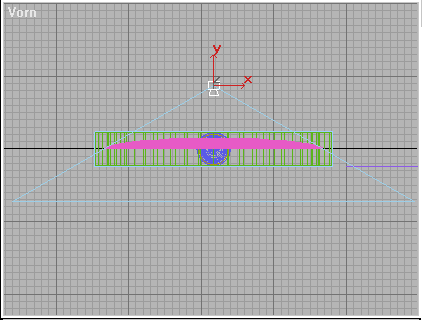
Select the bottom-left viewport, and press C to show the Camera view.
Link the Camera to the Glass Group.
Animate the motion of the Glass Group. (The Camera will follow).
Create Shadowcasting Lighting and a Target Camera to set the scene.
Activate the Target Camera as the bottom-right (Perspective) Viewport.
Set a Background color in the Environment window as you wish.
Select the Grouped Magnifying Glass and Hide it.
Render to AVI (or another animation format) from the Free Camera view.
In the Material Editor, assign this animation to the Diffuse Map Channel of the Glass Material we already created.
Press the "Show Map in Viewport" icon.
In Shaded mode, Unhide and select the Glass Group.
Open the Group and select the Hemi-Sphere.

Push the Sub-Object button of the UVW-Map Modifier and use Bitmap Fit and Uniform Scale to adjust the Bitmap - this will adjust the grade of magnification.
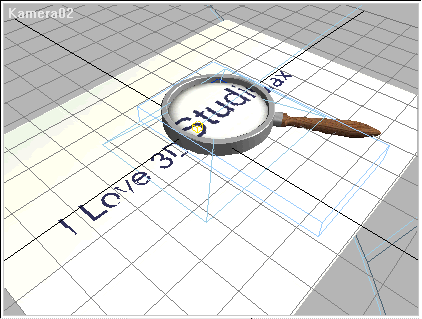
You can render the scene now.
ENJOY!
Magnifying Glass Tutorial using Faked Rafraction Map
(c) 1997 by Borislav "3DJ Bobo" Petrov (9/4/97)