Q:
Where can I find some very basic MAX tutorials on the Web?
A:
This is the first of many TBTs (Totally Basic Tutorials). It shows a quick way for modeling an Egg.
You need MAX 1.1 or 1.2 with the FreeFormDeformation modifier installed, or MAX 2.0.
The Egg
Start your 3DS MAX (1.x or 2.0)
MAX 1.x only: Right-click on the Viewport's name saying "Perspective" and select the top entry of the drop-down list to get into Shaded mode.
In the "Create" tab, Standard Primitives, click on "Sphere"
Click and hold with the mouse in the Perspective viewport to define the center of the object, then drag the mouse while still holding the button to define the radius.
You have a Sphere now. It is selected. You can refine its appearance by entering a higher number of segments. You can do this anytime later in the "Modify" tab.
Activate the "Modify" tab, click on the "More" button and select the "FFD 3x3x3" entry from the list.
Click on the "Sub-Object" button - it turns yellow, and the next field reads "Control Points".
Right-click in the "Front" viewport to activate it
Click on the "Select and Move" icon in the toolbar.  Click on the "Y" icon in the toolbar.
 Click and hold the mouse outside the objects and drag to select the upper Control Points of the FFD lattice.
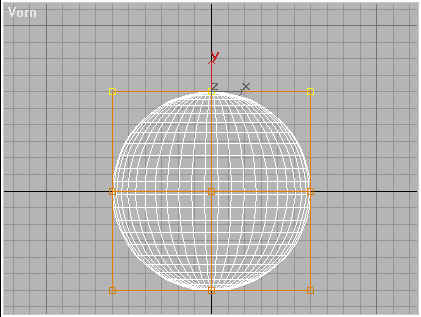
Press Space bar to lock the selection.  Click, hold and drag the mouse up anywhere in the Front viewport to move the selected Control Points up.
Click on the "Scale" icon in the toolbar.
Click, hold and drag the mouse up anywhere in the Front viewport to move the selected Control Points up.
Click on the "Scale" icon in the toolbar. Click, hold and drag the mouse down anywhere in the viewport to scale the selection down a bit.
Click on the "Sub-Object" button to deactivate it. Press Space bar to unlock selection.
Click, hold and drag the mouse down anywhere in the viewport to scale the selection down a bit.
Click on the "Sub-Object" button to deactivate it. Press Space bar to unlock selection.
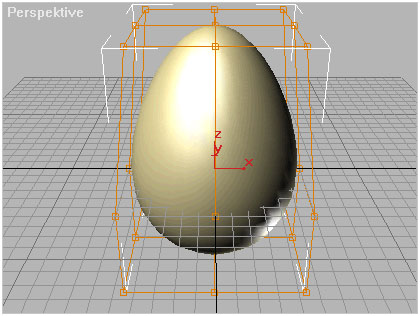
Congratulations! You just made an Egg...