Q:
Where can I find some very basic MAX tutorials on the Web?
A:
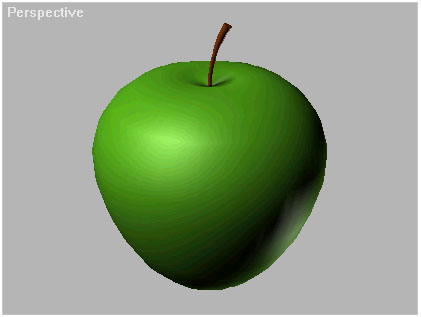
This is the second TBT. It shows a quick way for modeling an Apple.
It works with any release of 3DS MAX and covers some basics of:
Shapes and Splines
Edit Spline
Lathe - Surface of Revolution
Basic Objects - Cylinder
Basic Modifiers - Taper and Bend.
The Apple
Start your 3DS MAX.
MAX 1.x only: Right-click on the Viewport's name saying "Perspective" and select the top entry of the drop-down list to get into Shaded mode.
Press the "S" key to turn "Snap" on. Right-click in the "Front" viewport to activate it.
In the "Create" tab, click on "Shapes".
Click on "Circle"
Click and hold with the mouse in the Front viewport to define the center of the Circle, then drag the mouse while still holding the button to define the radius.
Right-click in the "Front" viewport to activate it.
In the "Create" tab, click on "Shapes".
Click on "Circle"
Click and hold with the mouse in the Front viewport to define the center of the Circle, then drag the mouse while still holding the button to define the radius.
Activate the "Modify" tab and click on "EditSpline". The Sub-Object button will be activated automatically (yellow) and will be in Vertex mode.
Click with the mouse to select the left vertex of the circle.
Press the "Delete" key to delete the vertex.
Select "Segment" from the Sub-Object drop-down list.
Click on the left segment to select it - it turns red.
Right-click on the selected segment and select "Line".
You have a half-circle now.
Select "Vertex" for Sub-Object mode again.
Activate the "Select and Move" icon.  Select the right vertex of the shape and move it up and to the right.
Select the upper vertex and move its tangent's left control point down.
Select the bottom vertex and move its tangent's left control point up.
Select the right vertex of the shape and move it up and to the right.
Select the upper vertex and move its tangent's left control point down.
Select the bottom vertex and move its tangent's left control point up.
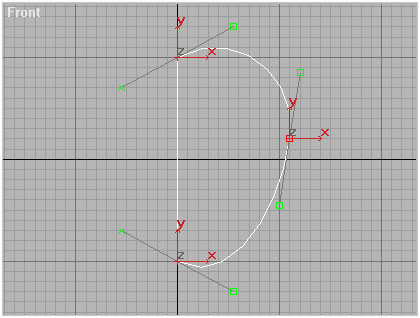
Click on "Sub-Object" to deactivate it.
In the Modify tab, click on "Lathe".
You should have the apple object now. You can increase the number of segments to adjust detail.
Go to the "Create" tab / "Geometry"
Right-click in the Top Viewport.
Create a Cylinder in the middle of the apple. Set the number of Segments to 10.
In the Front viewport, move the Cylinder up.
Go to the Modify tab and apply a Tapper modifier with Amount 1,0 and Curve -2,0.
Apply a Bend modifier with Angle 30,0.
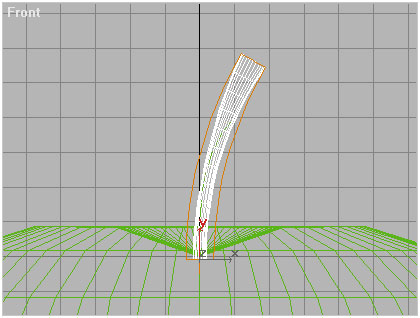
Congratulations! You just made an Apple...