Q1:
Is it possible to wrap text around a sphere and animate it spinning?
Q2:
I need to make text around a sphere i mean, the text is straight
usually..
A:
Receiving 2 messages about this on the same day means this is a real FAQ :o)
It works in both MAX 1.x and MAX 2.
There are some small differences though.
The following TBT is for MAX 2 with some additional descriptions for MAX 1.x users.
In the Top Viewport, create a Sphere Primitive with Radius 180 and 32 segments.
In the Top Viewport, create a Circle Shape with Radius 200.
In case the Circle is not centered to the Sphere, use the Align tool to center it.
In the Top Viewport, create a Text Shape and enter the desired text.
Go to the Modify tab, add an Extrude Modifier with Amount 10.
Add a PathDeform WorldSpaceModifier (WSM) modifier and select the Circle for path.
MAX 1.x Users please go to the Create/Space Warps rollout and select PathDeform.
Then Select the Circle Shape - a Spqce Warp will be genarated.
Select the text again. Note that all settings for the PathDeform are done in the SpaceWarp Binding in the
modifier stack. This is why in R2, PathDeform is a special kind of Modifier-like Space Warp
and is found in the Modifier list instead under Space Warps.
Check the "Move to Path" button and in Deform Axis select X - the text should be deformed around the sphere, but in the XY plane.
To rotate it, enter -90 into the Rotation field.
Press the Animate button, go to the last frame, and enter 100% into the Percent field.
The Percent field describes the position of the object along the spline. In our case,
we will get a full turn for 0 to 100%.
You can assign some materials to the objects (this is not covered by this Tutorial ;o)
The whole shouldn't take more than 5 minutes...
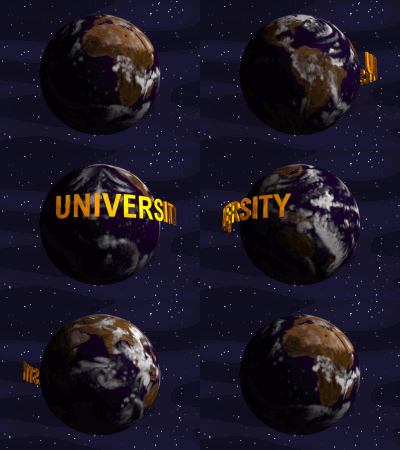
Text Around a Sphere Totally Basic Tutorial
(c) 1998 by Borislav "3DJ Bobo" Petrov