
Q:
Hi, I got the following problem.
I'm trying to draw face-gearwheels.
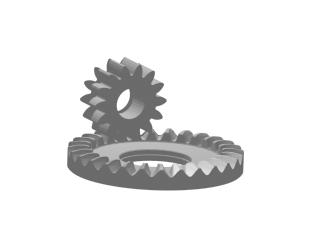
(see attached image) A face-gearwheel
is
created by "rolling" the pinion trough it. I created this one in
Acad R14.
This method works, but is very very slow, and I get a real big file
in ACAD.
Is there a (easier) way to create a gearwheel like this in 3DSMAX
II or ACAD
A: Here is
an idea how you could do it. It took about 10 minutes in MAX 2
 You can download the MAX2 file to play with
HERE IS HOW IT WORKS
Create a Circle Shape.
Create a Rectangle.
Select the Circle, go to Create tab, select Loft from the dropdown list. Click on Loft, make sure the Instance option is selected, and get the Rectangle for Shape.
Add an EditSpline modifier to the original Rectangle
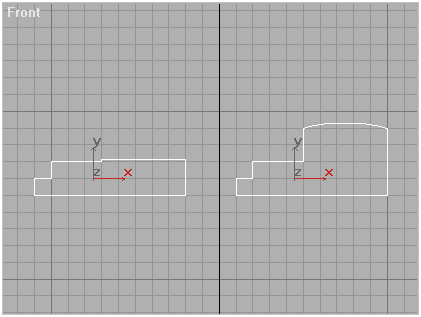
Insert vertices and make it look like the cross-section of the wheel
at the highest point of the teeth.
The Loft object will react and display a HIGH zone where the
teeth are going to be...
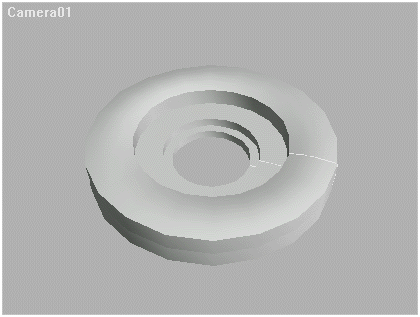
Create a Copy of the Rectangle, go to Sub-object level and move the vertices at the TOP of the tooth down to set the LOW part of the tooth.
In Modify Tab, go to "Path Parameters".
Check the "Snap On" checkbox and enter a snap value of 2 (or any other value
- this defines the number of teeth)
The value of 2 means tha low/high cross-sections will apear every
4 (2+2) percent of the path's lenght. This gives 25 teeth. (4*25 = 100%)
Now, with value 0% in the Path spinner, press the upper arrow of the spinner
- you will get the value 2..
Press the Get Shape button and select the Low Tooth shape (Rectangle Copy).
Click the upper arrow of the Path spinner again - it increases by 2.
Get the High Tooth again.
Press the arrow up, get the Low Tooth etc.... (Repeat until Path=98%)
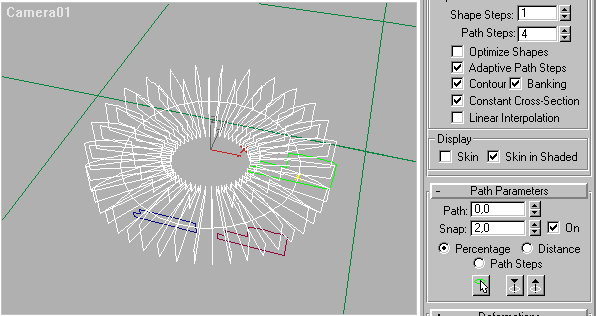
It requires some clicking around, but it is faster than you think....
:o)
Also, you can change the detail by setting the Shape and Path steps in the Loft to different values. The model on the picture has 10400 faces / 5200 verts. (Shape Steps 1, Path Steps 4)
Here is what it looks like after rendeing:
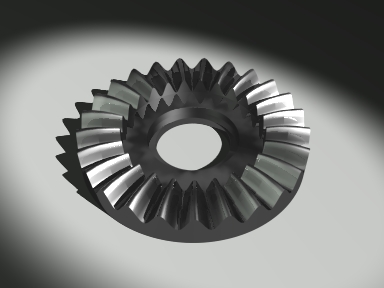
Face-gearwheel Lofting Tutorial
(c) 1998 by Borislav "3DJ Bobo" Petrov