ScriptSpot is a diverse online community of artists and developers who come together to find and share scripts that empower their creativity with 3ds Max. Our users come from all parts of the world and work in everything from visual effects to gaming, architecture, students or hobbyists.
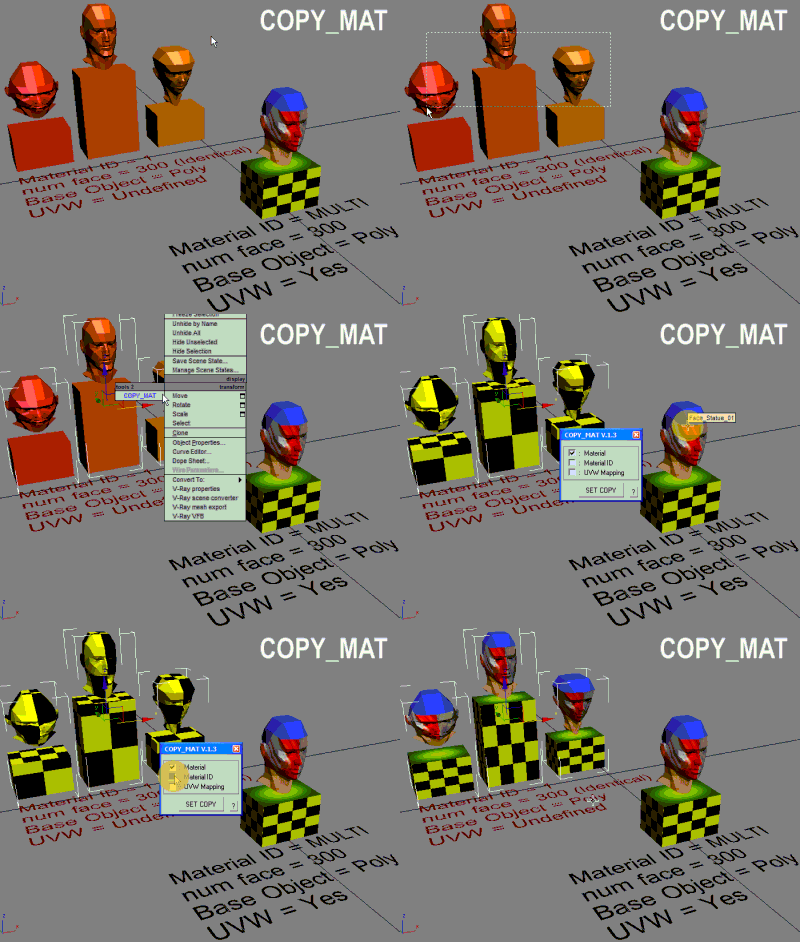
Script transports the material from one object to another without materialeditor. Скрипт передаёт материал от одного объекта другому без материалэдитора.
This scripted plugin is intended for inner RayFire faces of debris fragments.
While the wellknown Asperity Modifier adds detalization by adding geometry modifying the existing topology, this parametric material works in a different way, as a procedural texture adding strong details with a variety of basic materials, including wood splinters, without adding any extra polygon to the scene.
In many cases, the Asperity modifier causes the system to crash specially when using a huge amount of debris objects in the scene.
This script will allow you to replace the materials in your scene with materials from a library or max file in mass. Use the match name button if the names of your materials are similar.
Simple floating 'toolbar' example where you can quickly toggle reflection override for the current viewport (any custom picked hdri map will work) and set its rotation. Since it's just a viewport override, all the materials applied to the objects will be left untouched. Comes in handy for example when checking for shading errors.
With this script you can select splines' segments by matID.
There are two methods of selection:
- "Use IDs of selected segments" - select some segments and press the [Select] button. The script will find the matIDs of the selected segments and will select all other segments with the same matIDs.
- "Use IDs typed below" - type as many matIDs as you want in the field(separate matIDs with comma) and press the [Select] button. The script will select all segments with the matIDs entered by you.