MCG
HyperClone
 By Atelier Bump · 2015-05-09
- Version
- 1.3
- Version requirement
- 2016
- Date updated
- 2015-05-09
- Votes
- 11
- Homepage
- https://atelierbump.com
- Download
- Download
Description
Additional Info
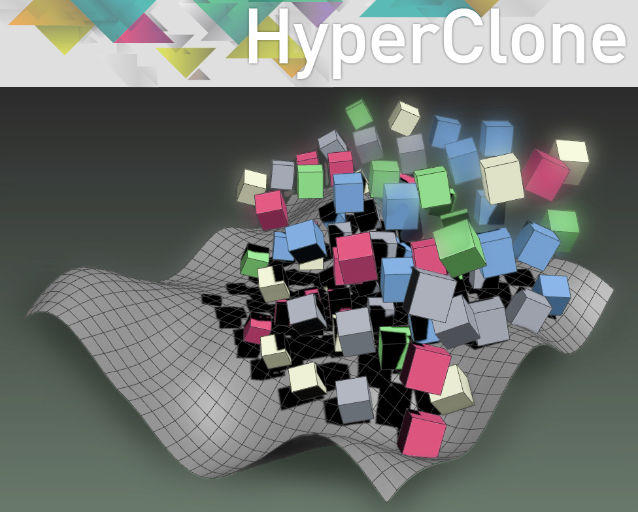
FEATURES
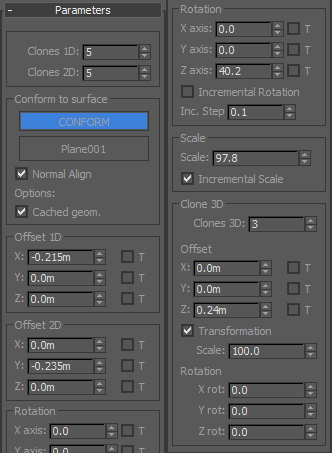
- multidimensional Array
- conform to surface, align to normal
- various options for scaling and rotation
Comments (14)
love this array modifier !!
ltchest · 2019-03-31
I have tried many, many such array tools - this is the best one out there. Thankyou for providing :)
errors in listener
cptSwing · 2017-09-21
as follows:
Error occurred in HyperClone defined in C:\Users\xxx\Autodesk\3ds Max 2018\Max Creation Graph\Packages\HyperClone.mcg - System.Runtime.InteropServices.SEHException, External component has thrown an exception. at Int32 Mesh_GetNumVertices(System.Runtime.InteropServices.HandleRef) at Autodesk.Max.MaxPlus.MaxPlusPINVOKE.Mesh_GetNumVertices(HandleRef jarg1) at Viper3dsMaxBridge.Converters.TriMeshToMaxMesh(TriMesh mesh, Mesh maxMesh, TriMesh originalMesh) at Viper3dsMaxBridge.MeshUpdaterPluginInstance.UpdateMesh(Int32 time, Mesh maxMesh, Object[] args)
(the MCG seems to run fine though. and it's a beauty)
error call needs fonction or class
 Gspoutnik · 2016-10-26
Hello
everytime i reopen 3ds max i got:
Type error: Call needs function or class, got: undefined
When i open a scene where i use hyperclone.
Any idea why ?
thanks
clone along spline / spacing
thewool · 2015-05-12
A simple clone along a spline mcg would be good, like an mcg version of the tools-align-spacing tool.
I tried and failed miserably!
ACloneOnCurve
 vusta · 2015-05-12
didn't the ACloneOnCurve work ? get from MCG Sample Pack
thewool · 2015-05-13
Yeah, saw the ACloneOnCurve.
It'll be good if it had all the options of the spacing tool though...
Next suggestion
vusta · 2015-05-10
Now here's my suggestion Ariel,
Imagine I have a box to represent buildings, I want to place these buildings onto my little world, a sphere...so position my building just above my sphere, clone/scatter them...but like the early explorers...they fall off the edge of the world.
It's friggin' funny to look at actually (hmm could be useful as some sort of poorman's dripping off system...) but anyway, please help these explorers will you ? ie, can you make it work on a fully 3D surface.
Vu.
lol
Atelier Bump · 2015-05-10
I really don't experimented too much using it, was more like an experiential exercise. You can orient the reference surface in any direction you like, as long the cloned object Z axis is opposed to the surface (maybe I can add a selector for the projection axis), but I don't think its possible for a full 3d convex surface, you will be better scattering using face normals than some sort of raycast.
Atelier Bump · 2015-05-10
On a Second thought, a Spherical array should do the job, I will look in to it when I can have some spare time.
share on FB
vusta · 2015-05-10
arrgg...I didn't wanna steal your thunder and post this on FB, I thought you should have the chance to introduce yourself there with a BANG !!! But someone beat you/me to it...
Cheers.
Vu.
Seems I should start posting on FB then
Atelier Bump · 2015-05-10
so, I'm going viral? better add cats to the scripts.
Greets!
Spherical clone & conform to mesh volume
Atelier Bump · 2015-05-12
Here you go:
http://www.scriptspot.com/3ds-max/mcg/sphereclone
dsp_418 · 2015-05-09
Not sure to understand how it works.
I created a little cube and a plane.
I added HyperClone to the cube and clicked on Reference Node, then picked the Plane. The cube disappeared.
Then I changed the Clones 1D, 2D, 3D values to 2 each, but still nothing.
I also tried changing the Offset 1D X value, no luck. Checking/unchecking T checkbox didn't work either (I've no idea what that would do though..)
Am I missing something?
Ref Node
vusta · 2015-05-10
Ensure your local Z axis (of the box) is perpendicular to the surface
eg. if I create a box with Z point up, it will work with a surface RIGHT BELOW it. If it's off to the side it will disappear.
One funny test you can do is cut holes into your surface and make your boxes move towards the holes...watch them disappear like lemmings !!! (then they reappear on the other side)
Same as if I want to scatter these boxes onto a vertical wall..they will disappear, unless you point you local Z axis onto the wall.
This is excellent work Ariel !!!.
Vu.