A2Dimage is a scripted 3ds Max plug-in for adding simple 2D images with alpha channel to your 3ds Max scene. Script reads the height of the image from the end of the file name and on render generate automatically shadows based on alpha channel of the image. With this script you can render fast previews and final images with correct shadows in one pass without compositing all individual elements later.
Additional Info
|New in version 1.21:
Free 15 Day Trial for the Pro version
Fixed "Rotate all to camera" option
Fixed UI alignment in create and modify
Fixed other small bugs
New in version 1.20:
Two new materials types
Additional shortcuts to change the file for the object
When using V-Ray DR, the shadows are generated correctly before the file is sent to other render nodes
New in version 1.15:
Option to search for missing bitmaps in the object’s material
Other small bug fixes
New in version 1.12:
Two new material options - Mental Ray & Maxwell
Relink Pro Tool - Relink A2Dimage from folder base on best match algorithm
Scatter Pro Tool - Scatter A2Dimage objects by replacing existing object. Watch video here
Convert Pro Tool - Convert A2Dimage objects and shadows in editable mesh
New in version 1.10:
Fix image preview in some versions of 3ds Max
Batch render with Vray now works. For other renderers see Camera Overwrite Pro Tool
New Pro Parameters and Tools: - Color Multiply - Viewport Preview - Fast Shadow Cache - Fast Shadow Calculation - Camera Overwrite - Relink A2Dimages
New in version 1.03:
Fix the orientation of A2Dimage objects in orthographic views
New in version 1.02:
Option for V-Ray materials
Disable Bitmaps Filtering
Reuse Scene Materials
Auto rotate to the camera in the viewport
Installation:
Download and unzip the desired version
From 3ds Max menu select: MaxScript> Run Script ...> AvizStudioTools_A2Dimage.mse
If you want to load the script automatically, copy the content of the archive in the 3ds Max root folder\scripts\startup\
VideosComments (26)
subfeel · 2015-03-09
thank you )
i will try it
auto-rotating
subfeel · 2015-01-28
big thnx for script, it is really useful!
i need help with: "Auto rotate to the camera in the viewport".
can u tell me plz what should i do with a simple object (for example - box) to make that auto-rotating?
i spent a lot of time to find the solution, but still i dunno how :(
Auto rotate to camera
atanasbak · 2015-03-08
Hi, you can use LookAt Constraint (if you know your target camera or object). If you want to write a script you can search maxscript help for Viewport Redraw Callback Mechanism. And of course you can use A2Dimage object as a parent and link your simple object as a child.
andomar · 2014-11-23
thanks, ok, at back in the first pc for test with vray 3.07(w8.1), mm i don't know if i am doing somethig bad or i've found errors, i'm uploading my tests.
Edit. upload more scenes at test
Hi andomar,
From what I can see you are using .jpg files in your scene.
Can you test the same scene but using images with alpha channel - .tiff or .tga ?
Can you send me the scene with the errors with included bitmaps images to: tools[at]avizstudio.com ?
andomar · 2014-11-23
Hi, thanks for you answer, i downloaded from you web: AvizStudioTools_A2Dimage_v1.12.zip, it install but not run, i go to run, maxscript, select the file and nothing, i tried with administrador righs and same.
max 2015 x 64 win 8.1
Edit. i am uploading errors with another pc, in this case w8
From what I can see, windows 8 is not sure if the script is installed correctly or not. The other screen-shots show that files for the script are installed in the correct folder. On the windows error massage you should select "This program installed correctly" and restart 3ds Max to load the script.
To create A2Dimage object go to Create Tab -> Geometry (where you create boxes, planes and so on) -> select "Avizstudio Tools" from drop down at the top -> press A2Dimage button -> Select point in the view-port.
andomar · 2014-11-21
not run in max 2015 x 64
max 2015 x 64
atanasbak · 2014-11-21
Script works with 3ds Max 2015.
Install the latest version from: www.avizstudio.com/tools/a2dimage
When do you get error: during installation, when starting 3ds Max or when you create A2Dimage object?
speed check
Ffuturaa · 2012-09-02
another great script!! im having some speed issues that i dont know if its normal, takes a lot to load for the first time the parameters on 3d max 2012, also when you select a a2dimage already created to reload the parameters takes more than 15-20 sec any ideas?
great great tool, i wonder if the pro version will give me same speed issues?
Speed
atanasbak · 2012-09-03
If you are using high resolution images it will take more time to scan the image alpha channel to generate preview and shadows.
You can enable "Don't Render Preview" option in advanced parameters and disable shadows to see if the speed improves.
For speed you also may try to down size your images to 512x512 pixels.
If this is the case Pro version will not improve your speeds.
Pro version only add more control over shadows and let you use "Advanced Tools" to modify selection of multiple objects at ones.
Orthographic view
atanasbak · 2012-06-27
Hi rawshark,
Thanks for noticing the problem with orientation of the object in orthographic views.
New version 1.03 fixes this problem.
Rotate to camera
Rrawshark · 2012-06-25
Thanks for the great script!!
However for me the 'Rotate to Camera' functions strangely - e.g. panning in the 'Top' viewport causes the image to change orientation. Clicking in the 'Camera' viewport corrects the orientation but still seems strange to have that behavior...unless I'm missing something?
Transparency
atanasbak · 2012-06-13
Set transparency in the viewport to "Best".
V-Ray materials don't support transparency in the viewport.
And it works
11rv · 2012-06-13
correctly with Batch render (diffrent camera and sun locations saved in scene states). Wow!!!
Mirza's billboard manager does't do this.
Vvhector · 2012-07-09
In my case, with the batch rendering it doesn't work. Overall, really nice script.
Dude this is script of the Year
11rv · 2012-06-13
for me. Huge thank you!
The minor glitch (not critical). The a2dimage object in viewport is shown without transperency (black background) while 'transparency and show maps' is 'on'.
Imagecells tiffs were used.
Do you know how to fix it?
To 1rv
atanasbak · 2012-06-12
Version 1.02 have option for V-Ray material.
For no GI of the image plane right mouse click on selected objects > V-Ray properties > turn off "Generate GI"
I've found workaround:
11rv · 2012-06-11
Converting (via VrayMtlConverter) to Vray matereal solves the problem
but still I'd be a pleasure if only you could fix it within the script itself.
something is wrong with gamma\RGB levels
11rv · 2012-06-11
1.The A2images objects look too dark in the render output (though the matslot and
viewport look overexposed). (The Imagecells tiff files were used for the first tests).
Setting the RGB level at ~15 (adv. parameters) solves this problem, but creates
over-lighted areas around the object).
Could you fix it please?
( BTW I use 'linear gamma workflow':
In the Max preferences:
Gamma 2.2, input 2.2, output 1
Vray color mapping rollout: gamma set 2.2)
2. Could you please add 'don't generate vray GI' option?
P.S. Man this plugin is awesome! Huge thank you!
something is wrong with gamma\RGB levels
11rv · 2012-06-11
1.The A2images objects look too dark in the render output (though the matslot and
viewport look overexposed).
Setting the RGB level at ~15 (adv. parameters) solves this problem, but creates
over-lighted areas around the object).
Could you fix it please?
( BTW I use 'linear gamma workflow':
In the Max preferences:
Gamma 2.2, input 2.2, output 1
Vray color mapping rollout: gamma set 2.2)
2. Could you please add 'don't generate vray GI' option?
P.S. Man this plugin is awesome! Huge thank you!
atanasbak · 2012-06-11
Thanks for suggestions and comments.
To harumscarum: Thanks for your time end effort for writing this code. In the next version I'll try to add such functionality built-in the script.
camera (perspective) orientation
harumscarum · 2012-06-13
here is simple script to make A2Dimage objects always perpendicular to axis of view in viewport
would be great if it could be part of your tool (currently it must be in scripts/startup folder)
***********************************************************************

-- Author :  Чубе / http://3dcenter.ru/forum/index.php?showuser=17731 /

***********************************************************************

g_facingObjects = #()

fn GetZAngle obj target =
(
    mul = 1
    objpos = obj.pos
    objpos[3] = 0
    targetpos = target.pos
    targetpos[3] = 0

    if (cross (targetpos-objpos) [0,1,0] ) [3] > 0 do mul = -1

    mul * acos (dot (normalize (targetpos-objpos)) [0,1,0] )
)

fn CBFaceToView =
(
    if(g_facingObjects != undefined) then
    (
        animate off
        (
            ViewTM = inverse ( viewport.getTM() )
            for obj in g_facingObjects do
            if (isvalidnode obj) do
            (
                pos = obj.pos
                rot = angleaxis ( GetZAngle obj viewTM ) [0,0,1]
                obj.rotation = rot
                obj.pos = pos
            )
        )
    )
    else
    (
        unregisterRedrawViewsCallback CBFaceToView
    )
)

fn CBOnSceneNodeAdded =
(
    newNode = callbacks.notificationParam()

    if ((findString newNode.name "A2Dimage") == 1) do
    (
        appendifunique g_facingObjects newNode

        unregisterRedrawViewsCallback CBFaceToView
        registerRedrawViewsCallback CBFaceToView
    )
)

fn CBOnSceneNodeRenamed =
(
    nameSet = callbacks.notificationParam()

    if ((findString nameSet[2] "A2Dimage") == 1) then
    (
        appendifunique g_facingObjects nameSet[3]

        unregisterRedrawViewsCallback CBFaceToView
        registerRedrawViewsCallback CBFaceToView
    )
    else
    (
        itemID = finditem g_facingObjects nameSet[3]
        if itemID != 0 do
        (
            deleteItem g_facingObjects itemID

            unregisterRedrawViewsCallback CBFaceToView
            registerRedrawViewsCallback CBFaceToView
        )
    )
)

fn CBOnFileOpen =
(
    g_facingObjects = #()

    for obj in objects do
    (
        if ((findString obj.name "A2Dimage") == 1) do appendifunique g_facingObjects obj
    )

    if (g_facingObjects.count>0) do registerRedrawViewsCallback CBFaceToView

    callbacks.addScript #sceneNodeAdded "CBOnSceneNodeAdded()" id:#OnSceneNodeAdded
    callbacks.addScript #nodeNameSet "CBOnSceneNodeRenamed()" id:#CBOnSceneNodeRenamed
)


callbacks.addScript #filePostOpenProcess "CBOnFileOpen()" id:#OnFileOpen
Ffajar · 2012-06-08
+1 match to camera orientation....
Scene from demo video
atanasbak · 2012-06-08
Download the scene from A2Dimage demo video (high res shadows are built-in and can be rendered with standard version of the script).
 By atanasbak · 2012-06-05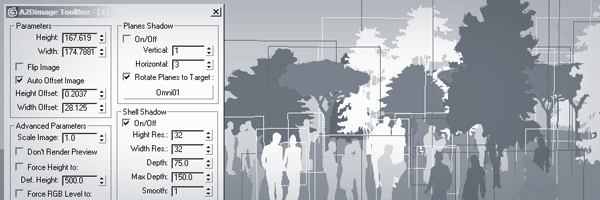
 subfeel · 2015-03-09
 andomar · 2014-11-23
 harumscarum · 2012-06-13
 barigazy · 2012-06-05