Quick script to merge multiple files in a scene quickly.
Changelog from 1.3: Added support for many file formats for merging including
fbx, prj, dwg, dxf, ige, igs, iges, max, 3ds, shp, skp, stl, obj
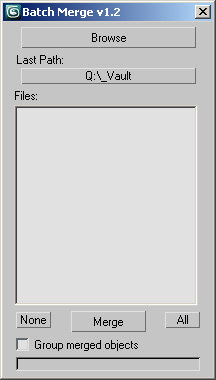
Script
 By colinsenner · Credited author: Colin Senner · 2008-12-15
Quick script to merge multiple files in a scene quickly.
Changelog from 1.3: Added support for many file formats for merging including
fbx, prj, dwg, dxf, ige, igs, iges, max, 3ds, shp, skp, stl, obj
Tags: batch import merge max files
Use Scene Material function
GoodVibes · 2020-06-19
Hey, Colin! Your script is very useful, especially when creating a kitbash for a project! Is it possible to add the Use Scene Material function to this script?
Very useful
 Waseem3D · 2019-08-31
Thank you very much for sharing us this useful script.
I used it in 3ds max 2020 and it works fine.
auto scale
hippiearchitect · 2019-02-12
i have loads of models all in different units. so when i run the merge script they all come in at different scales. would it be possible to build in a correction for this?
auto scale
hippiearchitect · 2019-02-12
i have loads of models all in different units. so when i run the merge script they all come in at different scales. would it be possible to build in a correction for this?
Max 2018
colinsenner · 2018-10-16
Thanks for the reports everyone. I'll take a look as I just got Max 2018.
2018 not working anylonger
dub73 · 2018-10-12
unfortunately, the script is not working any longer
Thank you +1
 cjwidd · 2018-06-08
Very nice, thank you!
Thanks!
 Smallpoly · 2018-03-19
Nice one!
VEry goot!
 Luchiano · 2014-11-07
Thanks! good and usefull script!
error running script
hanselmoniz · 2010-11-22
hi............this script seems great
but im having problems with running it in 3dsmax 2009
when I click on the browse btn it gives me an error on the line below
if (dir = getSavePath caption:"Select the directory you want to merge files from" initialDir:theLastPath)!= undefined then (
Thank you!
igamaximus · 2010-12-13
Fantastic real world script. Thanks creator!
 islamscience · 2010-11-11
thank you very much this is what am searching for to load many morph targets..............it is great
Spline · 2010-02-02
Hi, I have installed max 2010 64bits on windows7 and your don't remember the last path I've use.
Thanks
colinsenner · 2010-02-24
I will check into this, thanks Spline.
veneta · 2009-11-06
hi sjmoir, when see this one:
http://www.scriptspot.com/3ds-max/batch-loader
colinsenner · 2009-11-05
YES! Good to hear :)
-Colin
sjmoir · 2009-11-05
I just used your script to import 1000s of buildings in .3ds format. Cheers!
jfmonod · 2009-09-29
Hi Colin,
I just downloaded your script. It's a big help. Just one question tho. I believe Cippall asked previously if .3ds support was available. Did you ever get around to that ? I just gave it a try and it's not "seeing" .3ds files. I only ask cos I haven't found any other batch importers for Max at all and I've got 600 .3ds objects to merge into a scene. Unless you know of any other scripts, plugins or what have you which could do that, your importer could be a lifesaver :)
Thanks again for your time and effort.
JF
colinsenner · 2009-09-30
I can do that, but you'll have to wait a day or two. Check back here then for a new version with 3ds support.
-Colin
jfmonod · 2009-09-30
Huzzah ! I'll be here. Between this and your "repath maps" script, you are the most productive person on this project.
JF
colinsenner · 2009-09-11
That would require a bit of an overhaul to the script honestly. I haven't had any problem seeing as any directory is just a few clicks away. I will consider doing this when I get some free time.
-Colin
Spline · 2009-09-10
Hi again Collin,
This scipt is just fine but can be more usefull you can add new button for every path I want to keep in memory.
Is that possible?
With practice you become a Master.
When youre the Master, start over and practice again. / Spline
colinsenner · 2009-07-16
Absolutely Cippall, I'll update it later this week for .3ds file support.
cippall · 2009-06-10
Hi Colin,
Can you make this script or another to batch import 3ds files from a specific folder?
Cheers,
Cipriano
lewchico · 2009-05-31
Hi Colin,
Sorry to trouble you,I am new to Max and specifically 2010,so I must have goofed somewhere.Thanks again for your generosity of spirit,
Best wishes,
Lewis.
colinsenner · 2009-06-01
No problems Lewis! Let me know if it saves you time :)
-Colin
colinsenner · 2009-05-27
Lews, I just got a chance to test BatchMerge in max2010, and had no problems using the installation procedure I described above. The script works great in 2010, let me know if there's still any problem or I'll consider this solved.
Have a great week,
Colin
colinsenner · 2009-05-26
-- see above
colinsenner · 2009-05-26
Hey Lew,
I just got my hands on max2010 and will update this script in the next day or two. check back soon.
make sure also lew you are following the installation instructions. once you run the script goto customize->customize user interface->toolbars. and drop down the "category" to "colinscripts" and drag "batch merge" to a toolbar! let me know.
-Colin
lewchico · 2009-05-26
Hi Colin...like your script...I have lots of importing to do in Max 2010...and I seem to be unable to run it...any advice or help would be appreciated.
Cheers,
Lew.
colinsenner · 2009-01-30
Sounds good, I'll add the quick path for you :)
Regards,
Colin
Spline · 2009-01-30
Good morning Colin,
My use with this script it's to merge sometime 15 different product from my library. Every product are made from different object included in a single groupe that are at 0,0,0,.
Thanks for your help!!!
With practice you become a Master.
When youre the Master, start over and practice again. / Spline
colinsenner · 2009-01-29
The files are merged based on where they are in their respective files. Choosing to group the merged objects and moving them manually is really the easiest/foolproof way of moving them, I could implement something that could separate them, but I see less use in this but then again I'm not exactly sure how are you using the script, how many objects you merge, what you do with them when merged, etc. I'll implement the last used path later tonight when I get home, look for an update.
Regards,
Colin
Spline · 2009-01-29
Hey Colin,
maybe just a dropdown menu with the latest path we've used, nothing to complicated.
And also, when we merge alot of file and there are all at 0,0,0, it's hard to manage it, what do think of a way to determine a space between each object we merge?, maybe use the bounding box to determin the distance
Thanks for your help
With practice you become a Master.
When youre the Master, start over and practice again. / Spline
colinsenner · 2009-01-29
Hey Spline,
Something like the quick paths I've implemented in my "Relink Bitmaps" script seen here.
http://www.scriptspot.com/3ds-max/relink-bitmaps
or do you want a quicker solution with maybe 1 saved path or something like that. Also would recursive folder searching be of use to you? Honestly this is pretty funny to me, I wrote this script in like 1hr thinking maybe one or two people might be able to use it without the foresight to see how many people this might help on a daily/weekly basis. Clearly this script is proving useful for many people and if that's the case I can build in more functionality if need be. Let me know what you think.
Regards,
Colin
Spline · 2009-01-29
Hi Colin, very nice script, Thanks!!
Is that possible to add a choise of path we use often in the browse feild? Each time we close the script we have to go over all the path again.
Keep up the good work!!
With practice you become a Master.
When you are a Master, start over and practice again. / Spline
 jsrocha · 2009-01-28
sorry, forget the previous comment, the problem was with the max files. The script is working...
thanks,
Jsr
colinsenner · 2009-01-28
Thanks for your comment! Hope it helps.
Regards,
Colin
jsrocha · 2009-01-28
I´m using max2008 and the script is not working. I select the files and click "merge", but nothing happens. should the script work in max 2008??
thanks...
Jsrocha