Biped Helper + Picker

7 votes
Version: 
3.5
Date Updated: 
06/18/2024
Author Name: 
Lorne Brooks

Biped Helper is a support interface designed to be used in conjunction with the main Biped panel.

It is intended to provide both quick access to existing Biped panel tools, as well as functionality that is not supported by the Biped panel.


See online guide in links section. 


Features include:

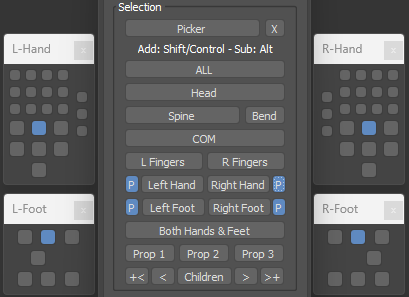
  • Limited parts selection with IK limb pivot settings
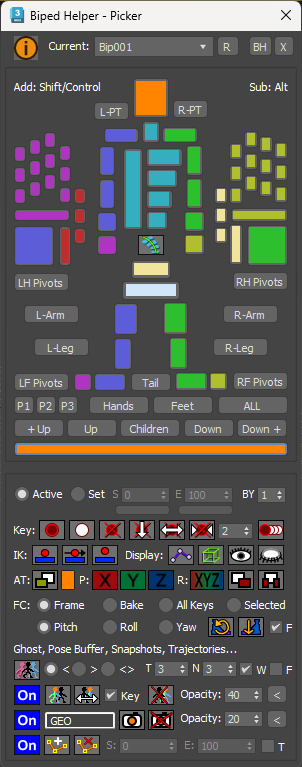
  • A dedicated Picker UI that uses most of the same functionality as the main UI
  • Display options
  • References: Ghosting, Pose buffering, Geometry snapshots, Placed trajectory helpers
  • Time range settings (for all range-based operations)
  • Keying operations
  • TCB settings
  • Apply transform and foot-step cleanup
  • Limb space settings (Body/Object)
  • Load and save animation clips
  • Layers management and IK constraints retargeting
  • Pose or Posture copy/paste
  • Limb mirroring
  • Finger and spine alignment
  • Biped or prop alignment and baking tools
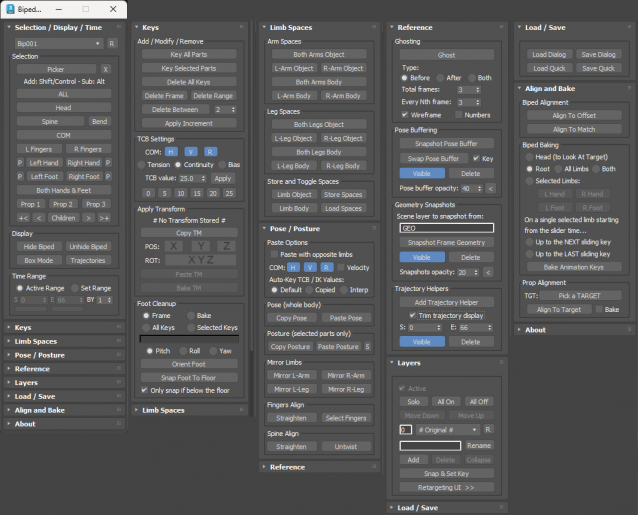


IK Pivots Selection...
 

Picker UI...
 

Latest Updates:

Version 3.5;

  • Added the Apply Transform and Foot Cleanup functionality to the Picker UI.

Version 3.4;

  • Added a new Biped Picker UI which works with the Biped Helper functions. This can be opened in several ways including: From the main Biped Helper UI using a picker button; By clicking the Biped Helper toolbar icon while holding Shift; By assigning a hotkey to a macro; Or by placing a dedicated toolbar icon. The picker has been designed to work with a standard human Biped configuration.
  • Moved pose buffering into the Reference rollout.
  • Toggle trajectories now behaves as a check button and queries the current Biped state.
  • Added new ability to toggle ghost on selected objects with all ghost settings in the Reference rollout.
  • Added the ability to swap to the Pose Buffer when one is available and toggled active. Used after altering a pose to allow swapping between the new pose and pose buffer while keeping it active.
  • Prevented pose buffer mesh from using display by layer property which resulted in an opaque rendering and not using opacity setting.
  • Added new ability to copy the transform of an object (e.g. a hand or foot) then paste or bake to either the current frame or a selected time range. Different axes for position and rotation can be set when pasting or baking. Can also be applied generically to non-Biped objects. Found in the Keys rollout.
  • Added new ability to cleanup footsteps by re-orienting a foot in pitch, roll or yaw, as well as snapping the base of the foot to the ground plane. Found in the Keys rollout.
  • Added the apply increment functionaily (without displaying the dialog) to the Keys rollout.
  • Added box mode and bend links toggles.
  • Added new selection buttons for getting the parent, child, all children, or growing seleection up or down the hierarchy.
  • Added new ability to add trajectory helpers to the surface of picked Biped parts, with the option to trim using a time range. Found in the Reference rollout.


Additional Info: 

The script can be found in category “LB Tools”.

The script creates its own macro to be placed as a toolbar icon or a keyboard shortcut added.

Installation:

Drag the MZP file into your Max viewport.

Files will be copied to...

C:\Users\<userName>\AppData\Local\Autodesk\3dsMax\<maxVersion>\ENU\scripts\startup

and...

C:\Users\<userName>\AppData\Local\Autodesk\3dsMax\<maxVersion>\ENU\usericons

Version Requirement: 
3dsmax 2020-2025
AttachmentSize
old_3-4_lbtools_biped_helper.mzp91.35 KB
lbtools_biped_helper.mzp105.27 KB

Comments

Comment viewing options

Select your preferred way to display the comments and click "Save settings" to activate your changes.
jgk1981's picture

Works Great in max2021 Is it

Works Great in max2021
Is it possible to add bake option for head too?

jgk1981's picture

Thanks for the quick update.

Thanks for the quick update. Works like a charm now :)

lbrooks's picture

Re: The Posture grabber tool

Hi,

I've fixed the problem with the crash, which was due to non-Biped parts (or even no Biped parts) being selected when trying to copy a posture. This caused the pasting to not be able to find the copied posture in the collection and hence crash.

You should now be able to have non-Biped parts selected (in addition to Biped parts) when copying and the script will filter those out.

Thanks for the find.

Lorne Brooks

jgk1981's picture

The Posture grabber tool

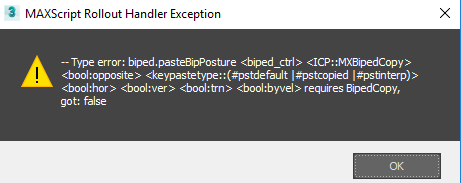
The Posture grabber tool gives this error when I try to paste the pose on the selected parts. normal or opposite in max 2017

AttachmentSize
error.png 7.6 KB
lbrooks's picture

Re: Biped Helper not working

Hi,

Unfortunately, Max version 2016 somehow broke the ability to load MZP files by dragging them directly into the viewport.

If you run the MZP from the Utilties panel (or top menu bar) as though it were a .ms file, the necessary files will be installed. However, the macro for the script won't have run yet, so you'll need to restart Max. The menu item should then be visible in the Customize User Interface > Toolbars > LB Tools category.

Lorne Brooks

jenumba's picture

Biped Helper not working.

Hi,

Thanks for the great looking script! But I can't get it to run in 3DS Max 2016. Drag n Drop does'n't work for me, and loading manually doesn't seem to work either.

ramin92003's picture

awesome script

I was wondering, it is possible for you to guide me how to extract biped rotation for each part.

this is my code but but the rotations dosen't correct.

if checkboxRotation.checked == true then
(
curRots = parseRotationsAnimated readerPoint
rotationZChannelString = rotationZChannelString + returnText + " " + currentFrameText + " " +(curRots[1] as string)
rotationXChannelString = rotationXChannelString + returnText + " " + currentFrameText + " " +(curRots[2] as string)
rotationYChannelString = rotationYChannelString + returnText + " " + currentFrameText + " " +(curRots[3] as string)
)

C_Man777's picture

Yes I can confirm works fine

Yes I can confirm works fine in Max 2016. Dragging the .mzp didn't work the first time, but I just repeated it and the drag worked the second time for whatever reason. Thanks again for the useful script. It is definitely helping my workflow as I block scenes with multiple biped characters.

lbrooks's picture

Re: Biped Helper minor error to report

Good catch, thanks. I've updated the installer.

Yes, it should work fine in 2016 - tested using service pack 2.

In 2016 - Drag and dropping the MZP doesn't work for me. You may need to run the script from the utility panel.

Lorne Brooks

C_Man777's picture

Biped Helper minor error to report

Thanks for the useful script. Apaprently the current version of the script does not copy the image file, "LBTools_PDF_Image.bmp" to the usericons directory and the script throws up an error message. I did fix it simply by creating a pdf icon and placing it in the correct directory with the name, "LBTools_PDF_Image.bmp". Not a big deal, but thought that you might like to know.

By the way, does this work in Max 2016?

Comment viewing options

Select your preferred way to display the comments and click "Save settings" to activate your changes.