By lbrooks
Biped Helper is a support interface designed to be used in conjunction with the main Biped panel.
It is intended to provide both quick access to existing Biped panel tools, as well as functionality that is not supported by the Biped panel.
See online guide in links section.
Features include:
- Limited parts selection with IK limb pivot settings
- A dedicated Picker UI that uses most of the same functionality as the main UI
- Display options
- References: Ghosting, Pose buffering, Geometry snapshots, Placed trajectory helpers
- Time range settings (for all range-based operations)
- Keying operations
- TCB settings
- Apply transform and foot-step cleanup
- Limb space settings (Body/Object)
- Load and save animation clips
- Layers management and IK constraints retargeting
- Pose or Posture copy/paste
- Limb mirroring
- Finger and spine alignment
- Biped or prop alignment and baking tools
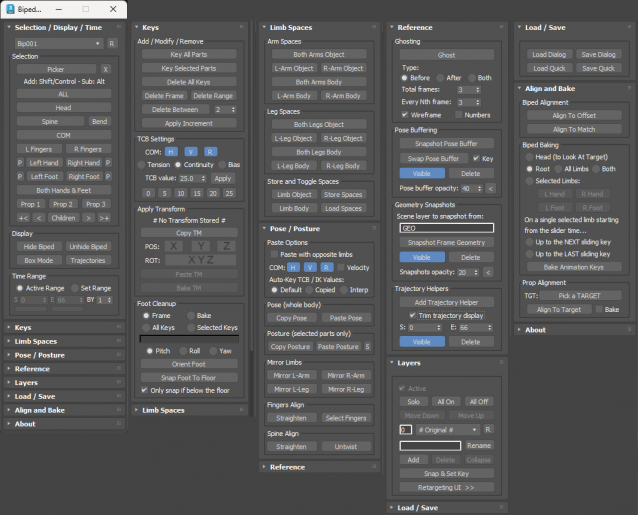
IK Pivots Selection...
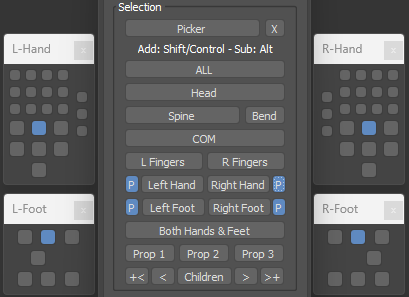
Picker UI...
Latest Updates:
Version 3.5;
- Added the Apply Transform and Foot Cleanup functionality to the Picker UI.
Version 3.4;
- Added a new Biped Picker UI which works with the Biped Helper functions. This can be opened in several ways including: From the main Biped Helper UI using a picker button; By clicking the Biped Helper toolbar icon while holding Shift; By assigning a hotkey to a macro; Or by placing a dedicated toolbar icon. The picker has been designed to work with a standard human Biped configuration.
- Moved pose buffering into the Reference rollout.
- Toggle trajectories now behaves as a check button and queries the current Biped state.
- Added new ability to toggle ghost on selected objects with all ghost settings in the Reference rollout.
- Added the ability to swap to the Pose Buffer when one is available and toggled active. Used after altering a pose to allow swapping between the new pose and pose buffer while keeping it active.
- Prevented pose buffer mesh from using display by layer property which resulted in an opaque rendering and not using opacity setting.
- Added new ability to copy the transform of an object (e.g. a hand or foot) then paste or bake to either the current frame or a selected time range. Different axes for position and rotation can be set when pasting or baking. Can also be applied generically to non-Biped objects. Found in the Keys rollout.
- Added new ability to cleanup footsteps by re-orienting a foot in pitch, roll or yaw, as well as snapping the base of the foot to the ground plane. Found in the Keys rollout.
- Added the apply increment functionaily (without displaying the dialog) to the Keys rollout.
- Added box mode and bend links toggles.
- Added new selection buttons for getting the parent, child, all children, or growing seleection up or down the hierarchy.
- Added new ability to add trajectory helpers to the surface of picked Biped parts, with the option to trim using a time range. Found in the Reference rollout.
 jgk1981 · 2021-04-09