ScriptSpot

Script

Book Rigger

By masquerade · Credited author: Arda Kutlu · 2008-10-06

Version
3.5
Version requirement
3ds Max 2026+
Date updated
2025-09-08
Votes
166
Download
Download
Description

Now Supports the Latest 3ds Max Versions with Improved features!

One-click page turns, ready to animate.

Make believable book and page animations in seconds. Book Rigger builds a full page-turn rig for any page count, gives you intuitive controls for flipping and shuffling, and supports single or double-sided materials. Drag, drop, rig, animate.

What’s new in 3.5

  • Compatible with the latest 3ds Max versions, fixing the old crash and freeze issues

  • Oldness attribute to add quick per-page noise for a used or vintage look

  • Reset to Defaults button to instantly restore clean settings

  • More animateable attributes such as Flex Crease Center/Area, Turn Crease Center, Land Crease Center/Area and Flex Angle

  • Optimised and easy-to-use expression-based page turn, shuffle and multiply functions.

What it does

  • Creates a complete, animator-friendly book rig in one click

  • Lets you flip, land, and shuffle pages with simple controls

  • Speeds up or slows down turns with a single multiplier

  • Assigns single or double-sided materials, including animated diffuse sequences

Key features


  • Any page count, built in a single click

  • Interactive controls for page curvature, turn, land, and shuffle

  • Global speed multiplier for timing tweaks

  • Material setup for single or double-sided pages

  • Diffuse textures can be driven by animated sequences

  • Quality-of-life tools: Oldness attribute and Reset to Defaults

Videos

Tags: Page turn, book rig, paper animation, shuffle, notebook, Thorn pages

Comments (68)

lykenan · 2018-01-28

which version are you using?

parenting objects

skubeedoo · 2016-12-22

is there any way to parent objects to a page?

can't see animation of pages using the time slide

ikaru · 2016-10-06

it opens up perfectly but when I put key frames lets sayfrom 01 to 20 and try to test the animation of pages using the time slides nothing happens.
please help I am in the middle of a proyect which I have to deliver.
do Ineed to clean previous versions? in that case how I can do it?
many thanks

how do I activate it ? do you send an e mail for activation after the pucharse or something

Shuffle on reverse animation no work.

Leandro Salerno · 2016-09-22

Hello, this script is great! but shuffle on reverse no working....

1. create book.
2. animate page to 10.
3. set Shuffle to 1000
4. animate page to 0. And Shuffle no work.

any solution?
Thanks!

DOWNLOAD

diegovr · 2012-03-27

Hi man, I've just paid for the book rigger in your side using paypal, but after the confirmation page nothing else happens, how do I download it now?
Thanks.
Btw, great reel!

diegovr · 2012-03-27

Didn't read the part that said there's no direct download, lol.
I'll wait.
Thanks

Menna_Mahmoud · 2011-12-29

am trying to load sequence of images and every time the script reads only the last image in the sequence and apply it to the whole pages

Attachments

masquerade · 2012-01-15

which version are you using?

phamtom · 2010-09-24

hi Arda---i came across your script through fellow animation student Jais. thanks so much for putting this out there for everyone to use---really cool on your part!
here's my virtual Moleskine:
http://www.vimeo.com/15225677

masquerade · 2010-09-27

Thank you phamton. Very nice sketchbook by the way. I also appreciate the credit.

Natti · 2010-07-13

Hi,
thank-you for my reply......
can't wait for version 2.5.......
thank-you so much for all your hard work in advance,
Masquerade you rock !!!
and thanks epic1511 for your help !!

epic1511 · 2010-07-10

hey natti,

apparently,the back sequence isnt working there

i tried to assign back sequence but i couldn't..i think ur magazine has to be
only one page assigned each time u rig it(the page on the right-hand)

otherwise..debug the script and publish to help!

masquerade · 2010-07-11

There were problems with the image sequence option as you noticed. I actually fixed that along with a couple of bugs. Soon I will publish it as version 2.5

Thanks

Natti · 2010-07-05

please please could you create a tutorial for image sequence materials,
as I am going round in circles trying to get my image sequence to work.
thank-you for all your hard work in advance.

Natti · 2010-07-03

Hi and thanks for your reply, :-)
I still am having trouble getting the materials to work,
should I load the first 2 images in my sequence as front and back materials and then load the sequence with the select sequence (Dif) button???
I am trying to create a magazine with images on both sides of the pages,
thanks again for this great script, your work is awesome.

Natti · 2010-07-02

Thanks, every time i try to run IFL file I get Error unable to convert: undefined to type: Integer please help as I am new to scripts,

masquerade · 2010-07-02

I assume you are trying to load a sequence. Dont select the ifl file. Select the first image of the sequence, and check the sequence checkbox at the bottom.

masquerade · 2010-07-01

epic1511 and jais,
You are most welcome. Glad that you like it.

And Jais, that showreel is awesome. I really liked the concept.

jais · 2010-06-30

Hey Arda!
Thank you so much for the effort.
It's guys like you that keep the internet awesome.
I made my class 1 reel on animation mentor with your script.
Check it out:
http://www.youtube.com/watch?v=pYxY-zPKU9g

epic1511 · 2010-06-29

super script...iam using it with my project

thanks arda!

cheers

masquerade · 2010-05-23

Find this line in the script

movekeys t ((i*14)-14)

Change it with a higher multiplier. For example if you make it

movekeys t ((i*28)-28)

and animate master_controllers page value (linear animation) each page will wait for the next turn exactly 1-page-turning-time.

In another words,

if you animate page 1 to 10 in 100 frames, only 5 pages will be turned, and it will pause 10 frames between each frame.

Increasing the multiplier will increase the pauses between pages.

zigitor · 2010-05-16

Hi :-)
any idea how to make some time delay between page turns (in frames)? help pls

Thank you for this amazing script.

islamscience · 2010-02-13

thanks for the great tool but is that working for max 2010 i make a run for the script but it doesnt make any sens

masquerade · 2010-03-05

its a macroscript. Please read the additional info.

48design · 2010-02-02

Great idea and wonderful implementation!

hawkarena · 2009-12-01

i like this

Salve of Allah

capcaverna · 2009-11-27

what I need say about this script?

awsome.

Anubis · 2009-09-26

cheers for the creative idea, but still alot of bugs, keep working-out

cinematicfusion · 2009-09-26

I can get all image sequence pages to run on "select front material" only. It will have no backside but will play all image sequence files. Will do so in all the alpha source files.

For double sided material, I can get only the first two image files to run and that is just with RGB Intensity and None)opaque.

The program gives Max script error when trying to run double sided image sequence with the image alpha.

cinematicfusion · 2009-09-26

I can get a double sided image when I select "none" or "RGB intensity" on the alpha source.

But... it is only picking up the first two images of my sequence file. I had 7 images, it is only picking up the first two and putting them on front and back on page.

Is there a way to make load more of the images in the file sequence?

cinematicfusion · 2009-09-26

I agree, amazing script but I'm having the same problem like everyone else. Can't get double sided material to work?

1. Using 3ds max 2009 64 bit

2. I check dbl side material in the Book Rigger v2.21 panel

3. click on "select front material", put material in the first spot on the material editor, then click the front material button again in the book rigger v2.21 panel

4. I repeat this step again with the "select back mat"

5 I leave image alpha checked.

6. I select "go" from the book rigger panel

7. grab the helper to turn a page

8. When I render the page it only shows the first material on both the front and back on the page.

Not sure what I'm doing wrong?

Also, having problem with the Images sequence part...
I get a "Maxscript rollout handler exception", it says.... Unable to convert: Undefined to type: Interger

What I'm doing is selecting both materials front and back side on the book rigger, clicking on the "select sequence", going to my image files. They are .tga format, I select the first image "pageo1", there are 6 images and are numbered. I select the sequence button.

everything seems ready to roll but I get the exception when I click the go button on the book rigger panel.

Thank you for any help you may give, and thank you for creating this amazing script.

movingmagic · 2009-09-22

Hi,

this is a great script.
I am going nuts however because I cannot succeed in creating a normal book with double sided pages.

I read all the explanations above but still cannot do it.

I come as far as creating images on one side, but the other side stays black.

What material should you make in the material editor. Should you assign an image sequence in the material of the material editor? Should you click "2 sided" in the material editor?

I am lost.

Please help.

wicq08 · 2009-04-23

hi, love the script but i have problems with materials.
it doesnt matter if I checked the 2 sided material from the book rigger tool , it only assigns the front not the back unless i chekced 2 side in the material editor.
when I assign front material is ok but when I assign back material just replace the front material and the back material remains black and doesnt render. Am I doing something wrong? i did all i could imagine even reading help in the book rigger tool. please help me with that

masquerade · 2009-04-24

I just checked again and it seems well. You have to check double sided material and assign two materials for the front and back pages. If you dont check "double Sided" it just assigns selected material to every page. And if you dont create a two sided material, naturally it doesnt render the back of the pages.

revanimus · 2009-02-27

Hello, this seems to be a very useful tool. But unfortunately I don't succeed in assigning an image sequence. I mean I can tell the script where to find the images but when I render a frame the pages are simply colored and don't have any picture assigned to them. I wanted to use the script for a booklet of a DVD with pictures on the different pages.
What am I doing wrong? I'm running it on 3dsmax 2009.

masquerade · 2009-02-28

I checked it again with 3ds Max 2008, nothing seems wrong. I dont think it would be related with max 2009, since you mentioned no error message. Here is the basic precedure, make sure you follow it.

 - make sure you use the latest version (2.21) If you are using vray sp2 use that version.

- after deciding the page options, under the material section click select front material button.

- Material editor will pop up, the first material in the material editor will be the material of your pages. Create a material in here or copy one from other slots to the first slot of the material editor. You can ONLY use standard material, Arch_Design Material (MentalRay) or Vray Material. Dont use, multi, doublesided, blend or any other material. click to the "Click When Done" button from Book Riggers material menu when you are done.

- If you want each page to be double sided, check "Double Sided" and assign another material for the back of each page from "Select Back Mat."

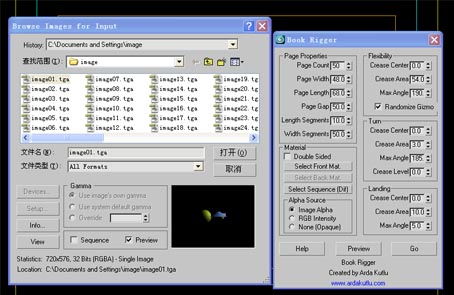
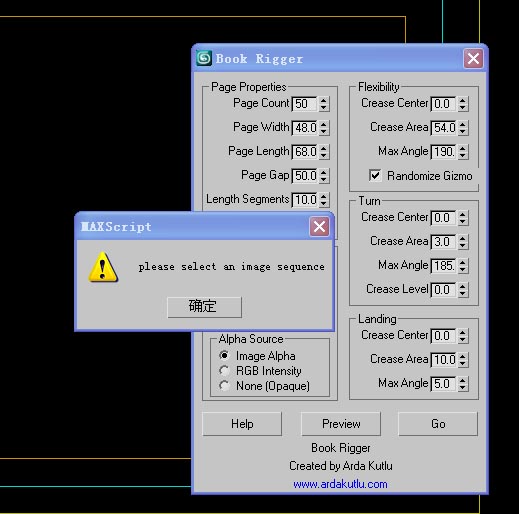
- Click to the "Select Sequence (Dif)" button from Material section of Book Rigger. From here you will assign an image sequence to each page of the book as a diffuse map. your images must be in numerical order (page01.jpg, page02.jpg, page03.jpg ...) select one of them and dont forget to check sequence option in the browser page. You can later define the Alpha source of the selected bitmap from book rigger. (image Alpha, RGB Intensity or None(opaque)) these are the same setting as the default bitmap alpha options.

-Click Go to create the Book Rig. 

Mikerad · 2009-02-08

I am new in using scripts, therefore, please, excuse my amateur opinion. Your script fits very well to the situations when pages are turned by a wind or two fingers which grasp a page before its turning. Is it possible to add an option of turning pages by one finger? In this case the right part of a page first slides on the surface of the next page while its left part arches, and only then it turns, following the finger.

Mikerad,thats a good

masquerade · 2009-02-09

Mikerad,

thats a good question. I never thought that actually.

With current modifiers i think it is not possible. Though it is possible to modify the script to add extra modifiers or changing the properties of current ones. I can work on that when I have some time. thanks. 

niedziak · 2009-01-09

Problem solved, it was my fault. Sorry.

niedziak · 2009-01-08

The problem is, after running the script (MAXScript --> Run Script...) listener doesn't respond (I've opened it and try to run the script under it, but nothing happened). I didn't find the option in keyboard shortcuts after that. So I don't know if I'm doing something wrong.

Admin · 2009-01-07

Maybe this will help - from the "Additional Info" section above:

"This is a Macroscript. After you run the script, you can find the
script under customize => customize user interface - category: Tik
Works, and can assign it to a hotkey, menu or quad menu"

niedziak · 2009-01-07

Will it work with 3DS MAX 2009 x64? I tried to run it on this version, but program didn't reacted to it.

ebee · 2008-12-12

Thank you for your fast reply!
Yes I got it working now with a shuffle-value of 200.

masquerade · 2008-12-12

you are welcome. Honestly, I couldn figure out myself why it isnt working without setting keyframes... And probably I should find a better control mechanism for that.

ebee · 2008-12-11

Hello!
The Shuffle-parameter doesn't seem to have any effect.
I'm using 64bit max 2009.

edit: no... it does _something_. The flipping speed seems to change somehow... but should I be able to achieve something like this with it? (click here)
Now whatever values I use in shuffle, I can't get more than one page up at a time.

masquerade · 2008-12-11

Yes. Shuffle option does the exact thing in your image. You see, normally each page starts its animation after the previos one landed. Shuffle option defines overlapping value of each page. If you increase that value (You have to make an page turn animation before) you will notice that space between pages decrease. (making the animation shorter.)

By the way, I read your message one more time, and realized that you didnt do that image of yours using shuflle option. In that case, I can say that you have to set your page keys first, then try to increase shuffle value.

I know it doesnt work very practical right now. I am working on it.

nikiken · 2008-11-24

thank you, look very tiptop.

D.R. · 2008-11-23

I Love this script, when you are working on the new version of the script, and i don't know if it is posible now, but can you make it so that each page has a front and a back for two sided reading. This way if you want to have a blank page on the back of each page or the next page show on the back.

masquerade · 2008-11-24

D,R,

it is possible, but it dramatically decreases the viewport performance.

You can use two sided materials instead. Inside the script you can assign two sided materials and assign sequences to the pages.

Or you can add shell modifier to one page and instance them to the other pages. You may use Modifier Instancer for this particular situation.

aimerYuer · 2008-11-03

That's OK now, how careless I am!
Thanks

masquerade · 2008-11-01

while browsing images, you must check "Sequence" checkbox. just select the image01.tga and check the sequence checkbox which is visible in the 01.jpg. Max will create automatically an ifl file, and script will use that file to assign seperate images to the pages.

aimerYuer · 2008-11-01

I have done as you said, but it donsen't work still. I send the images here. By the way, my Max version is Max9.0,maybe this is the problome? but everything else is normal.

Attachments

masquerade · 2008-10-31

aimerYuer, I sent you a PM related to the detailed usage.

aimerYuer · 2008-10-31

Oh,what a pity! I can't access the site really.
I have download your new version, when i assigned a material, nothing changed, can you show me some pictures to tell me how to use it. And, whether if the image sequence must to be "dig" format? I never heard it before.
Expcting your answer, thanks.

masquerade · 2008-10-24

You are welcome.

Strange, I have no problem to accessing the site. its www.ardakutlu.com in case of any typo mistake.

Updated the script by the way.

aimerYuer · 2008-10-24

Thanks for your explanation, i get it.
By the way, i would like to visit your homepage, but the link you gived is failed to visit it.

masquerade · 2008-10-23

:) probably I wrote it wrong. As anyone can imagine, English is not my native language.

I tried to mean by that the relation between crease amount and crease altitude. Right now, if you increase the turner angle up to 360 degree, creases will be on the wrong side. It will stay on top of the page. It makes impossible to correctly turn the page 360 degree. I fixed that adding a new spinner which controls crease level.(angle of the corresponding bend modifiers' gizmo actually)

Probably I again failed to explain that properly. If I can have some free time, in a few days I will complete the material code and finish the new version. If you try it, you can understand better than my lousy explanation attempts.

Thickness options will be nice. I will consider these for the next version. But I have to focus on material and crease stuff for upcoming version. Afterwards I will definitely get into other stuff. Thanks

aimerYuer · 2008-10-23

I am expcting for your new version!
And also i have a thought about this, maybe you can add the option of "thickness" , it contants two part: the cover pages and the inner pages,so that we can make much more different books handy.

Would you please tell me the meaning of the word "compansation" since i am not good at English,and i can't get it from a dictionary.

Thanks

masquerade · 2008-10-22

Yes I agree with you.

Actually I thought about for a while. At last I decided not to take that into account for now. This script only animates inner pages of a book. Since the cover contains only 2 pages, it can easily hand animated with an additional geometry.

You know there would be too many variables (hard cover, soft cover, different extrusion levels etc.) I tried to keep it as simple as possible.

 Now I am working on a new version. it will be possible to turn the pages 360 degrees with crease compansation, there will be more options to control creases and there will be an option to assign materials and texture maps to each page from a given image sequence.

On the next version I am planning to work on thorning apart pages and maybe do some stuff about cover issue.

Thank you.

aimerYuer · 2008-10-21

Thanks very much for this. Well done!
But i think there is a problome, it does not like a really book because the cover page should be different from the other page. DO you agree?

de_ar73 · 2008-10-20

thanks !

jonnybefree · 2008-10-20

damn thats nice!!

thank you very much man! exactly what i'am looking for since some time!

nomdeguerre · 2008-10-16

Great script Thank You

fayezgfx · 2008-10-15

It's Nice script Thanks allot

jfazzi · 2008-10-07

Wow! I wish I would have had that when I animated some books by hand! This is awesome!

Thanks!

nakolus · 2008-10-06

What an amazing tool it is !!!!!!!!!!!!!
Thanks you a lot !!!!

If it can set every pages texture easier I think it will be more wonderful.
(I think it is very difficult to compelete this work)
(Sorry for that impolite asking)

Oh~~how great tool it is. Thanks you

masquerade · 2008-10-06

Thank you guys. I am glad that you liked it.


nakolus,

it is not impolite to ask anything. It is a nice request. I didnt try anything yet but actually I was planning an option of automatically assigning textures from a given image sequence soon.

cheers

MarTroYx · 2008-10-06

Well done 😉