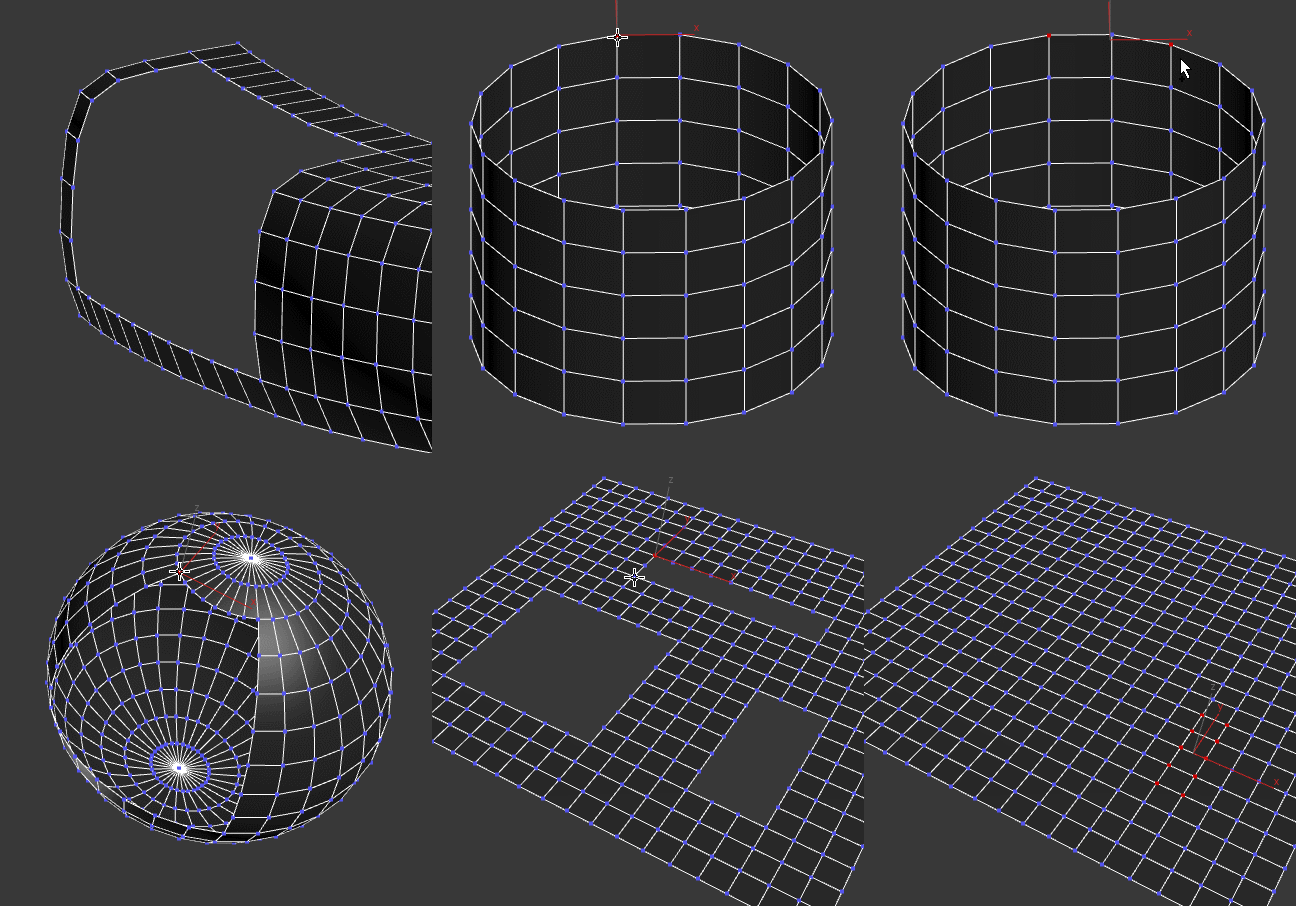
Fills a border with quads. Selects the newly created faces (sometimes you want to do an inset afterwards) and verts (sometimes you might want to relax them)
Script
 By Swordslayer · Credited author: Vojtech Cada · 2017-01-12
Fills a border with quads. Selects the newly created faces (sometimes you want to do an inset afterwards) and verts (sometimes you might want to relax them)
Installation: Run the .mcr file once. It creates a polyOp Border Fill item in the polyOp category under Customize UI, which you can then add to a quadmenu or assign a shortcut to it (that's what I'm showing in the preview gif). To use it, select a border vertex that defines the border corner and press the button/keyboard shortcut - this will fill a regular border. Or select two corners and press the shortcut, when filling irregular border. The border edge count has to be even.
Edit Poly support: If you don't need Edit Poly modifier support, you don't have to do anything else, if you want it, install the polyModOp function library.
Tags: Editable Poly, mesh fill, tolopogy, polyop, poly tools
Edit Poly
Fle · 2019-05-13
Hello, very useful script. Thank you for sharing.
I have a problem with the script when I use it in Edit poly in stack.
If I move the object(e.g.1) in sub-object level in the modifier below from the one I applied Border Fill, The verticies of border fill(e.g.2) will not follow the movement from the modifier stack below and they remain in the same position.
e.g.
2. Edit Poly (Border Fill applyed)
1. Editable Poly
Thank you.
Swordslayer · 2019-05-18
Well, yes, it fills a hole and to do that it creates new verts and those new verts are in no way linked to the underlying geometry because they weren't there before. To behave as you wanted, it would have to be a 'cap holes'-style modifier that works on the fly, not on user command.
StormBrig · 2019-04-06
Super useful tool. ~~
nasehyar
parvizb7 · 2019-04-05
آرچینا
parvizb7 · 2020-04-06
آرچینا یک رسانه پروژه محور ایرانی است که به پوشش و انتشار مطالب و محصولات دست اول دنیای لذت بخش معماری در سبکهای مختلف این رشته میپردازد. آرچینا در سال ۹۷ تاسیس شده و توسط گروه تحریریه ۳ نفره مدیریت و بروز رسانی می گردد.
دانلود پروژه های معماری
parvizb7 · 2020-04-06
آرچینا یک رسانه پروژه محور ایرانی است که به پوشش و انتشار مطالب و محصولات دست اول دنیای لذت بخش معماری در سبکهای مختلف این رشته میپردازد. آرچینا در سال ۹۷ تاسیس شده و توسط گروه تحریریه ۳ نفره مدیریت و بروز رسانی می گردد.
Thanks
Petta · 2018-10-22
Thank you so much, it is very helpfull
Nice work, buddy.
 IN_human · 2018-01-15
Very useful.
awesome
archprojects · 2017-03-02
It was awesome thanks
http://arch-projects.com/3dsmax/tutorial-3dsmax/
+1
 3dline · 2017-02-27
perfect as always
pls help me!
 hakanturker · 2017-02-26
I could not run the script
.
Swordslayer · 2017-02-27
What did you try and what didn't work?
AMAZING
Marksman · 2017-01-19
THANKS SO MUCH!! This is incredible!
pixamoon · 2017-01-19
Master piece ! Thanks for sharing !
excellent
 Waltez · 2017-01-19
Ottimo !
Thank you
arch.jalal · 2017-01-18
Really nice !!! Thank you
arch.jalal · 2017-01-18
THANX
Nice
brainsgonedead · 2017-01-16
Appreciate this, Marius charges for this so well done for making a freebie!
Can't get it to work
mali · 2017-01-16
Edit: Never mind, it does work. Thanks for sharing!
I̶t̶ ̶d̶o̶e̶s̶ ̶n̶o̶t̶h̶i̶n̶g̶ ̶f̶o̶r̶ ̶m̶e̶ ̶i̶n̶ ̶M̶a̶x̶ ̶2̶0̶1̶5̶,̶ ̶n̶o̶ ̶m̶a̶t̶t̶e̶r̶ ̶h̶o̶w̶ ̶m̶a̶n̶y̶ ̶v̶e̶r̶t̶s̶ ̶I̶ ̶s̶e̶l̶e̶c̶t̶ ̶:̶/̶
titane357 · 2017-01-14
Really nice !!! Thank you very much !! ( 3dsmax 2017 )