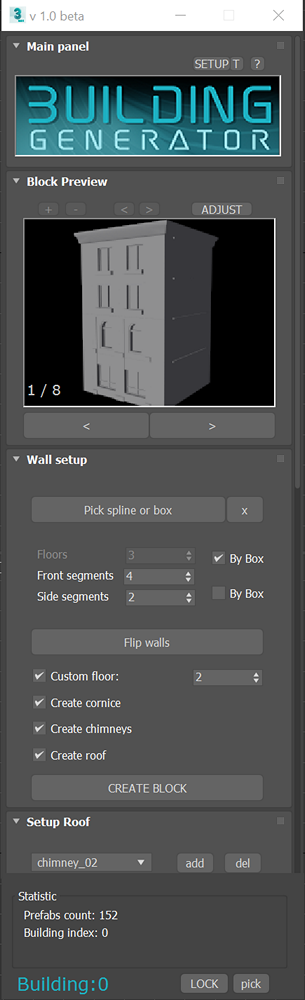
Description:
Building generator allows fast production of complex assets , especially those that consist from lot of repetitive patterns. It`s ideal for production assets like buildings, game levels, interiors..
It may be used for fast prototyping (building grayboxes) but also for final assets. User can edit assets similar way like in most of 3d software when working with polygons - using loop selection of rows and columns, extruding walls IN and OUT etc.
Update 18.9.2022
-Wall preview Thumb is now embedded in Rollout (Floating option can be still enabled in preferences)
-renamed source rectangles and source nodes for more logical naming convention
-possibility of adding floor with custom height. Floor number can be specified. This feature was added after user feedback and should allow to create more realistic buildings.
-Add custom defined height of bottom floor (also added after user feedback)
-Now its possible to create roof after building is done. This can be handy for example when user create building but forget to check “create roof
-Now its possible create wall from open spline
-bug fixes
Update 20.4.2022
- new preview window - this window shows block before is build, so user can quickly choose prefab combination he likes most. Using this window is optional, but it should make pipeline more convenient.
- reorganized source scenes, organisation is now more logical and respect new preview window.
- various bugfixes
Installation and run :
In 3DS max go to Script \ Run Script and run building_generator_install.mzp
This will install all necessary files.
Then go to add icon to your panel. Go to Customize / Customize User Interface. In Category go to Building Utils, then just drag and drop Building generator to your toolbar.
Curent state:
Currently script is in beta stage and it`s free to use. As i don`t have use of script for myself, i can adjust some functionality regarding feedback from users, if there will be any. As i work on script only myself i would really appreciate some feedback.
Advantages:
Script is easy to use. No technical artist needed
very fast prototyping - create building in few minutes (in case source prefabs are prepared)
Easy to use GUI, no nodes. Just buttons and thumbnails. basic philosophy of tool - "Work with prefabs like with polygons." No complicated nodes, no tech-artist skills needed.
script is non destructive - it not touches source prefab geometry. ( What script is only does is moving / rotating / mirroring asset and adding slice modifier on corners )
No saving required - just use standard 3dsmax save/ load, you can always continue edit project (in case you will use script proper way ).
Not only for buildings - tool is convenient for any assets with lot of repetitive parts. For example bridge construction, railings, interior walls etc..
More info on homepage!
Betatesters needed. If you are interested in betatesting or if you have any feedback, please contact me!