By Swordslayer
Simple color mixer. You can change the number of segments of the gradient control and move the slider or enter a percentage to get a desired blend of two colors in RGB or HSV color space. The width of the dialog can be changed.
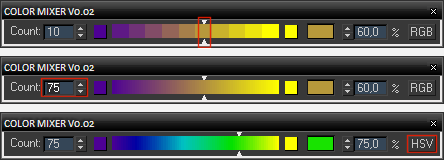
I made this script because quite frequently in the past I had to reach for Photoshop or Mix color map just to find a value somewhere in-between two colors. This control offers more intuitive way of blending them and more control over the result. The two source colors and the resulting blend color are colorpickers and as such you can right-click them and copy/paste their values.
For newer max versions (starting with max 2020) you can use the colorMixerQt.ms file instead:

Installation: The .ms file can be run from any location (Maxscript -> Run Script...). If you want to put it in toolbar, menu or quadmenu, you can create a macroscript using Macroscript Creator.
 MrTom · 2013-12-15
 JokerMartini · 2011-08-09