Create Walkthrough Camera v1.0
The idea behind Walkthrough Camera
was to speed up workflow in terms of
attaching a camera to a path. This way
it's done with only a couple of mouse
clicks.
Script
By martinskinner · 2008-07-17
Create Walkthrough Camera v1.0
The idea behind Walkthrough Camera
was to speed up workflow in terms of
attaching a camera to a path. This way
it's done with only a couple of mouse
clicks.
Installation
Each Maxscript comes zipped, along with .txt manual file, and any .jpgs required.
1) Download the file (follow the link below).
2) Unzip the file and copy the content to your Scripts folder for 3dsMax (version 8 or higher).
Use
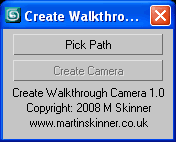
Pick Path - Pick the path you want your camera to follow.
Create Camera - Creates a camera which moves along chosen path.
It's as simple as that! Pick your path then create your camera - done.