
ScriptSpot

Script

DarkScintilla: Maxscript Editor dark scheme

By spacefrog · 2011-08-05

Version
1.2d
Version requirement
3ds Max 2008 and up
Date updated
2021-04-13
Votes
42
Download
Download
Description

A dark color scheme for the Maxscript Editor, inspired by dark schemes available for other IDEs

As i was doing more and more max scripting lately, the urge to do something with the eye hurting Maxscript Editor colors escalated. So i sat down today and had a walkthrough on the various options Scintilla (Maxscript Editors core) provides.

 

After that i started to tweak, and integrate the color scheme and font settings which i use in other IDE's like Monodevelop, Flashdevelop or Eclipse ( even VS is set to the dark scheme here). Additionally i transfered nearly all of the color settings previously in the "maxscript.properties" to the "MXS_EditorUser.properties" file, using symbolic color names etc...

So here is the result:
It has not been tested to all it's extends, but this is a pretty complete set.

Updates:

  • V1.2d - fixed too dark-blue color for FPS and struct properties...
                 slightly brightened color for global constants and made it use bold fonts
  • V1.2c - fixed yet another typo in "MXS_EditorUser.properties" which was breaking coloring of verbatim strings..
                  ( corrected line is "colour.string.verbatim=...", the equals-sign was typed as colon   )
                  Huge thanks for reporting this go to Klaas Nienhuis from the beautiful netherlands
                  Made caret color a bit darker ( this is global), now it should be better visible on white backgrounds
  • V1.2b - fixed typo in "MXS_EditorUser.properties" ( "indent.closeing" changed to "indent.closing" )
                  Now autoindenting should work again as expected (thx go to James Haywood for reporting)
  • V1.2a- Fixed some stupid install script error popup happening on older Max versions.
                 Note: you can't assign a string-variable to a maxscript  label-text during roll out creation.🙂
  • V1.2  - provided an installer Script. Just Drag and Drop the complete packacke ( *.mzp) into a 3ds Max viewport
                 The Installationscript will guide you through the complete installation (or uninstallation) process
                 Some minor color tweaks...
  • V1.1a- Updated readme for people having trouble installing. The "MXS_EditorUser.properties" has to go to the Max
                  user- folder. See readme. I will create a install script over the weekend, so stay tuned...
  • V1.1  - integrated ALL tweaks in "MXS_EditorUser.properties", replacing maxscript.properties NO LONGER necessary !!!
                 I recommend to restore the original from your backup, or use the one in [maxscript.properties ORIGINAL] in the zip
                 Thanks go to Johan Boekhoven for the hint...
  • V1.0a - Fixed "MXS_EditorUser.properties" to not modify global color styles( back color most noticable )
  • V1.0    - Initial release

Notes:

  • Internet Explorer tends to rename *.mzp  (Maxscript Package)  downloads to *.zip -  please change extension back to *.mzp
  • !!! BACKUP YOUR ORIGINAL FILES !!!
  • There is no adapted html.properties, so html file display with Maxscript editor is not "recolored" -> see readme in the zip
  • This scheme uses Microsofts Consolas font, which is freely downloadable at MS ( see link inside the zip)
  • Changes can easily be done, just edit self-explaining symbolic color values in MXS_EditorUser.properties
  • If you make some improvements and tweaks, please contact me and share and i will integrate them

Suggestions, improvements etc.. are welcome

Here is how it looks
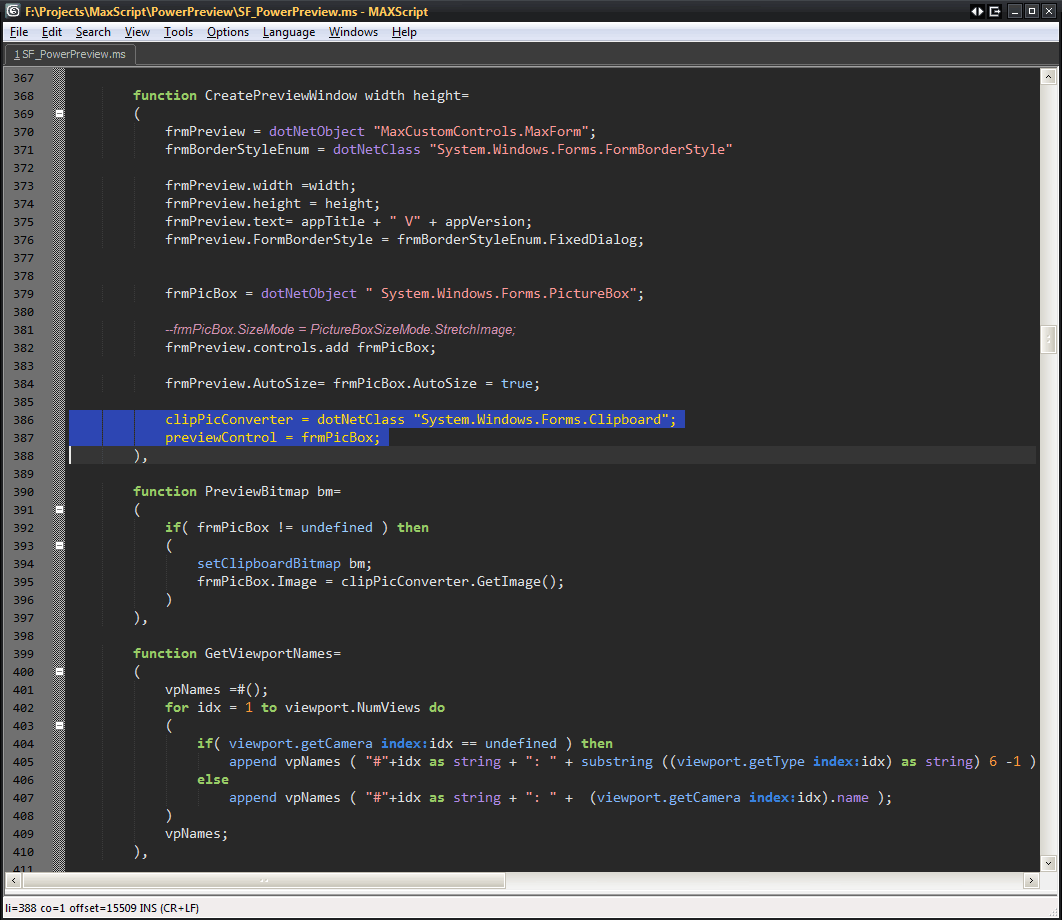
 

Dark Color Scheme for Maxscript Editor

Tags: editor, Color, maxscript, colour, dark, scheme

Comments (41)

Any plans for script listener window?

To-mos · 2022-02-21

This is great but sadly the script listener window is still white. while it's nice to have dark colors in the editor it doesn't do much good when the debugger window is still blinding white.

MrPingouin · 2022-07-06

Those values are accessible via maxscript.
You could put them in an autoloaded script.

listenerBackgroundColor = (color 40 40 40)
inputTextColor = (color 225 225 225)
outputTextColor = (color 153 204 102)
listenerSelectionBackgroundColor = (color 58 82 184)
listenerSelectionForegroundColor = (color 255 218 18)
messageTextColor = (color 255 0 0)
macroRecorderBackgroundColor = (color 60 60 60)
macroRecorderTextColor = (color 225 225 225)
macroRecorderSelectionBackgroundColor = (color 58 82 184)
macroRecorderSelectionForegroundColor = (color 255 218 18)

dark mode listener

hannes · 2023-04-12

This is great but sadly the script listener window is still white. while it's nice to have dark colors in the editor it doesn't do much good when the debugger window is still blinding white.

this plugin does that for you https://github.com/hannesdelbeke/dark-listener-max

hannes · 2023-04-12

_

Python editor version?

Riviera · 2021-11-10

Hello.

Super useful!

Could you help or give some guidance how to copy/create the same for the Python editor too?

Thanks a lot!

obaida · 2021-09-23

Thanks for the update :) , the colour.structFPS was so dark .

Thank you!

jeffreysbrown · 2021-09-13

Just found this. I'm using Max 2022, and while that is an ~OK~ upgrade from Max 2020, this dark theme is an awesome upgrade to the MXS editor. Thank you thank you thank you.

small update after a very long time

spacefrog · 2021-04-13

Just wanted to give a headsup that i've just uploaded two fixes for small issues i came across just now ...
But anyways, colorscheme still keeps working on newest 3ds Max versions

Any · 2018-12-15

Good day.

Write the following code in the editor
____________________________________________________

ModObj = $Modified_Shapes/* as array
ini = abs (in coordsys $CameraProject ModObj[1].pos.z)
for i = 2 to ModObj.count do
_______________________________________________________

The color coding of the code disappears after the symbol /*.

spacefrog · 2018-12-16

This is to be expected:
the /* sequence opens a comment block ( same as -- , just for multiple lines of text ). Comment blocks are colored using a single color. This is one of the quirks of the maxscript language definitions i guess ...
Not sure how to work around this as i never used this kind of syntax ..

lutteral · 2020-06-26

it happens also with the vanilla editor, it is because of maxscript formatting. Add "--*/" (without the quotes) at the end of the first line to restore the formatting

Awesome !

NicolasC · 2018-04-24

Perfect, thanks a lot !

Aah, lovely...

triff · 2017-07-28

Found this scheme a year or two ago but completely forgot what it was called, then I tripped over it on cbuelter.de. Thanks for saving me from the almost-but-not-quite-Comic-Sans default setup again :)

Love it

bathyscaph · 2014-04-01

Thanks! This makes a world of difference. I never realized just how horrible the default maxscript editor color scheme was; I have been enlightened.

Thanks!

Nik · 2014-02-16

--Nice script of dark scheme.

Thanks!

BradT · 2013-03-20

So much easier on the eyes. Thanks for creating this!

Alexey

borent · 2012-11-19

Cool thanks!!!

hedphelym · 2012-02-02

Thanks, it works perfectly!
I really enjoy using this.

ravenslayer · 2012-01-02

awesome, just what i wanted!
tnx :)

tim_little · 2011-10-29

After spending 8 hours straight one day staring at the retina-frying beams of my white maxscript page I decided there must be something out there that could change the default colors. I was very grateful when I found your UI script. Thank you very much for sharing your secret to avoid scalded eyeballs.

thanks!

maxwell3d · 2011-09-28

i like very much the color scheme!
I installed but my previous autocomplete script from Jan is not working anymore, how can i add the autocomlete tools to this beutiful scheme?
thanks in advance

idiotic · 2011-09-25

Good Job Man. I Like It.

spacefrog · 2011-09-24

Thanks all for the nice comments ;-)

@argonavt3D:
the answer is already a few posts below your post, basically the answer is no, because this color scheme depends a lot on the "maxscript" language lexer

but of course you could simply grab the color values and edit the standard SciTE's properties file manually. You just can't take this one and simply copy it over, it will not work in standard SciTE...

argonavt3D · 2011-09-20

Great color scheme!
It's possible to make it work in standalone SciTe ?

thanks for sharing

lalamax3d · 2011-09-09

its amazing..

viro · 2011-08-30

Thanks, I love it

Thanks!

rotem · 2011-08-24

As said, this is very pleasant to look at and easy on the eyes. Thanks for the many future headaches you've saved me! :)

spacefrog · 2011-08-20

Thanks guys for your nice comments - highly appreciated ;-)

@Klaas :
special thanks go to you for detecting the verbatim bug, it's actually a typo in the symbolic color name, the '=' was mistakenly replaced by ':' . I have fixed that and made the verbatim string coloring a bit stronger compared to standard strings. Never would ever have found that by myself, because i even was'nt aware of any maxscript verbatim string usage ;-)

@easyfrog:
Dont exactly understand .. you want to use it for standalone Scite or d oyou have problems installing the mzp package ?

easyfrog · 2011-08-22

.Sorry for my English. I want to use it for standalone Scite. :)

spacefrog · 2011-08-24

ahh - well - i guess that will not be possible without heavily modifying the user properties file i created as it depends on the other changes and properties Autodesk implemented for the Maxscript editor ...

i guess your best luck would be searching for customized SciTE color themes via google ...

grabjacket · 2011-08-19

It's a very relaxed color-scheme, not so shouty. I've noticed that on my system the verbatim-strings (@"string here") are the same as normal strings. I had a very hard time to change this, but otherwise: very nice!
Klaas

How can i use this scheme to my sciTE??

easyfrog · 2011-08-19

I'm very like this scheme. It's pretty cool . so how to use this scheme to my sciTE??

br0t · 2011-08-11

Hey, nice job with that installer, that really helped make things easier. The first version in copying files by hand did fail for me and I was kinda frustrated, but now it works fine, cheers!

This NEEDED to be done.

Curtis W. Tooley · 2011-08-11

I am so happy that I no longer have to go blind writing maxscripts.

Curt

barigazy · 2011-08-11

Thanks man. I missed it. In this website actually has the nice themes. I have not used Eclips, so I was not thinking in that direction. However, I like your idea about the converter. I hope that your plan will be achieved soon. Cheers :}

@barigazynice dark scheme

spacefrog · 2011-08-10

@barigazy nice dark scheme !

actually i'm currently considering doing something like an eclipse to Maxscript editor theme converter, possibly even integrating online resources like this:
http://www.eclipsecolorthemes.org
.

No promises, but that's the plan...

BTW:
You still have the "indent.closeing" typo in the themes you posted hence autointending does'nt work correctly - that bug was fixed with V1.2b ( only fix from V1.2a - so you easily can fix it manually yourself..)

barigazy · 2011-08-10

Hallo, spacefrog
Nice work,man! You save are eyes.
I send you my MXS_EditorUser.Properties (Dark and Light Elegant Schemes).
I do not know that you thought to write a script that could edit the files as the Notepad++ ( "Style Configuration").That would be the right thing.

Attachments

holycause · 2011-08-08

my bad ;)

thx for the update. :)

holycause · 2011-08-08

I can't download it

The requested URL /downloads/DarkScintilla_V1.2.mzp was not found on this server.

spacefrog · 2011-08-08

Had to pull it for about an hour, because some stupid label error kept appearing on older Max Versions when trying to install. Is back online now with V1.2a

Sorry for the hassle ;-)

Michele71 · 2011-08-08

Wow! Nice and very helpful! Thanks