Scale tool coded as modifier plugin
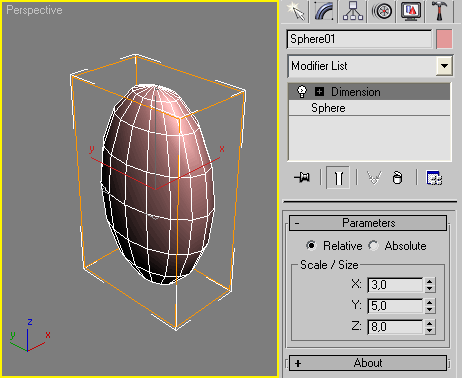
Script
 By Anubis · 2010-06-22
Scale tool coded as modifier plugin
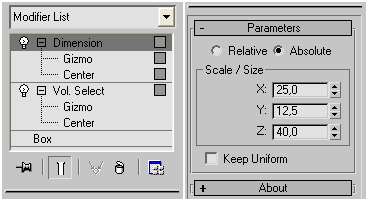 Update Log:
v.1.1 - added checkbox to keep proportion
v.1.2 - now switch between relative/absolute mode fixed
Usage Notes:
Such scripted modifiers are memory consumer and I prefer to omit any callbacks additions which might polish some behaviours but will make the whole solution more dirty.
Instead of future complications, just read next usage notes about 2 known cases:
1. The size of modified object is acquired once when the Dimension is added to it. And that mean any size's changes of the base object after that are not handled. Shortly, if you need to modify the base object, just temporality remove/cut the Dimension modifier and then you are done, turn/past it back on the stack.
2. When you apply the modifier as instance to many objects of varied size, and wish to work in Absolute mode, keep in mind that the XYZ values you see are the size of the first object (to which the modifier is applied to). I hope this not look too logical confusing.
Update Log:
v.1.1 - added checkbox to keep proportion
v.1.2 - now switch between relative/absolute mode fixed
Usage Notes:
Such scripted modifiers are memory consumer and I prefer to omit any callbacks additions which might polish some behaviours but will make the whole solution more dirty.
Instead of future complications, just read next usage notes about 2 known cases:
1. The size of modified object is acquired once when the Dimension is added to it. And that mean any size's changes of the base object after that are not handled. Shortly, if you need to modify the base object, just temporality remove/cut the Dimension modifier and then you are done, turn/past it back on the stack.
2. When you apply the modifier as instance to many objects of varied size, and wish to work in Absolute mode, keep in mind that the XYZ values you see are the size of the first object (to which the modifier is applied to). I hope this not look too logical confusing.Tags: modifier, scale, measure, dimension, anubis, simpleMod, plugin
agree with other commenters
janci · 2015-07-31
i agree with others who commented, as a dimension plugin it should be primarly showing absolute dimensions, and rather than changing the dimension to a fixed number, it should show the current dimensions and let the user change them as needed.
otherwise great job! thanks!
mohgharib · 2024-11-23
I made one that takes it that way https://www.scriptspot.com/3ds-max/mcg/edim
Scale each Element
rs3d · 2014-10-24
Would it be possible to implement a function to scale each Element around its Pivot? So no global scale, but subobject-based scaling...
 DavidAnatolie · 2014-08-11
Excellent script, works very fine.
Very GOOD Script
 mustafa mamdouh · 2014-02-09
Hope you have some time to develop it more ..
dsp_418 · 2014-01-03
Dom,
apologies, I totally forgot about this post!
Maybe there's an email notification system here on script spot, if so I've to turn it on somehow.
Anyway, don't drop the script in the viewport, copy it in the scripts/Startup folder in your 3ds Max program folder.
not working in 2014
Dom · 2013-08-07
Very usefull script, but not working in Max 2014, can you have a look ?
dsp_418 · 2013-08-07
It works just fine here. What's the issue?
not working in 2014
Dom · 2013-08-07
Nothing happens when I select the modifier, it's not in the stack.
Maybe I have made a wrong install, I have dropped the script in the Max viewport, I see the dimension modifier in the list,
but when I select it, nothing happens and the modifier do not appear in the stack-list.
milie · 2012-08-28
Hey...
Could you add the possibility to scale to system units. I mean that the modifier read the actual object bounding box size, and then you can modify further.
Thanks
thanks for all suggestions
Anubis · 2012-08-28
As for the system units just find this 3 strings
#floatand replace them with
#worldUnitsdsp_418 · 2012-08-24
Great script!
It should built-in.
Agree with rs3d, rotation and transform would be cool.
Cool
 Hani Tiby · 2012-04-15
It's a cool idea Anubis, great approach.
I believe that making the dimensions dynamic would be a very big plus, so none scripters could use it in wiring or reaction manager.
Rotation and Transform
rs3d · 2012-03-17
Would be great to have Rotation and Transform as additional
functions in the Dimension Modifier. So switching off
transformations would be really easy...
i see
 harumscarum · 2012-01-04
i think this was only 2012x64 issue
ok, good to know
Anubis · 2012-01-04
Its hard to help then. You can change the default type to Absolute (to see if that help somehow) by editing this line (17):
-- original code:
type type:#integer ui:rtype default:1
-- edited code:
type type:#integer ui:rtype default:2
weird Absolute behavior
harumscarum · 2012-01-03
when switch to Absolute all rollouts sets to 0.01 and object became huge!
maybe - since modifier is called Dimensions - make Absolute mode default one? so as soon this modifier is applied we see exact object dimensions and if any corrections needed - switch to Relative to transform object
strange...
Anubis · 2012-01-04
Its works fine here.
Keep in mind i tested it in Max 2009.
Now have no idea how to helps more :/
Same here
 maicogir · 2012-01-09
Same error here.. Max 2012x64.
eh...
Anubis · 2012-01-09
bad news then... can't help for Max 2012
maicogir · 2012-01-12
Yeah, but is a good script, and with a little tricks we can use it ... :) Tks
Ps.: Max2012 sucks!
updated
Anubis · 2012-01-02
very quickly tested though ;)
harumscarum · 2011-12-30
checkbox woks fine! thank you!
harumscarum · 2011-12-30
yeah! thank you very much and happy new year!
thanks
Anubis · 2011-12-30
I update a bit the script, adding checkbox.
Drop a line on how it works when you test it.
Happy new year!
ok, i see
Anubis · 2011-12-30
You're right about switching btw Relative/Asbolute, I s'd handle this.
As for the single checkbox, that w'd limit the usage, I think, as will constrain proportion always to X.
Ok, I'll play with this staffs after the holidays.
regarding constrain proportion
harumscarum · 2011-12-30
i see it very simple. only one checkbox because object has only one proportion.
so if we have source sphere with dimensions by X,Y,Z=10cm and X changed to 15cm with "constrain proportion" enabled - Y and Z also be 15cm.
one more issue - default dimensions is Relative and it is ok, but when switch to Asbolute - object gain incorrect dimensions of 1,1,1cm
Thanks everybody
Anubis · 2011-12-30
@maicogir - I'm too thought once about this but seems impossible mission. This modifier can be applied to one or multiple objects, but also can be applied to sub-object selection, for instance, you can add Mesh Select and made sub-selection, and then applying Dimension on top of the stack. And the problem is... well, lets quote the help file:
You should not try to access the object being modified from within the
maphandler as this will attempt to evaluate the scripted modifier again. This will result in an infinite loop and hang 3ds Max.
@harumscarum - Hmm, at first look this sounds as minor improvement that can be done but how you imagine the work of such checkbox? There are 3 dimesions (XYZ), maybe needs 3 checkboxes? Sounds a bit messy.
nice script!
harumscarum · 2011-12-30
thank you
could you add "keep proportions" checkbox?
Great Work
maicogir · 2011-12-30
Realy nice script!
I have one tip... would be wonderful if the function "relative" reads the actual size (x,y,z)of the object, and you could change this numbers accordly.
 lantlant · 2011-12-29
useful script