ScriptSpot

Script

Displacement Roof Surfaces

By digitalx3d · Credited author: DigitalXModels.com · 2010-08-11

Version
1.0
Version requirement
2010, 2011
Date updated
2010-12-14
Votes
118
Download
Download
Description

See "Additional Info" for the latest version history.

Displacement Roof Surfaces is a Free MaxScript that will take your existing roof geometry and properly apply UV Mapping coordinates to each roof plane and then apply convincing materials and displacement modifiers to the geometry.

Our goal is to eliminate the need for filling your 3d scenes with millions of polygons of roof tile geometry, thus keeping your viewports moving quickly and saving you hours of tedious work.

Simply choose your existing roof geometry, select the edges that represent ridges, hips, and gables, and click "Create!". After the script runs, you can quickly adjust the color, variation, and tile size in the viewport and in real time.

In future releases we will add additional roof tile profiles, asphalt shingles, metal seamed roofs, and corrugated metal. If you have a specific type of roof surface you'd like us add, please contact us via email.

Additional Info

Version History: v1.0 - 10/20/10 -added menu for choosing multiple roof types -added 2 Flat Concrete Tile types -added ability to create multiple roof types within the same file -added support for metric units -added options for Creating UVs, Materials, and Ridge Geometry -added tooltips -fixed rotation of ridge tiles existing on horizontal edges with only 1 face v.90 - 8/10/10 -1st Public Release
Videos

Tags: script, 3dsmax, maxscript, roof, rooftop, tile, rooftile, barrel, displacement

Comments (43)

Anybody know how to get version 1.0

Andrew541960 · 2015-07-30

Long ago when this script first came out, I downloaded it and while it is a very handy thing to have, in my line of work, it had one drawback, only one type of tile (barrel)

However, when I recently discovered it was now at version 1.0 and had new tile types, including flat, I rushed straight over to the site and downloaded what I hoped would be the latest version, only to discover it was still v0.9

I know digitalx moved to a new site not so long ago and perhaps this explains why..I am pretty sure it exists, since I have seen a screenshot of the new interface, on the scripts page and it also appears elsewhere

Would love to know if this version is actually available and when I can get this latest version, via the site

Any news about the SphereHelper error ?

theedge · 2013-07-09

Each time I try to use the script I get this error.

SphereHelper is a reserved keyword

robcapper · 2017-11-01

SphereHelper is an exLevel object type. If you uninstall GrowFX this will fix it. The author of the script can also change SphereHelper to a none reserved word and it will fix it too.

Curtis W. Tooley · 2013-02-22

How about just a download url and not a convoluted login/register grope.

HOW TO DOWNLOAD SCRIPT FROM THE SITE

njm1 · 2012-09-21

WHERE IS THE FILE TO DOWNLOAD IT,,HAVING PROBLEM I CANNOT FIND THE FILE,OR DUNNO HOW TO DOWNLOAD TO GET IT

Snytax Error: at bad, expected <factor>

someturkishguy · 2012-06-01

I get an error, when i try to make it work... I am using 3D Studio Max 9, and i read that this problem might be caused because i don't have installed SP1... Then i have installed SP1, but still no luck... then i installed SP2, still no luck... Is there anyone out there likely to help?

This is shown on the dialog..

-- Syntax error: at bad, expected
-- In line:

And when i look at the MaxScript Listener it writes like that

-- Error occurred during fileIn in
>> MAXScript FileIn Exception: -- Syntax error: at bad, expected
-- In line: <<

Best Regards
Jaseen

Version for max 2009 x64

birket · 2011-09-02

Wondered if it would be possible for you to release a version of this script that will work on Max 2009 x64?

SphereHelper error

digitalx3d · 2011-03-24

Looks like several people have gotten this error. For some reason I haven't been able to reproduce it myself. I will look into this though once I have some free time and see if I can come up with a fix... and hopefully add a couple more roof types as well. Sorry for the inconvenience to those of you getting the error.

Maps problem

scepticus · 2011-03-09

Hi, this script looks great but i've a problem, it looks like it doesnt create any displacement bitmap and gives me "white" roofs, without displacement.
I've choosed a folder, always empty, tried to launch max as admin, same. Dunno what to do, any idea?

ps: running max 2011 + vray 1.5 sp5 + on win7 x64.

maxpoz · 2011-03-08

Hello,
i've a problem
No "select" function for spherehelper
in max 2011 x64
exist a solution?

fajar · 2011-02-20

its only for vray, I think.

Link

alanvava · 2011-02-20

Can anybody sent link

shoni · 2011-02-10

I cant seem to get this to work with mental ray.
I have followed the tutorials and checked the displacement slot under the tiles and ridge tiles however when it renders, it only shows the flat diffuse colors..

No "select" function for spherehelper

beagle · 2011-02-07

Me too....

No "select" function for spherehelper

And nothing appear...

I'm using 3dsmax 2010 X64 and Vray

Thanks by advance !

Error

raistlin · 2011-01-08

Great script as i can see... But i can't use it! I have an error when i'lve selected everything and press the "generate" button.

My error is > -- No "select" function for spherehelper

And nothing appear...

I'm using 3dsmax 2011 X64 and Vray 2.002

Thanks by advance !

download

Glend · 2010-12-25

hi...how i can download the scripts?

digitalx3d · 2010-10-29

In response to my last post, the migration to the new server is finally complete. You will no longer see any invalid certificate warnings. Other than a faster browsing experience, everything else concerning the site is the same as it was.

Website issues

digitalx3d · 2010-10-14

Hey folks,
As of 10/13/10, You may be seeing a Security Warning on our website today and tomorrow. We are in the process of migrating to a newer and faster server, but at the same time our SSL certificate has expired, and due to technical reasons, we are just going to wait until the new server is online to activate the new SSL certificate. If you are just wanting to obtain the free scripts, feel free to continue on through the warnings. If you are uncomfortable doing so, then wait another day or two for the new server to come online with the functional SSL certificate. As a reminder the scripts are free, so even though you will be prompted for credit card information, you DO NOT need to enter this info. Simply leave it blank.
Thanks,
John Pruden
DigitalXmodels

editing for use with metric system

gkscorpio · 2010-10-11

I'm using metric system too and I would like to write some instructions to edit the script output to meet our needs.

The script output consists of 2 objects. One is the "main roof" and the other one is ridge tiles.

First you need to select the main roof and click on the VrayDisplacementMod in the modifier list. Then you need to adjust the amount to suit your needs. I've put it in 0,2m but I guess it's a matter of personal preference really. You will need to do the same with the ridge tiles object.

Now comes the crucial part. You need to select the ridge tiles object and lift it a bit. My guess is that the script has the amount of lift in inches, so it's too small when you use the metric system.

Finally, we need to change the width of the ridge tiles to suit our needs. You need to edit each plane separately. For some of them, you can just scale them in the width direction. For the rest (if you try to do it and the plane starts changing direction), you can select each of its edges and move it outwards..

I know it's a bit of a fuss (especially if you have a complicated roof),but it's a workaround I figured out until the script maker modifies the script, I thought I should share it with you..

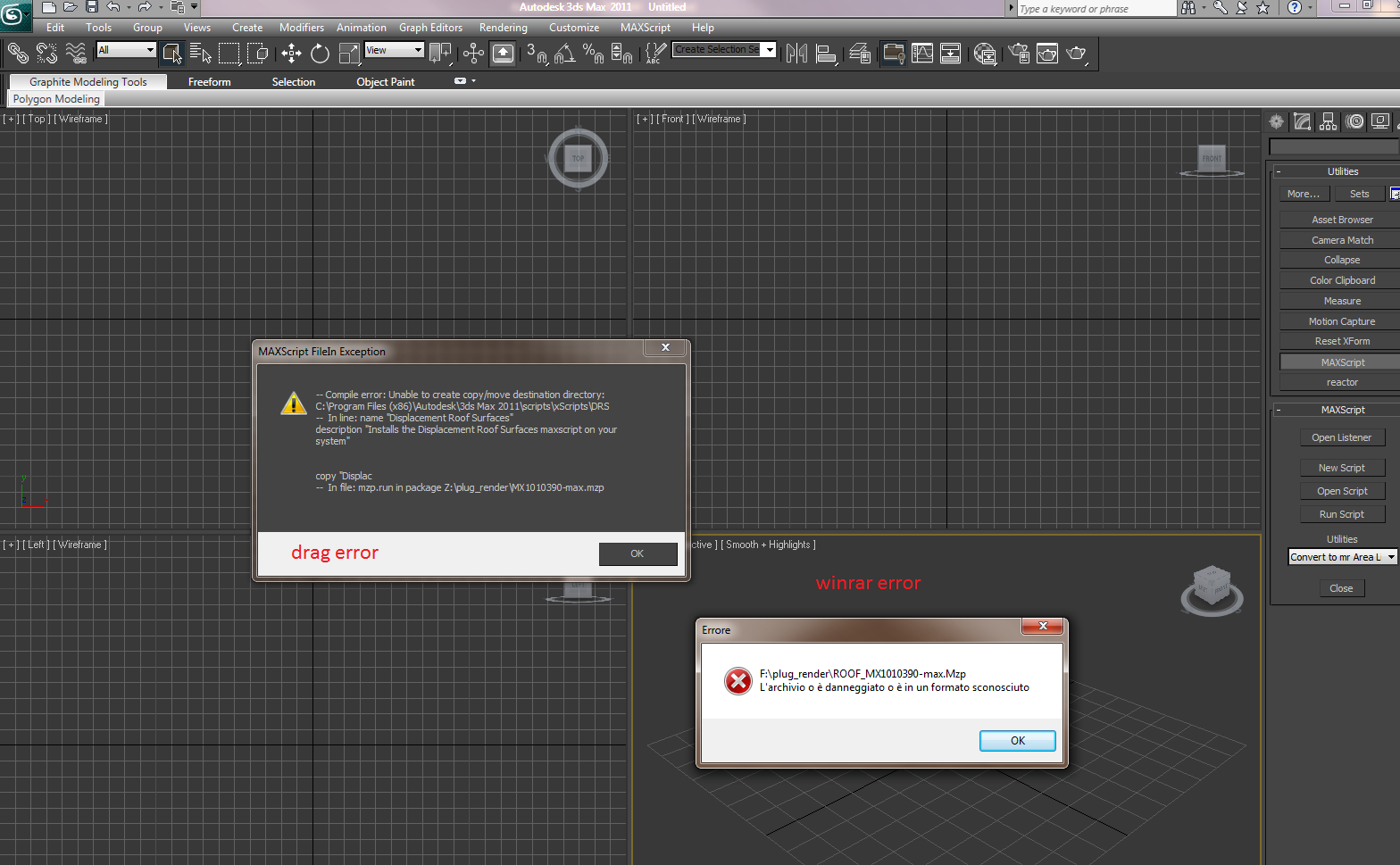
Problem to run the script

3dlands · 2010-10-06

Compile error problem on max 2011 x64.

Impossible to open with any winrar or winzip....

Please help

Rox

Attachments

Michele71 · 2010-10-06

Try to open .mzp with "Run MaxScript"... also, read some answers below your request for help...

assaultzero · 2010-09-18

How would I download this? is it not free anymore?....

1rv · 2010-09-13

Sorry if I'm missin' something..
How would I download this? With add to cart button and then
a huge form of 1 mile long?

digitalx3d · 2010-08-30

Justin,
Are you working in Metric? I haven't had time yet to add in 'native' support for metric units. In any case, it sounds like your system scale is in something other than inches. Until I can update the script, you'll need to convert your units to inches and then everything should scale properly.

Concerning the flat color on the tiles, is this a displacement issue? Or a diffuse color issue? If you have Vray installed, and you check the Vray displacement option, it should automatically add the Vray displacement modifier. Although... I think one other option I planned to add later is a control for the displacement amount in the DRS UI. Since your system scale seems to be larger(?), a displacement amount of 3 inches might be so small that it's not really visible. You may need to crank this up (which you can just do manually in the modifiers for the main roof tile and the ridge tile objects (each has a unique modifier since they use different maps).

Let me know if this info helps. Also, I can get back to you faster if you send me email through support @ digitalxmodels.com.

trixian · 2010-08-27

Would it be possible to have a change log in your main post so one can see what you have added\fixed?

I'm interested in seeing if you have added any new shingle\tile types, and maybe made it handle real world coordinates properly like someone mentioned earlier.

digitalx3d · 2010-08-30

Hi Trixian,
When I post an update I will definitely list the changes made. I just haven't had time to update this script yet.

justin101 · 2010-08-27

Thanks guys. I got it installed, but I just cant get the same result as in the two video tutorials. The way I create my roof is by using the line tool to create the various roof faces, then I convert them into an editable mesh and attach all the roof faces into one mesh. Then I weld the corner verticies together. At this stage my roof is ready to apply the script to. I follow all the steps in the video tutorials but there are a few problems after I hit the step 3 "create roof tile".

- The ridges in my scene are so thin that they are not even visible where as in the video tutorial, they are quite wide as they would be in real life.

- When I hit render, my roof is just a flat colour. No roof tiles are visible and no ridges visible. So Im kind stuck here.

I'm sure I must be doing something wrong along the way as the result in the two video tutorials looks amazing. Any further help would be much appreciated.

digitalx3d · 2010-08-27

Ok, so hopefully I can clarify how to install the .mzp file. There are 2 simple ways.

1. Drag the .mzp file from any Windows Explorer window onto a Max viewport. The script will run automatically. However, this method does not add the script into the Customize UI commands list. What has happened though, is that the script files have been extracted to a new folder located in the Max\scripts folder. The folder will be \scripts\xScripts\DRS\. In order to have the script show up in the Customize UI commands list, you'll need to run the DRS_Macro.mcr macroscript. Or you can just run the Displacement_Roof_Surfaces.mse file anytime you want.

the much easier way...

2. is to choose "Run Script" from the maxscript menu and point it to wherever you saved the .mzp file when you downloaded it. This will place the script in the Customize UI commands list and you can then add it to a toolbar or menu. Or run it manually as described above.

Also, .mzp files are basically the same thing as a .zip file and will open with WinRar or WinZip, etc... All the script files need to be together though in order for the script to function properly.

justin101 · 2010-08-26

Thanks Michele71, but the file that I downloaded is called "MX1010390-max.mzp" and is not a rar file so Im still not sure what to do with it to get this great script working.

Any help would be much appreciated people.

Michele71 · 2010-08-26

It 'a file. Mzp! Open this file as .Rar !!

Click right on the file > Open > choose winrar as program to open it and extract the contents into a new folder named "xScripts" Ok?

justin101 · 2010-08-25

This plugin looks great but Im having trouble getting the script to run. When I try to run the downloaded "MX1010390-max.mzp" that i placed in my scripts folder, I get a message saying "MAXScript FileIn Exception" Compile error bla bla bla"

Can someone please tell me exactly what needs to be done with the downloaded MX1010390-max.mzp file in order to get this Displacement roof surfaces script to work?

Cheers.

Michele71 · 2010-08-25

It 'a file. Mzp Usually you do drag it to any window work in 3dsMax and "should" getting. If not, do so (I use Max2010 64-bit):

Open the file as .Rar (click right > Open > choose winrar as program)and extract the contents into a new folder named "xScripts"

Inside the folder "xScripts" create a new folder named "DRS"
Cut and paste the file "Displacement_Roof_Surfaces.mse" inside the folder "DRS"

Copy and paste the folder "xScripts" in:
"C:\Program Files\Autodesk\3ds Max 2010\Scripts"

Now you can follow two ways to launch the script:

1) In Max go to tab "Utilities" (Create panel) and choose "MaxScript".
Push "Run Script" and choose the file .mrc "displacement_roof_surfaces".

I remember that this method is wrong, but better than nothing...

2)(Recommended method):

Go to Customize > Customize User Interface > Toolbars > Category > "xScripts" and drag "Displacement Roof Surfaces" on empty space in the Main toolbar in Max. Click on icon newly created named "DRS" to start the script.

I hope this information will be of help

Michele71 · 2010-08-19

Cool Script Thank! registered and downloaded without any problem

But several questions..:

If I drag and Drop the .mzp (Displacement Roof Surfaces) in any viewport in 3dsMAx2010 64-bit nothing happens... I have manually install the entire script with repeated errors :( (now work :))

I wrote a news for your script on an Italian site (www.treddi.com) and many users were registered and have downloaded the script but have had problems installing...Please is possible to clarify how to install the script (and if there are alternative ways)?

When I created the mapping of the roof and I move it, I no control over it
is this normal? (move tool work bad).

If possible determine the "depth" of the map Displace?

If possible create a file Help for DRS(.pdf ecc.)?

Last thing:
If I work more than once on an object with the DRS (it happened the first few times to understand how the script works), after a while the scene becomes unmanageable and I have to restart max. It 's a problem of stability of DRS or I have created a mess??

However, I tested the DRS a long time and it is very powerful and useful. I can not wait to try the new features that are in the works (roof tile profiles, asphalt shingles, metal seamed roofs ecc.) :) :)

One point to you!!!

Ciao
Michele71

digitalx3d · 2010-08-15

You can use this script with any rendering software. The only extra step you will need to take is to add your own displacement (via Mental Ray, Maxwell, etc). There is a separate material for the field tiles and the ridge tiles, so use the maps located in the displacement slot (which will be unchecked in the material) as your displacement maps.

xtreme industries · 2010-08-13

will this work for mentalray? or is it vray specific?

48design · 2010-08-13

@aaa: I think you just registered to provide this beautiful website with nonsense comments, right? There is someone developing cool and useful tools and he provides this script for free. You just have to register at a website to use a brilliant software, which also ist for free, and you complain about that? Oh wonderful world...

aaa · 2010-08-12

I do not want to register for your site-no offense-please provide truly FREE links

titane357 · 2010-08-11

Hello

Thanks to share free your tool. Could be very handy for archviz.
The problem is I work in meter and ridge tiles are far too larges, and uv are not ok with real scale.

Hope you can solve :-)

digitalx3d · 2010-08-11

I'll see if I can get an option to switch between standard and metric for the next update.

digitalx3d · 2010-08-11

Script Butler, you don't need to enter any credit card info. You can just leave it blank when getting any of our free items.

Fajar, I honestly haven't tested it in Max 9. Feel free to try it, and let me know what, if any, errors you get.

Script_Butler · 2010-08-11

Thanks for the reply!

Script_Butler · 2010-08-11

I'd be keener to download this if I didn't have to give payment details for something that is free.

Any chance you can change this so it can just be downloaded?

fajar · 2010-08-11

is this support max 9 ?