Enhance your Slate Material Editor

Script
 By NiK684 · Credited author: Jahman, Nik · 2019-05-07
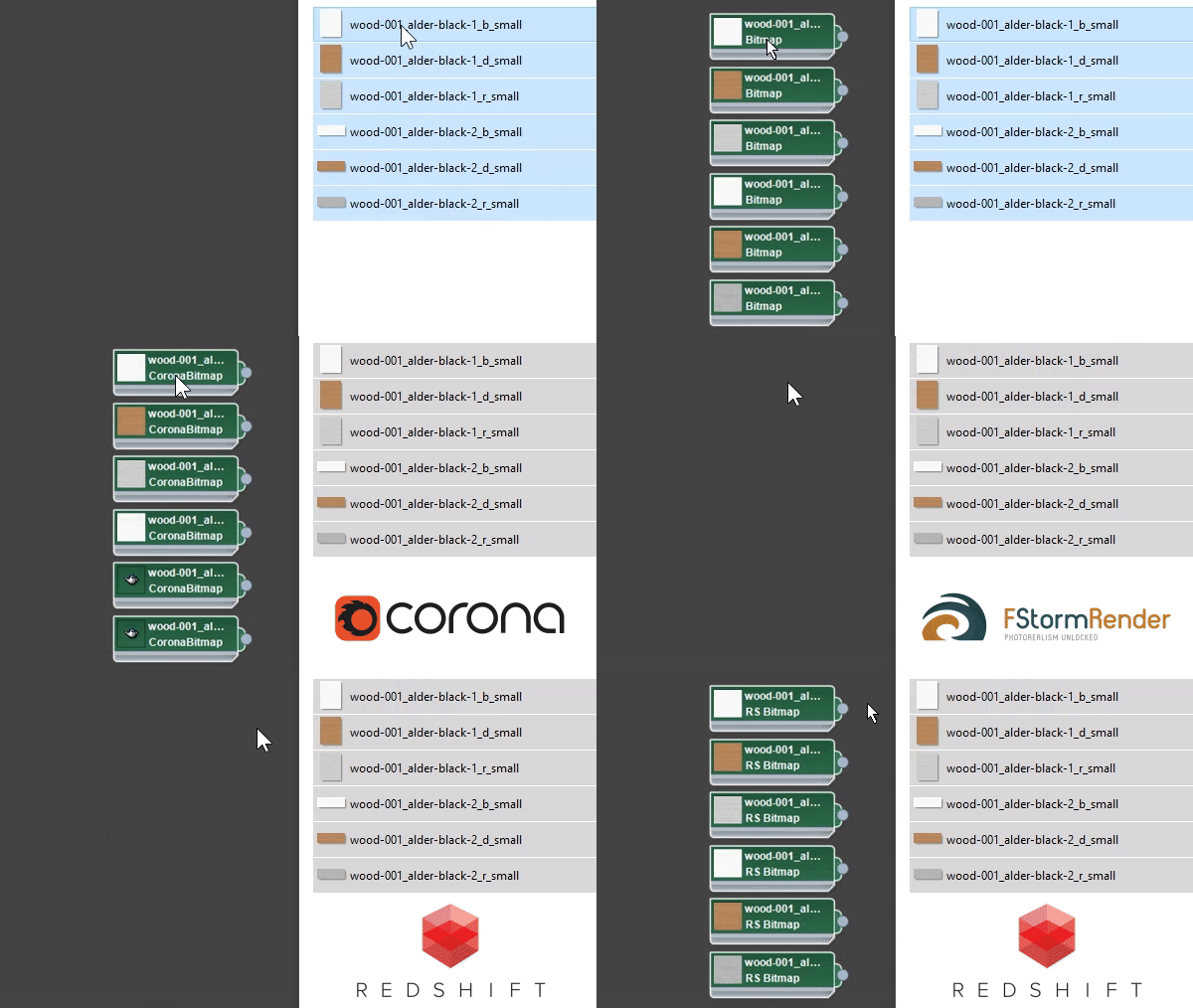
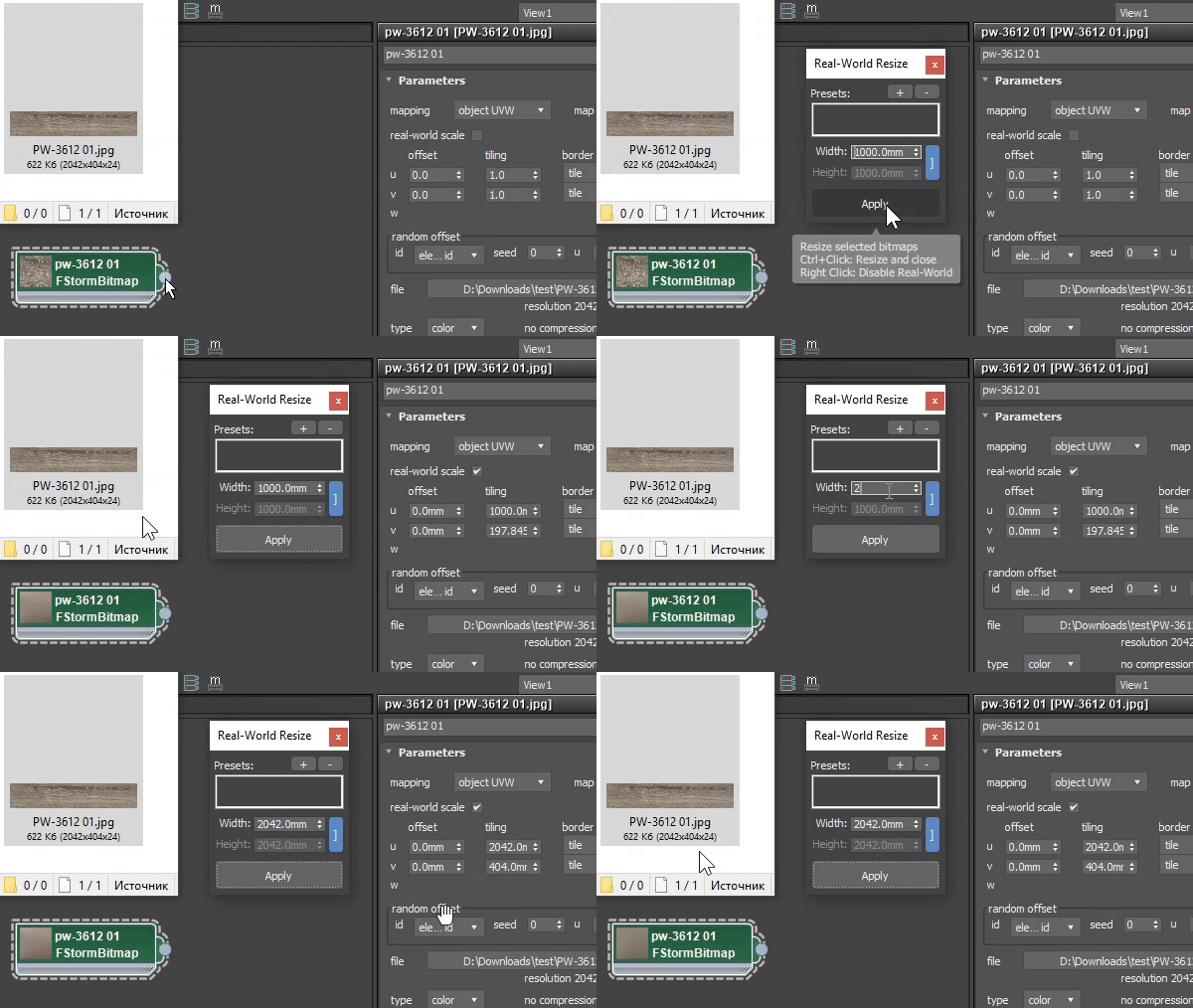
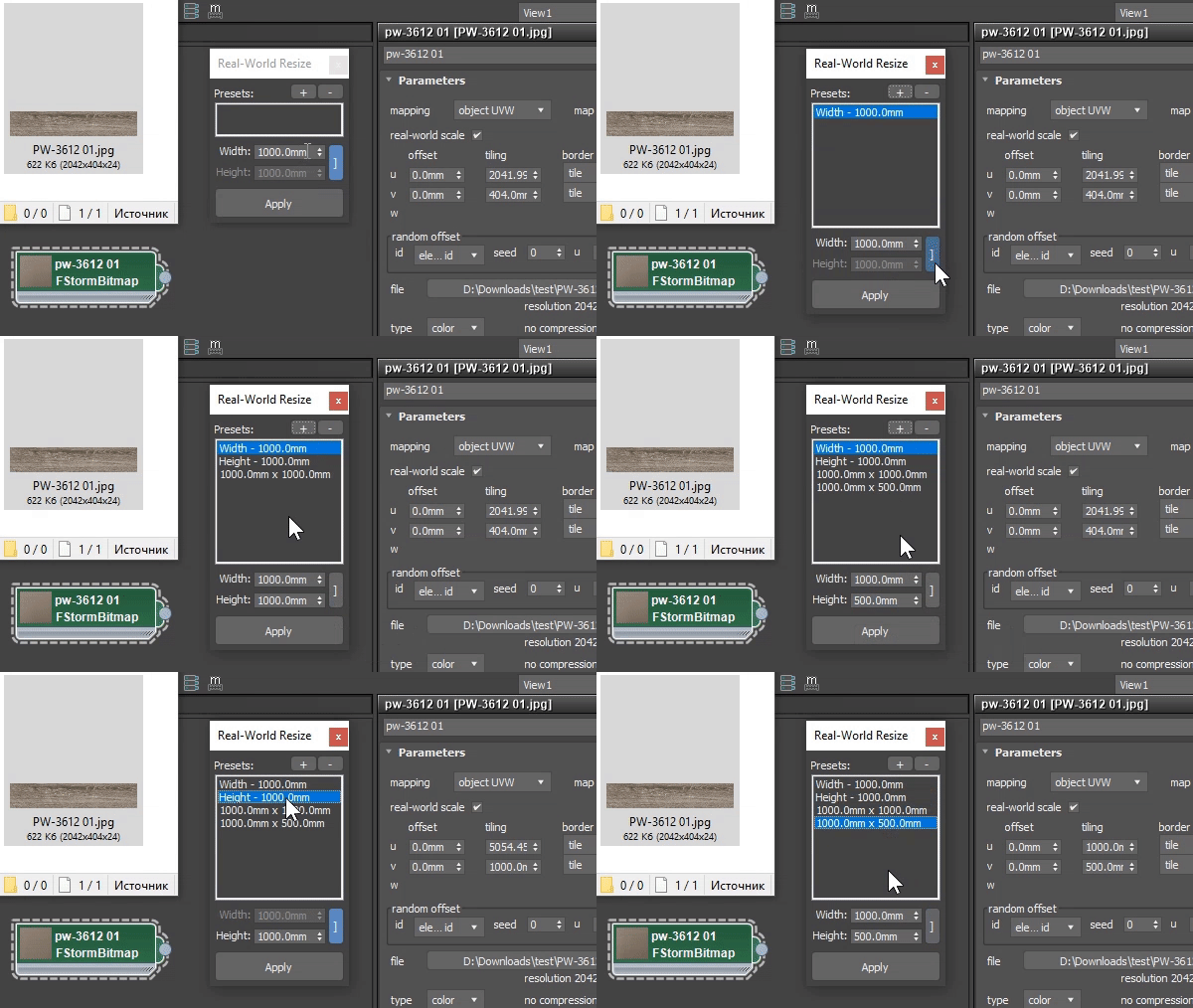
Common:
Render specific:
Slate options:
[1.30] - 2023.06
NiK684 · 2023-06-04
New. 3dsMax 2024.1 support. 3dsMax 2024 without updates is not supported.
Deprecated. Removed Slate toolbar buttons because of 2024. Macroses are still there - in Nik Scripts category. Please use max toolbar or hotkeys.
[1.29] - 2021.05
NiK684 · 2021-05-08
New. V-Ray 5 VrayBitmap Color space and RGB primaries Auto mode.
[1.28] - 2020.10
NiK684 · 2021-05-08
New. V-Ray 5 VrayBitmap default Color space transfer.
[1.27] – 2020.10
NiK684 · 2020-10-17
New. V-Ray 5 VrayBitmap default RGB color space.
[1.26] – 2020.10
Fix. Dotnet Escape related bug.
[1.25] – 2020.09
Fix. Resizer aspect ratio bug.
Fix. Resizer Substance2 support bug. Sorry for that.
Fix. Drag n drop conflicts with other scripts.
[1.24] – 2020.09
NiK684 · 2020-09-11
New. Substance and Substance2 support for Real-World resizer. Not for drag & drop yet.
[1.22] – 2020.06
NiK684 · 2020-06-20
New. Drop bitmaps with relative paths. DropToSlate respects “Convert local file paths to Relative” option in 3dsmax preferences. 3dsmax native drag-n-drop doesn’t :)
Very handy for Project Folders workflow.
[1.21] – 2020.02
NiK684 · 2020-06-20
Fix. MacroRecorder not working before opening Slate.
[1.2] - 2020.02
NiK684 · 2020-02-23
Fix. Errors after pressing Escape before opening Slate.
[1.19] - 2020.02
NiK684 · 2020-02-21
Fix. Startup issues on some systems.
Redshift Bitmaps are not being created without Vray installed
moody3dvincent · 2020-02-01
Hi, great script!
I am using Redshift 3.0.14.
RS Bitmaps are not being created unless Vray is also installed on the computer. Without Vray installed, maps are created as "bitmap" even when Redshift is the active renderer and "Use RS Bitmap" option is checked for DropToSlate Settings. With Vray installed, RS Bitmaps are created when active renderer is set to Redshift.
Thanks.
[1.18] - 2020.02
NiK684 · 2020-02-01
Fix. RedShift bitmaps without Vray installed.
moody3dvincent · 2020-02-03
Thank you!
[1.17] – 2019.12
NiK684 · 2019-12-11
Improved. Get resolution for *.hdr and *.exr is much faster.
Thanks
outofinsight · 2019-12-13
Works like a charm, thank you!
[1.16] – 2019.12
NiK684 · 2019-12-11
New. Load *.hdr and *.exr files as spherical images option.
Fix. Removed *.hdr and *.exr exclude for resizing.
Fix. Load previous width/height in Real-World Resize.
[1.15] – 2019.11
NiK684 · 2019-11-08
New. (Corona and Vray) Use Vray HDRI option.
.exr file resize
outofinsight · 2019-12-10
Hey. First of all thanks for the most recent implementation of VRayHDRI support. Works great (totally forgot to say thank you when you updated it)!
Just wanted to flag something. When an input is an .exr file, the resize function doesn't work. I'm guessing that was done on purpose so you wouldn't change the behavior of .exr files used for lighting. However, .exr files are also used for high quality displacement maps and at least in my workflow, I'd input displacement maps more often than .exr light textures. So in the end, if I drag and drop a texture pack - diffuse, ao, gloss/rough, normal and displacement, I'd always have to go and do the displacement size manually.
Not sure where I'd really mess up an .exr map that I use for lighting, as I'd never use the script on such a map. So if this is not working for "protection" reasons I don't think it's necessary. Otherwise, it just might be something that was overlooked. Will be happy to hear your thoughts!
P.S. As I was writing down this comment I've noticed that .exr files are also imported by default with spherical mapping which can also contradict with their use in some scenarios like the one mentioned above. Perhaps you can make this as an option that you can turn on/off in the settings?
I will add this option
NiK684 · 2019-12-11
I didn't think that somebody could use hdr that way :)
Well, okay it seems we need one more option.
_______
UPD.
Implemented.
The default one
outofinsight · 2019-11-07
Use the default Gamma space that VRay uses for VRayHDRI maps. Type: Inverse Gamma, Inverse Gamma: 1.0. This is the same as Gamma Override 1.0 for Bitmaps. So this is the correct gamma space for all Value/Data textures. All Color textures need to be set to Type: sRGB (when set like this, the Inverse Gamma value doesn't do anything). This is definitely more logical setup when compared to how 3ds Max deals with maps by default - all inputs by default are considered to be sRGB images and come in with Gamma correction. However, when you think about it, most maps that we use are actually Value/Data maps. It's Diffuse vs Roughness/Glossiness + Normal + Displacement + Bump. So you should leave the default setting of the VRayHDRI map mentioned above which will also speed up the work a bit as usually the only map that will need to be addressed would be the diffuse map.
All Bitmaps as VRayHDRI
outofinsight · 2019-11-05
Didn't know about the Corona feature, my apologies (not a Corona user myself).
The answer to your question - yes, I would like a script that converts all Bitmaps to VRayHDRIs when using Drag n Drop. Three main reasons to do so:
1. VRayHDRIs have better filtering.
2. VRayHDRIs load faster on render start up and also textures that are not needed for a particular camera angle are not loaded at all.
3. More intuitive Gamma control - you can just select the map and you can see what are the input gamma settings.
I'm guessing this feature will soon be implemented within VRay but until then I will be happy to use a script that does this.
NiK684 · 2019-11-05
It's pretty easy to implement, I'll do that
All Bitmaps as VRayHDRI
outofinsight · 2019-11-05
Sounds great. Tbh, if you can compile a separate script that only implements the VRayHDRI DragnDrop feature I'd be happy to pay for it.
All Bitmaps as VRayHDRI
NiK684 · 2019-11-06
So, I've implemented this feature for Vray and Corona renders, but I'm not sure what gamma "Color space" should be by default in VrayHDRI. None, Inverse, sRGB or 3dsmax? Vray default is Inverse 1.0 but it looks wrong for all maps except HDRs
All Bitmaps as VRayHDRI
outofinsight · 2019-11-04
Hey there. I see that the script can input .exr and .hdr files as VRayHDRI. I'm looking for a script which can do this for all types of bitmap files (essentially omitting the use of Bitmap maps) - no need to do anything else really so it can live on its own. I'm sure users of Corona will be happy to see the same script for CoronaBitmaps (I've seen a thread on the forums, people are asking). Will be happy to see something like this, thanks in advance!
CoronaBitmaps
NiK684 · 2019-11-04
There is a feature for Corona - Use CoronaBitmap or Bitmap. All dropped bitmaps automatically convert to CoronaBitmaps.
Or you need to drop all bitmaps as VrayHDRI? Is this really useful? Why?
 mad · 2019-06-13
supports UDIMs in VrayHDRi?
NiK684 · 2019-06-13
What do you mean by "support? What should happen with vrayhdri after drop?
mad · 2019-06-17
imagine that you drop to slate for example dif.1001.jpg,dif.1002.jpg,dif.1003.jpg,dif.1004.jpg,dif.1005.jpg by support i mean the script recognize its a UDIM texture and create just one VrayHDRi map with <UDIM> tag so it will be only dif.<UDIM>.jpg
[1.14] - 2019.05
NiK684 · 2019-05-14
Fix. Resize bug again. I hope last one
short_cirkuit · 2019-05-13
I work with the standard material editor so i think it would be a useful feature to also have as a script - for example for maps with non square shapes the ability to map ir proportionally if that makes sense.
I'll release another script
NiK684 · 2019-05-14
You don't use Slate so you don't need "drop to slate" :) resize in DropToSlate is bonus functionality. This script has important part which waits for Slate opening. This event will never be triggered in your case. This could be a problem.
Anyway, I'll release separate similar script for resize bitmaps based on selected object or selected material in basic editor. It should not be a part of DropToSlate.
short_cirkuit · 2019-05-14
that would be super awesome if you could do that. Ive been looking for something like that for a long time...
RealWorld Resizer
NiK684 · 2019-05-14
Here is the script for resize bitmaps in Compact Material Editor
[1.13] - 2019.05
NiK684 · 2019-05-13
Fix. Swapped Resize width height
website is down
short_cirkuit · 2019-05-13
looks promising - PS your website is down
Website mainteance
NiK684 · 2019-05-13
Website was on little mainteance :)
QUESTION
short_cirkuit · 2019-05-13
Does the Size presets in any units only work in slate or can it be dockable within a toolbar?
resize
NiK684 · 2019-05-13
This option gets selected map nodes from Slate to change their real-world size. What do you want to resize if Slate is closed?
[1.12] – 2019.05
NiK684 · 2019-05-12
New. Non-English 3dsMax versions support
[1.11] – 2019.05
NiK684 · 2019-05-11
New. (FStorm) Set gamma 2.2 for *.hdr & *.exr files
Fix. Unistall bug
[1.1] – 2019.05
NiK684 · 2019-05-09
New. Gamma override
[1.01] – 2019.05
NiK684 · 2019-05-09
Fix. Reset Scene timer error.