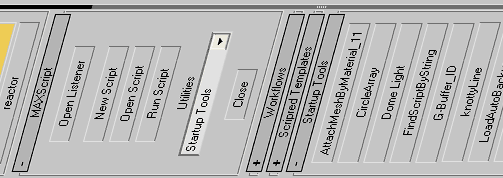
Smart utility menu for your scripts.
Easy customizable (noted inside the code).
Script
 By Anubis · 2009-09-03
Smart utility menu for your scripts.
Easy customizable (noted inside the code).
Tags: dynamic, menu, utility, anubis, smart, customize, .ms files, compact
 TitusLVR · 2010-08-02
Hi , this scripts works fine, just go to the Utilites panel -> max script button -> and select "Startup Tools" or other name what you gave for this.
Anubis · 2009-09-04
Put script in your Max "scripts/Startup" folder and it will scan on startup specified folder for .MS files there. Default folder name in script is "tools", that means it will search in "scripts/tools", but if you use different folder name, to say "my_scripts", just edit 1st variable in the script called "folder" like this:
-- old line:
local folder = "tools" -- replace "tools" with your folder
--new line:
local folder = "my_scripts"
Now the script will look in your "scripts/my_scripts" and made menu for all .MS files inside.
 3dbybrunolopes · 2009-09-04
Hello,
Can you explain a little better how to make this work?
Thanks