ScriptSpot

Script

Find And Bind - Vray Hdri & Sun

By lnio · 2016-12-02

Version
1.0
Version requirement
tested on max 2015,2016
Other software required
Vray
Date updated
2016-12-02
Votes
13
Description

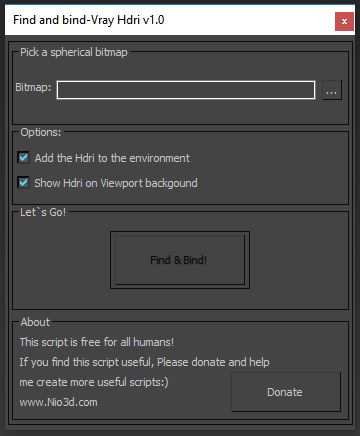
Find And Bind maxscript will scan your hdri and find the sun location.
After that,it will create V-Ray sun in this position and bind it to V-Ray Dome light.
You can rotate the rig by rotation the dome light or in the VrayHDRI map(horz rotation).

L-nio

Additional Info

Notes: -Vray only -Spherical hdri only -design for sun&sky hdri(one strong light)
Videos
Attachments
Comments (17)

Question

mfountouklis · 2019-04-08

Thanks for this awesome script!!

Just one question, i cant move the sun/dome at all.

Is there something i can deactivate that will allow me to move them? Usually thats not needed, but sometimes it is.

rachka · 2019-05-15

It's locked by default but I use a script to unlock it. The script can be found in Blur scripts pack and it's called ObjectLock. It allows you to lock and unlock objects.

movement unlock

kisade · 2020-02-13

go to Hierarchy panel (next to Modify) -> Link Info, untick the Locks what you want to change

Corona

darawork@gmail.com · 2018-08-01

How's the update for this script with Corona sun going?
I'll donate enough for a beer, but it has to be a Corona. :)

Hdri sequence?

thecreativecontrol · 2018-05-17

This script is exactly what I'm looking for, but I'm working with a hdri sequence. Is it possible to adapt it so the script would edit the sun's location for every frame instead of just once?

Doesn't work - something has since broken it ?

JezUK · 2018-01-11

I'm using 3DS Max 2017, V-Ray 3.60.04 and it doesn't work.

It creates the Dome, creates the sun, doesn't put the HDRI in the Environment Map Slot and it doesn't Bind the Sun to the HDRI.....

Something has happened to cause this to now, longer work.

3DS Max 2017 update maybe ?

Milyan · 2019-02-03

I havent had a chance to look at the script, but logically it could be that the script is using the root of the project to find the image or something like that. Could it be that the path to your HDRI is invalid or you could try to place the hdri inside of the project folder, maybe project/archives or something like that.

anjanbarai · 2017-02-08

Thanks

finalRender R3.6 support

igamaximus · 2017-10-04

Amazing script, thank you for your work.
Could you please add support for fR? It has the same light type as Vray, called fR-Dome light.
I am ready to assist with any MXS property of fR light that you might need.
Thank you very much.

Some bug 3ds Max 2016 vray 3.3

banquet · 2017-02-03


-- Error occurred in wireparm(); filename: C:\Program Files\Autodesk\3ds Max 2016\scripts\scripts_collect\finfandbind_forvray_v1.0.mse; position: 5401; line: 137
--  Defined in encrypted script
--   called in mainbut.pressed(); filename: C:\Program Files\Autodesk\3ds Max 2016\scripts\scripts_collect\finfandbind_forvray_v1.0.mse; position: 9971; line: 300
--  Defined in encrypted script
>> MAXScript Rollout Handler Exception:
-- Unable to convert: Dome to type: <node> <<
 

1rv · 2016-12-25

I was waiting fot a tool like this for a long time, thank you Lnio so much for creating and sharing it!
Personally, being a predator I'd prefer a domelight to be VISIBLE with intensity set to 30.
IF you could disable a preview generating in Open File window and adding chosen map to Environment would it cut processing times?
Thanks once again

fajar · 2016-12-11

no need so sarcastic here ? Do you want contribute freely or make paid script, or donate script ? just state it.

Nice script

Yusuf_ES · 2016-12-09

The script free for all humans! :)
What you think about predators? is it free to them? :)

awesome

sirmontal · 2016-12-08

works perfect thanks for your efforts!!

Is there a plan to do something like this for Corona?

Yes,Corona will be added

lnio · 2016-12-10

And it will be free only for predators:)
Donate humans!

elle manuele son :)

macker_54 · 2016-12-05

40 yıl düşünsem aklıma gelmezdi şerefsizim :D

good job & thank you :)

le1setreter · 2016-12-05

works really nice also on 3ds max design 2013.