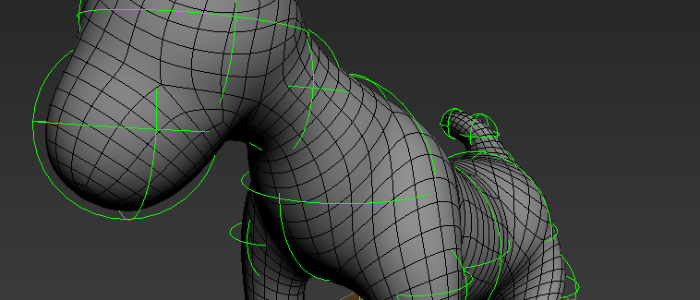
Form is a new modeling system for 3ds Max that allows to quickly and easily create models. It contains a Form modifier, a Form Sphere helper and a Form Tools script.
Script
 By Marius Silaghi · 2012-02-17
Form is a new modeling system for 3ds Max that allows to quickly and easily create models. It contains a Form modifier, a Form Sphere helper and a Form Tools script.
Thanx
 Nik · 2014-08-09
Very helpful!
Marius Silaghi · 2014-05-23
Form for 3ds Max 2015 released
2014 support
Marius Silaghi · 2013-05-03
2013 plugins work by default in 2014. Just use the files from 2013.
Nik · 2014-08-09
+1
Form 1.02 released
Marius Silaghi · 2012-08-03
@lightcube thanks for reporting that bug, I fixed it in 1.02
Changes for 1.02:
- Fixed a bug that caused the intersection mesh to not be build in 3ds max 2013
- Increased stability
Form Problems 3ds Max 2013
 lightcube · 2012-07-24
Marius,
I only started using 2013 full force within the last month so never noticed this before. It may or may not be a post Product Update 3 issue.
Whenever I try to have a branch in the Form Mesh by selecting any non end-node Form Sphere and clicking Append, the mesh that should appear in the branch is missing.
See the attached images. In #1 there is just a string of Form Spheres parented in a single array. With the hilighted Form Sphere in #1, I clicked Append and you can see the mesh is missing. In #3 I moved the new (appended) sphere to demonstrate the missing segement of mesh.
This happens at all times for me in Max 2013 64bit PU3.
Form 1.01 released
Marius Silaghi · 2012-05-16
- Adds support for 3ds Max 2013
pretty cool!
 kilad · 2012-02-29
I've been thinking about something like this since zspheres.
Is there any reason why you can't just do all the setup-stuff in the script?
Press form -> start clone or add gizmos
max script
max script · 2012-02-28
bunu nasıl yaptını max script le yapabilirmiyiz.
Marius Silaghi · 2012-02-28
Thanks everybody, I'm happy that you're happy with it.
@michael-kiss Yes you can animate the spheres but keep in mind the topology will change when it moves. It is best to collapse it to a mesh then rig and skin it manually.
ZSpheres directly inside 3DsMax
 48design · 2012-02-23
Wow! This is awesome! :oD
Animatable
 michael-kiss · 2012-02-21
Hi,
this seems like a very nice script. Looks promising!
Is it animatable with keyframes?
Cheers,
Michael
wahoo
 Gspoutnik · 2012-02-18
I purchase it and i can say that its a really great plug.
Like Zsphere in 3dsmax.
And, if you import/export in mudbox you have a really speed workflow.
i create this draft in less 10mn for my first try...
.
Excellent Tool
lightcube · 2012-02-18
For organic modelling, this adds a whole new world of possibilities. Well worth the price. Thanks for this one!


