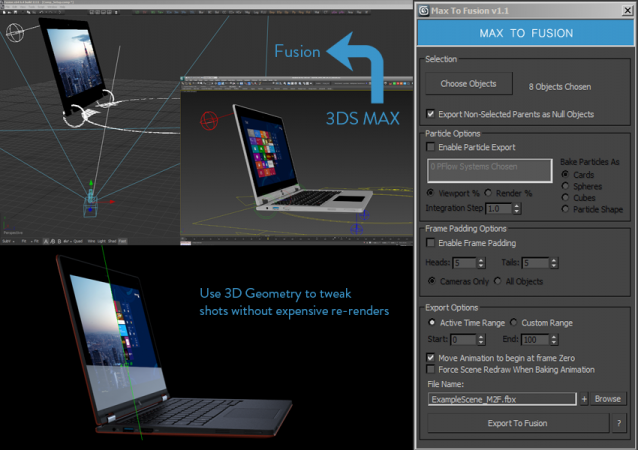
Bake selected scene objects and export an FBX file which can be loaded into Eyeon Fusion to assist with compositing. Offers greater control and flexibility than the standard FBX exporter.
UPDATE LOG
v1.1
New Features suggested by Colin James at Blur Studios
- When baking animation, new key tangents are set to linear. This avoids wonky tangent handles when baking TCB keys.
- Added Frame Padding Option. User can specify heads and tails to bake object animation beyond the normal Time Range. This helps ensure accurate 3D motion blur in Fusion.
- General cleanup and pruning of code
v1.0
- Automatically bake all object transformations to ensure a pixel perfect match between Max and Fusion renders.
- Bakes procedural animation such as expressions, script controllers, or Out-Of-Range looping
- Preserve complex camera animation (Camera Target, Camera FOV, Camera Roll, etc.)
- Export a Child object without including the geometry of its Parent objects.
- Bake Particle Flow systems and export particles as animated pieces of geometry (Scale, Rotation, and Position)
- Shift all animation to begin at frame zero (Useful when a Fusion Comp begins at frame zero while the Max scene has longer heads and tails)
- Automatically interpret and bake Out-Of-Range key methods (such as looping) for position, rotation, and scale of any object
- Does not currently support deforming meshes
- Baked PFlow particles do not support visibility changes
- Baked PFlow particles that are not yet born will sit at (0,0,0)
- Baked PFlow particles that are dead remain at their last position, rotation and scale. Future version will set particle scale to 0 when they die.
Created for CG Supervisor Chad Ashley to enhance the 3dsMax & Fusion pipeline at Digital Kitchen
Installation: Drag and drop the downloaded MZP file on to an open window of 3ds Max. An installer dialog will open automatically.
 johncrawshaw · 2013-09-24