ScriptSpot

Script

miauu's Edge Cutter

By miauu · 2010-09-24

Version
1.6
Version requirement
9, 2008, 2009, 2010, 2011.2012. 2013
Date updated
2013-02-04
Votes
79
Description


Version 1.6 - added installator. Now the script is properly installed in OS: Windows VIsta, 7, 8

Version 1.5 - added Compact UI mode - idea by @Silix

Version 1.4 - added support for 3ds max 2012.

Version 1.3 - Fixed some bugs - COde optimization

Version 1.2 - Add Interactive mode - watch the last video

Work with Editable Poly and Edit_Poly objects.

Cut quads and N-gons.

Save Preset system.

Works with edges and polygons on Editable Poly objects. On Edit_Poly objects works only with edges.

You can choose to Keep Quads when cutting.

For more information read Help.

Instalation:
Drag-n-drop miauuEdgeCutter_v1.mzp to 3ds max. Restart 3ds max. Go to Customize - Customize User Interface. Under "miauu" category you will find "miauu's Edge Cutter".

Strange, but I-mode does not work in max2011 and up.

Special thanks to:

Panayot "Anubis" Karabakalov

http://project3d.narod.ru

Enrico "SyncViewS" Gullotti

http://www.illusioncatalyst.com

Watch the video demonstration:

video01, video02, video03, video04

Videos
Attachments

Tags: Poly, lightwave, cut, edit, bandsaw, edge, face, polygon, connect, editable

Comments (42)

This is Geniously!!

x_OL · 2018-03-17

working good in max 2015
Very useful features + quick and handy interface
It seems that this script come from my own dreams :)

.

miauu · 2018-03-19

Thank you.

asymptote · 2013-10-22

Thx Miauu, I tried it in 2014 but keep getting these errors...


--   called in miauuCut1(); filename: C:\Users\xxx\AppData\Local\Autodesk\3dsMax\2014 - 64bit\ENU\scripts\miauuEdgeCutter\miauuEdgeCutter_v1.mse; position: 57905; line: 1821
--  Defined in encrypted script
--   called in cutEdges.pressed(); filename: C:\Users\xxx\AppData\Local\Autodesk\3dsMax\2014 - 64bit\ENU\scripts\miauuEdgeCutter\miauuEdgeCutter_v1.mse; position: 88600; line: 4321
--  Defined in encrypted script
--   called in miauuLMBU(); filename: C:\Users\xxx\AppData\Local\Autodesk\3dsMax\2014 - 64bit\ENU\scripts\miauuEdgeCutter\miauuEdgeCutter_v1.mse; position: 55110; line: 1716
--  Defined in encrypted script
--   called in b57.lbuttonup(); filename: C:\Users\xxx\AppData\Local\Autodesk\3dsMax\2014 - 64bit\ENU\scripts\miauuEdgeCutter\miauuEdgeCutter_v1.mse; position: 75021; line: 3223
--  Defined in encrypted script
>> MAXScript Rollout Handler Exception:
-- Unable to convert: undefined to type: Integer 

error on run

vikirecon · 2017-08-23

hi miauu

firstly thnx for every script that u have given to us.

i use 3dsmax 2015

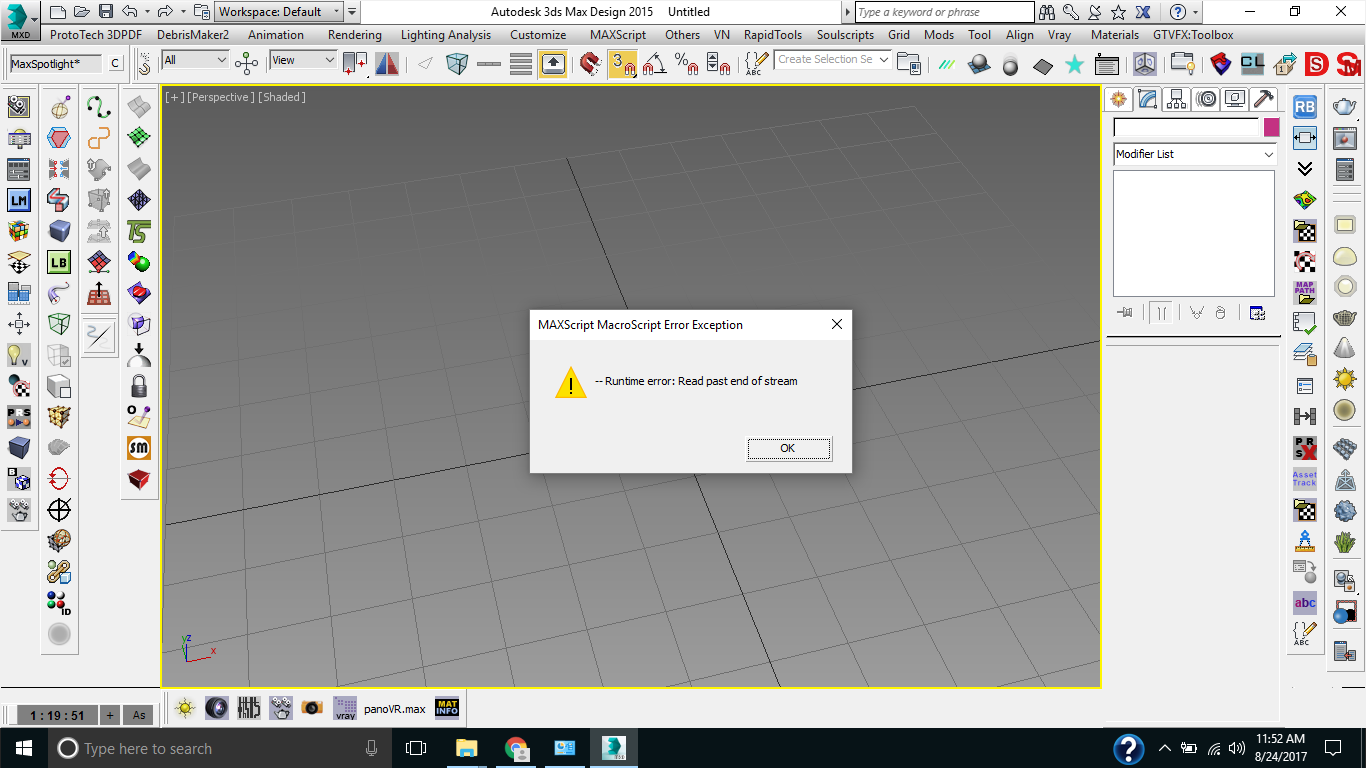
my problem is when we run script this message appears

runtime error:read past end of stream

.

miauu · 2017-08-23

Hi!

I just tested the script on Max2015 - there are no problems. I've used the miauuedgecutter_v16_0.mzp.

error on run

vikirecon · 2017-08-24

hi

thnx for reply

sorry i use 3dsmax design 2015 i attached the pic of error

Attachments

.

miauu · 2017-08-24

This error occurs when you tried to install the script or when you try to run it(the installation is OK)? The version of Max 2015(design or not) does not matter.

error on run

vikirecon · 2017-08-25

hi
this error occurs when i try to run it

asymptote · 2013-10-21

Hey Miauu, is this available in one of your script packs ? I would love to have this in 2014.

tia

.

miauu · 2013-10-21

It is a free script. Download version 1.6 and install it. It have to work on max2014. I did not test it, but tonight i will.

Nicholas87 · 2013-03-27

Everyone , i hope everyone can introduce for me install this plugin , Thanks so much ( i use 3dsmax design 2011)

miauu · 2013-02-18

This was my mistake. I forgot to add "and up" after max2012 was released. :)

miauu · 2013-02-18

The i-mode not works in max2011 and up. I wrote it in the description,:

Strange, but I-mode does not work in max2011.

I will change the text, so it will be clear that I-mode does not work on max2011 and up.

I see...

vitalquaD · 2013-02-18

Strange, I read that i-mode does not work in max 2011, but didn't see "and up".
I should stop read fluently=)
btw, thanks for the script.

Error

vitalquaD · 2013-02-18

Great script. I've got an error, says

- Unable to convert: undefined to type: Integer <<
0.004
-- Error occurred in miauuConnectEdgesSegm99EPM(); filename: C:\Users\Vitaly\AppData\Local\Autodesk\3dsMax\2012 - 64bit\enu\scripts\miauuEdgeCutter\miauuEdgeCutter_v1.mse; position: 41760; line: 185

I created a box. then I applied edit poly modifier, selected ring of edges, ran your script, enabled interactiv mode, clear and then created one loop. So far so good. But after I wanted create another loop - error occured.

3ds max 2012 64 bit, miauu edgecutter v16 , Windows 7 x64.

Thank you!

dethmond · 2013-02-05

Now it works.

Fixed.

miauu · 2013-02-04

dethmond, thank you for showed me this error. The script is fixed. Download ver 1.6 again(it will be downloaded as miauuedgecutter_v16_0.mzp) and try it. :)

Don't work

dethmond · 2013-02-04

Hi, Miauu
I Installed last 1.6 version, but nothing happens after pressing button. I change "silentErrors" from true to false and listener says:


-- Error occurred during fileIn in #C:\Users\X\AppData\Local\Autodesk\3dsMax\2012 - 64bit\enu\scripts\miauuEdgeCutter\miauuEdgeCutter_v1.mse; line number: 104
-- Error occurred in execute(); filename: C:\Users\X\AppData\Local\Autodesk\3dsMax\2012 - 64bit\enu\scripts\miauuEdgeCutter\miauuEdgeCutter_v1.mse; position: 26857; line: 104
--  Defined in encrypted script
--   called in anonymous codeblock
--  Frame:
>> MAXScript MacroScript Error Exception:
-- Runtime error: Code block not created, unable to access code block local or parameter: dir <<

Max 2012 x64, Win7 x64

thanx for script anyway!

miauu · 2012-11-21

@bronius, in the description of the script is written:
Strange, but I-mode does not work in max2011.

Seams this problems occurs witn max2012 and max2013

Nicholas87 · 2012-11-21

Thanks so much Miauu

Nicholas87 · 2012-11-21

I can't install this scrip . i hope who help me ( i use 3dsmax design 2011 ) Thanks

miauu · 2012-11-20

bronius, download version 1.5, unzip the mzp file and open mzp.run with Notepad. You can see where to place files and folders.
$max means max root folder.
Can you tell me your max and OS version?

version 1.6 installs the script in hidden folder. If you want I can tell you here to place files for version 1.6.

reply

bronius · 2012-11-21

Version 1.5 installs, but "--Runtime error: Cannot convert value to bitArray: undefined" message always appeares after second cut in interactive mode: http://imgur.com/E9B78

Version 1.6 installs only if MAX is started "as administrator", but after installing nothing happens when I press "edgeCutter" icon - dialog not opens.

3dsMAX Design 2012/2013. Windows 7, x64

miauu · 2012-11-19

Nicholas87, download version 1.6 and try it. I tested it on max2012 Win8 and it wworks.

hmm

bronius · 2012-11-20

Now it don't work at all.. :( Which install script files must be placed in which dirs? I'm asking because install is not working and I will try to put them by hand.

Теперь скрипт совсем неработает. Какие файлы из инстала в какие директории нужно класть? Попробую в ручную..

miauu · 2012-11-19

The problem is not in tma MAX version. I assumed that you have Windows Vista, 7 or 8. The OS is the problem. I will fix the installer later this night and you can install it properly.
:)

Nicholas87 · 2012-11-19

I use 3dsmax deisgn 2011 . i can't install it . Who can help me ? thanks

Ingenious!!!

SalahaDin · 2011-08-02

A script within a script within a script. Amazing!!!
Thanks a lot, it's so much fun using it...

airbrush · 2010-09-29

I'm getting errors with imode turned on, after placing the first cut and trying to place another cut anywhere in the cutting bar this error comes up

--Runtime error: Cannot convert bitArray: undefined

miauu · 2010-09-29

airbrush, I tested the script on max9 and max2009 and everything works. I will try to reproduce the error and find a solution. :)

airbrush · 2010-09-29

I'm using max 2011
anyone else using 2011 that can verify results?

miauu · 2010-09-30

Hi, airbrush!
I could not reproduce that error. What I can advice you is to press the Force button before turn On I-mode. The Force button forces the script to use slower algorhythm, but it works in almost every situation.

airbrush · 2010-09-30

no, didn't help with force turned on...

miauu · 2010-09-30

This is very strange. Can you send mi via e-mail a printscreen image of edge selection that you try to cut.

airbrush · 2010-10-01

just a box with rings selected around it...

bronius · 2012-11-19

Same there: --Runtime error: Cannot convert value to bitArray: undefined

(3dsMAX 2013 Design / 3dsMAX 2012 Design)

miauu · 2010-09-29

Thenk you, guys!

Michele71 · 2010-09-26

Great script! Very, very useful Thanks :)

carlos · 2010-09-26

very useful, tkx a lot

Anubis · 2010-09-24

Hey Kosta,
nice to see you finish this tool.
Thanks for the credits as well :D

miauu · 2010-09-25

I thank you for the help.
:)