A script asked in the forum.
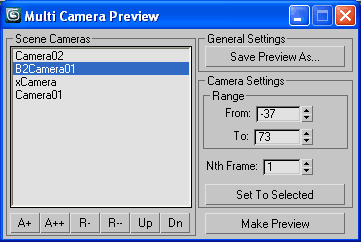
A tool with self explained interface.
Make viewport preview for multiple cameras
with separate range and Nth frame settings
and save to single video or image sequence
with desired compresion.
Script
 By Anubis · 2011-03-18
A script asked in the forum.
A tool with self explained interface.
Make viewport preview for multiple cameras
with separate range and Nth frame settings
and save to single video or image sequence
with desired compresion.
Tags: sequence, Preview, camera, viewport, multiple, anubis, avi
 Waseem3D · 2022-11-03
This script is very nice and saved a lot of time.
Thank you from the heart for posting it.
I have 1 question, can an option be added in order to control the quality of the viewport image? like the one that came with 3ds max tools, also the dimension of the image produced (like 1920x1080)
Hope you understand my point.
Hi Traustinn
Anubis · 2013-06-11
Save/load camera setups is a good idea, thanks, I'll keep this in mind.
As for renaming cameras, that's more complicated (if automated with callbacks) but maybe an option to rename cameras in the queue will help, or you have other idea?
Save camera setup
traustinn · 2013-06-10
It would be nice if you could save/load camera setups, like if Max crashes or if you are creating scenes using multiple files, also I noticed if you change camera names then the script loses the specific camera
other than that, a great script and excellent for planning shots from multiple angles
:)
/T
 asymptote · 2013-05-06
Ok here's a challenge...can this be made to perform the camera switches in realtime in the viewports ?...like a preview of a preview.
I've tried a few cam switching scripts but they stop the timeline playing and don't auto switch cameras.
Hi Asymptote
Anubis · 2013-05-13
What you ask is a kind of different script. This one queue multiple cameras for preview sequence (or avi) and not considered for realtime objectives.
I have one more request about this tool to allow saving separate avi file for each camera in the queue using it name for the output avi file name, but I thought this will limit the flexibility of this tool as now it allow to put in the list one camera more than once.
thanks for all feedback!
Anubis · 2012-12-24
Looks like am not reply here on many comments.
The most upper Max version I tested the script is 2009.
As for the output - avi or image sequence - there no difference between version 1.0 and 1.1. In both you can render to avi or image sequence. This is controlled by the file type you select via "Save Preview As..."-button. So if you prefer image sequence, then just select image format.
Cheers!
zemmu · 2012-06-27
modified the script to save a separate sequence per camera, with camera name in front of the filename - let me know if anyone's interested.
camera name and sequence
ederijke · 2013-02-04
Hi Zemmu, if you can forward the script would be appreciated. Is there also a chance to introduce a "cancel button". On the original test I did I was not able to cancel. Since I am Newbe I have no clue at the moment.
Thanks in advance for the help,
Ewout
Hi Ewout
Anubis · 2013-02-04
I added Cancel option in version 1.2 via ESC key, so you may need to hold that key for a while to interrupt the process. It's not tested yet, so let me know is it ok.
Cheers!
bigrock · 2012-03-27
Thank very much!
asymptote · 2012-03-20
1.1 Locks up max 2010 too, but it comes back after a while..Neat script tho'
thx
its crashing 2012
demoan666 · 2012-03-20
the 1.1 is crashing max and the older one renders out an avi file but it doesnt play :( any ideas anyone?
mhdmhd · 2011-04-07
Great script
Could it work with lpass manager "lpm"?
It would be nice to make a preview of all shots at once in lpm.
Thanks
Anubis · 2011-04-08
Fill free to ask the LPM's author to integrate my code to his tool.
OK
Anubis · 2011-04-06
Well, many name conventions are possible and that may open other requests in that direction... but i'll think about, soon i hope.
[edit]
Finally I found a little time to fit this request.
Cheers!
 noel_d3 · 2011-03-24
Great script !
It would be nice that the range of cameras are taken automatically in the name of cameras if you use a form like : cameraname [##;##]