selected 2 vertex to set Pivot
support mesh and poly for Hansanter (2008-08-02)
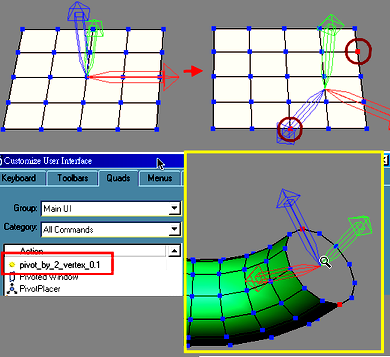
Script
By kuang123456 · Credited author: kuang · 2008-05-18
selected 2 vertex to set Pivot
support mesh and poly for Hansanter (2008-08-02)
Hansanter · 2008-08-02
Hey!!! Brilliant, thank you so much Kuang. That was very good of you- to create a new version for editable mesh. Thanks again.
Hansanter.
Hansanter · 2008-08-01
Thanks for your tip Kuang and of course for the great little script. Any chance of one for editable mesh ?
Hansanter.
kuang123456 · 2008-08-02
v0.2 support mesh and poly
kuang123456 · 2008-07-31
Tip:
you can select multi objects
then add modifier :poly select
then select vertexs at one time
Collapse All
run pivot_by_2_vertex
every object will be setup pivot
Hansanter · 2008-07-31
Hi Chris,
Many thanks indeed for your quick reply, I know have it working. When you mentioned 'editable poly' I knew that must be the problem (and it was) because I always work in editable mesh. I just need to temporarily change the part to editpoly to run the script, then back to editmesh again.
Thanks again Chris.
H./
 Christopher Grant · 2008-07-31
I don't have Max 8 but I don't think there is anything about this script that would keep it from running under 8...
I just ran it in 2009 and it worked fine - I collapsed an obj to editable poly, selected 2 verts and ran the script and it aligned the pivot to an axis created along the line between the 2 verts. Note that it doesn't work on editable mesh or objects with an edit poly modifier. It only works on collapsed epoly objects...
Chris
Hansanter · 2008-07-31
Hi, Great to find such a script, I've been looking for exactly this function for a long time. However, I cannot get it to work in Max8. Could you provide some basic instructions please ? I have installed properly and icon is present on my toolbar.
Many Thanks.
Hansanter./