ScriptSpot

Script

Power Masker

By DaveWortley · 2016-03-07

Version
1.3
Date updated
2017-08-18
Votes
5
Description

The 3dsmax UI only allows you to set material effects ID up to 16 channels. The VRayMtl allows you to go beyond this using the effects ID override but other types of materials don't have any UI to adjust this. This tool using a backdoor into 3dsmax to set the effects ID beyond the 16 limit imposed by the UI.

This means you can create masks for every material in your scene. Using this tool you can either assign effects IDs by hand or just press to automatically create them and their mask render elements.

You can also make a Vray Multi-matte mask for each layer in the scene too, this uses the include/exclude lists rather than the GBuffferIds, so that you can therefore use the GBuffer IDs for doing variation with texture maps or mask objects individually if you want to.

Additional Info

Bug found with VRay that made some of the mask render white. Put work-around in the script, don't worry that the layer masks say their ID is 10000.
Attachments

Tags: Matte, mask, layer, Render Elements, gbuffer id, MME, multi-matte, masker, material mask

Comments (20)

Max 2020

Richard7666 · 2020-01-12

hi Dave,
Seems to not be working on Max 2020

Getting this error:

--Unknown property: "StringStream" in dotNetObject:Autodesk.max.__Global

any ideas?

Same thing here

Tommy_LedZep · 2016-05-02

Hi,
The script works fine for me with VRayBlend and Multi-sub object materials, but at sub level only, not for the main material (with the larger .mcr file).

Multi-Subs and VrayBlends

DaveWortley · 2017-08-18

Sorry for late reply but if you are generating MMEs for materials inside an Multi-Sub material of Vray Blend mtl, you cannot get an MME for this material as well. I'd suggest using object masks to get around this. Bug Vlado to see if he can change that! ;)

Thanks

obaida · 2016-05-01

for making this script , but if you can make it apply at sub level materials like (multi/sub-object , vrayblend) will be more handy.
thanks in advanced

All to zero problem

alessandrod84 · 2016-04-30

Hi, first of all really thanks for this script i really need it.
Just one thing if i use the All to zero option it do not function with the main material of multisub and vrayblend.

Is my fault or a little bug?

Thanks Again.
Alessandro

Reset to 0 Bug

DaveWortley · 2017-08-18

Found the issue with the Reset to 0. Thanks for reporting.

Very cool but ...

Tommy_LedZep · 2016-03-21

Very cool script, thank you so much Dave !
The only problem I have (with 3ds max 2016)is when I use VRay MME per layers: they all appear filled with pure white.
Any idea ?

DaveWortley · 2016-03-21

Doesn't sound right.... works here fine! Sure you're not looking at the alpha channel of the MMEs by accident?

Tommy_LedZep · 2016-03-21

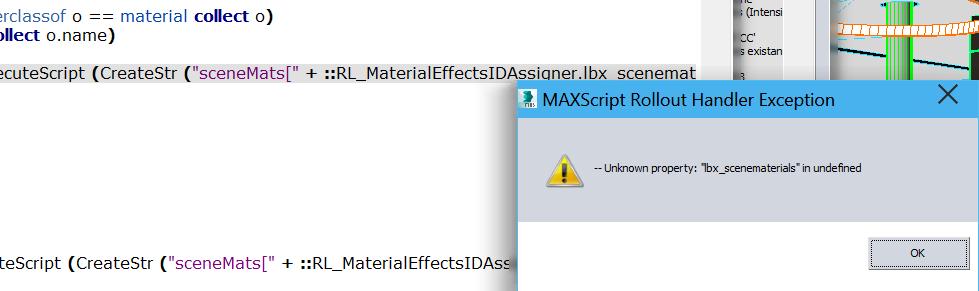
Well, I opened my test scene again to check what you told me, but, this time, I have an error when running your script (please see attached).A
And even if I click "Ok", the script can't go further, the same error appears again.

Attachments

DaveWortley · 2016-03-21

Which version of Vray are you running, all works fine here.....

Tommy_LedZep · 2016-03-21

I use last VRay 3.30.05

DaveWortley · 2016-03-22

Have you wrapped this in a macroscript by chance?

Tommy_LedZep · 2016-03-22

Yes indeed ! I forgot to mention it: for convenience I wanted your script to be assigned to a button so I added few lines at the begining of your script and saved it as .mcr and here comes the problem. I must have done something wrong here ...

But I don't have any problem when I drag & drop the .ms in 3dsmax, the script works fine except the VRay MME per Layer which still appear pure white (I checked, this is not the alpha channel).

Thank you Dave,

Thanks problem solved!

DaveWortley · 2016-03-23

Thanks, found the bug! A strange VRay one, not sure why I didn't see it originally, might be because I didn't have any empty layers.

I've made it a macroscript too now.

Cool (and improvement idea)

Tommy_LedZep · 2016-03-24

Thanks Dave, it works fine now :)
The only remaining point which could be improved to me, is that right now, one Material ID channel is generated for each sub-object material in the scene but all the Sub-Material inside of it remain to zero. It would be great if all the Sub-Materials could receive a unique ID too. I guess it is a bit more complicated but if it is possible, it would be totally awesome !

I can but....

DaveWortley · 2016-03-29

It's an all or nothing, if you want sub-materials then you get sub-material masks for everything and none for the root materials as 3dsmax/Vray can only give you a gBuffer ID for one material level at a time.

So if you have lots of levels of VRayBlend Materials this could get quite messy!

I've got a version, I'll upload it tomorrow when I've tested it some more.

Thanks ! Why not a switch ?

Tommy_LedZep · 2016-03-30

This is great news Dave, thank you !

I understand what you say and it's true it can quickly become very messy on complex scenes with a lot of Multi/Sub-Object and/or VRayBlendMtl. But as I mainly do exterior visualisations with few materials it should be very acceptable.

So why would'nt you create a simple switch to turn on or off this possibility depending on the user's needs ?

Thanks a lot again !

Test it for me :)

DaveWortley · 2016-04-01

I've added a new version (It's the larger file), see if it works for you.

Tommy_LedZep · 2016-04-04

Thank you Dave,

Your script now works the way I expected, but not with Multiscatter objects which have a Multi-Subobject Material on it. And this is due to Multiscatter creating a temporary layer at rendering time only: so your script can not create the appropriate render element. In this case I think I will rely on another usefull script: Render Mask.

Thank you again for the great work :)

wow seems great !!

NicolasC · 2016-03-08

Thanks for sharing - it will be very useful :)
Cheers.