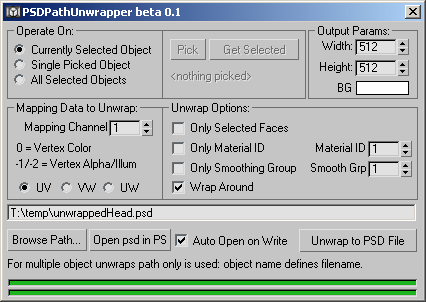
This tool unwraps your mesh and exports the edges as paths in an Adobe Photoshop file - the unwrapped mesh is then easily used as a template for painting etc. and allows resizing of the psd file with no loss of precision in the accuracy of the paths. Photoshop's built in hotkeys to show/hide the current path make it easy to work with - and each polygon is exported as a separate path allowing for selections in photoshop based on poly's. Supports specified mapping channel - UV/VW/UW unwrapping - with filters for selected faces - material id's - smoothing groups - as well as offering a Wrap Around mode (as per most other unwrappers). Batch unwrapping multiple objects is supported - but not batch unwrapping multiple UV channels (yet).
Script
PSDPathUnwrapper
By Grant Adam · 2006-10-21
- Version
- 0.5
- Version requirement
- 7; 6; 5
- Other software required
- RPM.dlx - get the <a href='http://www.rpmanager.com/bonusTools/RPMdlx.dlx' target=_top>R5.1 plugin here</a> - or the <a href='http://www.rpmanager.com/bonusTools/R6/RPMdlx.dlx' target=_top>R6.0/R7.0 plugin here</a> (put it in your plugins directory - or equivalent - and restart 3dsmax)
- Date updated
- 2003-08-18
- Votes
- 14
- Homepage
- http://www.rpmanager.com/
- Download
- Download
Description
Additional Info
Interface snapshot
Download sample exported PSD file
NOTE: PSDPathUnwrapper is an .mzp file that needs to be 'Run' from within max to install - if your download has a filetype of '.zip' change it to '.mzp'.
Download sample exported PSD file
NOTE: PSDPathUnwrapper is an .mzp file that needs to be 'Run' from within max to install - if your download has a filetype of '.zip' change it to '.mzp'.
Tags: UVW