ScriptSpot

Script

Quad Chamfer

By Marius Silaghi · 2011-06-07

Version
1.55
Date updated
2011-06-22
Votes
110
Download
Download
Description

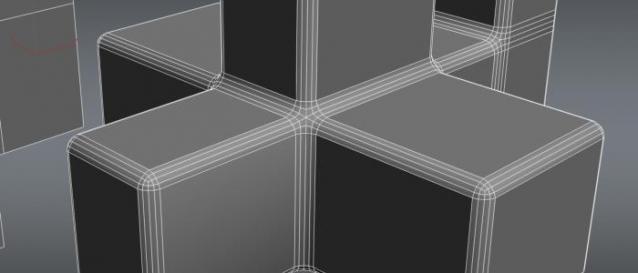
Quad Chamfer is a 3Ds Max script that produce all quad chamfers, unlike the normal 3ds Max chamfer which produces a lot of triangles.

Here are some of the benefits you get:

•You get better results if you use Quad Chamfer in conjunction with turbosmooth

•No more unwanted pinching

•Great topology

•And many more other benefits over the normal chamfer

Videos
Comments (64)

MajesticDolphin · 2016-07-12

This plugin is being used as bait to get people to install a virus package on handrolafol's wordpress. I found the page by searching "3ds max quad chamfer" and it's towards the bottom of the page and I am unable to link it here. It might be good to try and get it removed if you don't want your plugin associated with cyber criminals.

Marius Silaghi · 2016-07-15

People might get confused about your comment and think there is on a virus on my website or in my software. That is not the case. What MajesticDolphin meant there is website (not mine) that uses my plugin name for a bait and click thing. It is this website handrolafol.wordpress.com/2015/07/02/download-3ds-max-quad-chamfer/ . Thank you for pointing that out but there is nothing I can do about that, they only using the name.

Quad chamfer and glass material

wojcimierz · 2015-07-26

Hi, when you use quad chamfer to any glass materials it cause very strange reflections/refractions. It is useless for me with these types of materials. Do you know how to fix it ??? (using max 2014)

ObiOne · 2012-05-26

Great ! Thanks.

ObiOne · 2012-04-20

Hello Obliviboy,

Your script is great, unfortunately the resulting curve is not perfectly rounded, but slightly flattened :/

If you superpose circle/cylinder, it's visible.

Can you fix it?

Thanks

ObiOne · 2012-04-20

edit: deleted

Marius Silaghi · 2012-03-02

@barrlley drop me an email at silaghimarius@gmail.com with your paypal email address you used to purchase it

update

barrlley · 2012-03-02

and how do you go about getting an update?

Preview Modes

Daf57 · 2011-10-07

Hi,

I am finding this script useful! Thanks!

One question, and I'm somewhat new to modeling so excuse me if this is a silly question, why are there different preview modes? Seems like you would always want to see the chamfer as you apply it?

I find it a bit cumbersome changing it to realtime every time I use it. Is there a way to have it default to realtime?

Thanks again for a nice script!

Daf

Marius Silaghi · 2011-10-04

Hi ObiOne,

The updates are free for the script, but if I convert it to a c++ plugin there will a upgrade fee.

Quad Chamfer modifier

Marius Silaghi · 2011-09-15

Hi Rascal,
Thanks for the suggestions.

I'm currently making it as a modifier.

I have a wip thread over at Polycout.

coren · 2011-07-29

If I put your macro in a quad menu it's always visible, I've modified it taking some code from standard max chamfer:


(   
    On IsEnabled Return Filters.Is_EPolySpecifyLevel #{3,4}
    On IsVisible Return Filters.Is_EPolySpecifyLevel #{3,4}
   
    on execute do
    (
        scriptFile = (GetDir #scripts) + "\\QuadChamfer_1_52.mse"
        if (doesFileExist scriptFile) then
            fileIn scriptFile
        else
            messageBox "Unable to locate the script." title:"ERROR!!!"       
    )
)


coren · 2011-07-29

Great update!

Found a little bug: if I select some edges, lauch quadchamfer, set preview to semi-realtime, change the edge seletion, it always chamfer the initial selection.
To change the chamfered edges I need to turn off the preview, change edge selection, turn on the preview.

Do you plan to support also edit poly modifiers or only edit poly objects?

thanks

Quad Chamfer 1.55 released

Marius Silaghi · 2011-07-26

Made it A LOT FASTER!!!

Update price ?

ObiOne · 2011-10-03

Great job, but if we buy one version, must we pay again 20€ for each new update?

Marius Silaghi · 2011-07-06

shopkeeper there will be no modifier support for now
I haven't tried EdgeChEx but I only heard bad things about it.

My customers never complained about unsmooth chamfers with my Quad Chamfer. I can say that my script delivers what it promises.

There will be no demo version but if you buy it and you are not satisfied with it you can ask for you money back.

Hey obliviboy,this is a very

rascal · 2011-09-15

Hey obliviboy,

this is a very nice script you have here but it would be much better to have it as a modifier.

Since you never tried edgechex, there are 2 mayor benefits it has.

- it lets you do your chamfer edges exactly where you have your smoothing groups setup which is an indispensable feature for the highpoly creation process.
- you can make changes on your base mesh on the fly whenever you feel like without having the final chamfer put into your geometry! All it takes is to switch the modifier on and off.

With these features it would be a bomb.

Cheers, rascal

Modifier Support?

shopkeeper · 2011-07-05

Any luck with getting this to work as a modifier?

I tried the alternative version of this script which does have modifier support but the quad chamfering was kind of suspect. Lots of unusual distortions in the rounding. How does the chamfering in your script compare? Will you be releasing a demo version so we can also try it before investing?

Marius Silaghi · 2011-06-19

pixela the updates are free

kolts yes it works on open edges.

shopkeeper it would create the same topology on edges of an interior.

shopkeeper · 2011-06-19

Would this create the same clean topology when chamfering the edges of an interior? For example faces that make up the corner of walls and ceiling. In effect the opposite of the effect you have in your screen shots and youtube videos.

kolts · 2011-06-17

How it works on open edges?

wolfsoull · 2011-06-17

i already buy it! great tool thanks

Updates

pixela · 2011-06-15

Hi =)
I bought it today and will start to use.
First of all thank you very much.

Will we be able to have the updates and bug fixes?
Cheers

Marius Silaghi · 2011-06-14

Thanks you br0t!

Marius Silaghi · 2011-06-13

1.5 - Added support for 3DS Max 9sp1+/2008/2009

Marius Silaghi · 2011-06-12

jokerMartini no its not a modifier
how can I make it a modifier?

br0t · 2011-06-14

Look in the help files for "Scriped modifier" and "Scripted Plugin", maybe you can extend an Edit_Poly modifier

Extending EditPoly

jonahhawk · 2011-06-15

I took a stab at extending Edit_Poly so that it can select polygons by surface area. It sort of works... the hard part is getting it to update when the stack topology changes below the modifier.

http://forums.cgsociety.org/showthread.php?f=98&t=984510

modifier

JokerMartini · 2011-06-12

Is it a modifier now?

Marius Silaghi · 2011-06-12

1.42 - Exposed the quadChamfer functions to maxscript (you need to have the quad chamfer script open, be in the modify panal, be in editable poly, edge subobject selection, one or more edges selected)

quadChamfer.interactiveQuadChamfer (float amount) (int iterations) (optional)(bool silent:false) -- for round chamfer
quadChamfer.interactivePQuadChamfer (float amount) (int iterations) (optional)(bool silent:false) -- for parallel chamfer
quadChamfer.interactiveFQuadChamfer (float amount) (int iterations) (optional)(bool silent:false) -- for flat chamfer

returns ok on succes and undefined on failure
use the optinal silent variable to turn off the error messages

Marius Silaghi · 2011-06-12

1.41 - Fixed crash when another modifier was pressent

benjitho - that how it works, a chamfer of iteration 1 produces 3 edges,iteration 2 produces 5 as so on, if let's say I had 2 or 4 edges It can't produce all quads
no, it doesn't produce double chamfer, try it on more complex selection and see the difference

benjitho · 2011-06-12

Thanks for the clarification, as I said I am new :D - Glad it bought this baby.

1.41

benjitho · 2011-06-12

Hi, just wondering what the new point release includes if anything (1.41)

Also, is it meant to make a double chamfer (I am new to max hard to explain)
Using a box and selecting four top edges using your script I it set to 1 interation but it keeps the orignal edge where as max doesn't; so for instant, I chamfer with max, I end up with 2 edges, with your script I end up with 3..

Hope this makes sense.. =(

berdinatilli · 2011-06-11

sorry, due isp problems i was offline for a couple days.

marius, i just downloaded v1.4 and loved that you included parallel chamfer.

mwaif, icon is great.

and in respect to obliviboy and a slight disrespect to autodesk, i also share jokermartini's point of view.

shopkeeper · 2011-06-10

Genius. A must have for any serious modeler.

Autodesk are you listening?

I respect the time and effort of the creator of VG2MAX scripts, but some of the ones I have tried have been a little funky in there execution, including the previously mentioned edgechex.

Anyway competition is good for the end-user. As they say, snooze-you-lose.

This is payware!

MLB · 2011-06-10

Although your script seems very useful I hate paying for functionality that should've been in MAX in the first place.

If you do want to pay, then also have a look at this:

http://www.vg2max.spb.ru/EdgeChEx.htm

It also does parallel edges and is a modifier.

No one likes paying for anything in the world but in reality....

JokerMartini · 2011-06-10

You more so would be paying for a functionality that you would like in max but is non existent. And in all do respect to "obliviboy" for creating this great script. You would be paying for the time, efforts, and resources that he spent to make this script possible. Otherwise you'll be without these functions, most likely for a long time knowing how autodesk is, unless you spend the hours to make it. I can promise you it would be worth the money to purchase.

mwaif · 2011-06-10

I own edgechex, it doesnt have quad chamfer feature. It just has standard max chamfer and parallel edges and its 2-3 times more expensive than this one. This one is much better and it's updated very often. I'm sure we'll see it as a modifier very soon.

Thanks again

lucpet59 · 2011-06-10

I was just about to suggest parallel edges and then an e-mail with the update shows up, you're a legend :)

Marius Silaghi · 2011-06-10

mwaif thanks you very much, added the ico in 1.4

Released version 1.4 with two new chamfering types: parallel and flat.

Marius Silaghi · 2011-06-09

I like them, I think I'm gonna use these. But there are a few pixels wasted by the border space, it would be nice if could scale them up a little to occupy the whole space. Also I need an alpha for the black space around the ico.
thanks you very much

mwaif · 2011-06-09

Here they are with border space optimized. They have alpha channels. Tested them in my toolbar, looks ok to me.

Attachments

Marius Silaghi · 2011-06-09

mwaif thanks for the ico, great idea, but when I scale it down to the required 24*24 and 16*16 it is almost unrecognizable. If you can provide the ico in 24*24 and 16*16 it would be great

shoopkeeper In that version of the script there where some bugs that were causing the script to behave strangely, that why I had to select some another edges. Now in this current script most of the bugs are gone.

It wasn't my intention to double chamfer an edge, maybe I did it by mistake as there is no reason why I should because as you said there is the iterations spinner.

To everybody who wants it as modifier: I will make it as a modifier when I will be more proficient in max's SDK.

berdinatilli I'm glad the updates work for you. I will look into why that happens the normals/

Updated icons

mwaif · 2011-06-09

Here are the updated icons. Changed the colors and orientation so that it looks nicer. I included several sizes. Hope you like them.

Attachments

berdinatilli · 2011-06-09

marius,

thanks a lot, i receiving the updates without problems. :)

about mwaif's icon, the idea looks good to me, if you like it too, i would only suggest to match the icons colors with the colors of the subdivision reversion icon, to make kind of a standard for your scripts...

im in too for the idea of the modifier...

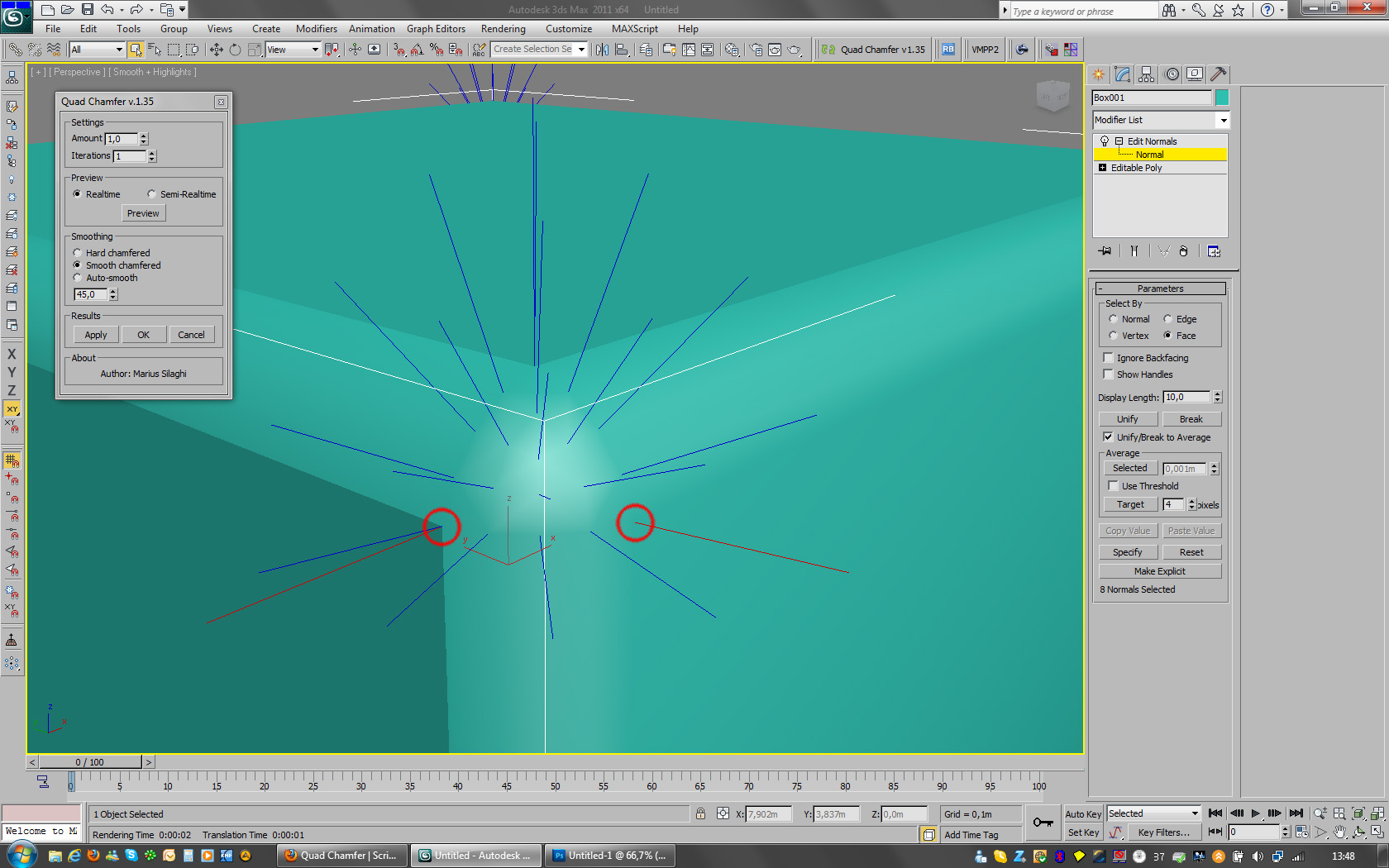
now i got a little time to play with QC, i found a little bug with the normals in smooth chamfered mode, please see attached .jpg file.

thanks in advance.

Attachments

shopkeeper · 2011-06-09

Could you explain a little what you are doing in the Boot Demonstration video?

It seems like you are selecting edges to chamfer, which sometimes causes errors or artefacts in the mesh, and then you reselect some slightly different set of edges to reapply chamfer to, to fixs those errors?

Also, I think I noticed you sometimes applied one chamfer to selected edge and then another to the edges formed from the previous chamfer? What are the reason for this considering you can select the number of iterations before applying the chamfer?

Would still like to see this work with edit-poly modifier. How likely a possibility is this in future versions?

Thanks

modifier

mwaif · 2011-06-09

Please, please, please make it as modifier. Anyway I'll buy it today.

I made a simple icon to give you an idea, maybe you'll like it. Keep up the good work.

Attachments

berdinatilli · 2011-06-08

Marius,

unfortunate, icon design is not my strength, but if something comes to my mind, i let you know. :)
anyway, no need to rush, important it looks good and represents well your product.

and yes, i bought, in fact i bought both scripts of yours, in different days.

Quad Chamfer 1.34 Released

Marius Silaghi · 2011-06-08

1.34 - Fixed a major crash from 1.32

berdinatilli,

Thanks, Yeah will need to update the link and the category.

I tried to make an icon but it looked ugly, If you have any suggestions for an icon I'm open.

yeah zSpheres is my current project, I'm working on it currently with Remus Juncu aka rappyBmx.

I use http://bitbuffet.com/ for file distribution, I can update the version of the script on the site and send an update email(automatically) to everyone who purchased.

Did you bought Quad chamfer because a few moments ago I send an update email.

suggestions and request info

berdinatilli · 2011-06-08

Marius,

i liked what you did in Subdivision Reversion v2, it was worth the update (in the customize menu, i suggest to place it in the same category as quad chamfer... and have the author weblink updated, if still not yet done).

Quad Chamfer is also great (needs an icon also, if there is not any yet).

i also read in evermotion you are working on a 3th script, wow, you are fast...
considering it was not long ago i encouraged you to sell them... :)

anyway, i have concerns about your file delivering system, specially considering you are advancing fast.
last time i checked, the buyer receives a link for 3 download attempts and it expires in 4 weeks...
how can we keep updated with the latest subversion ? are those links updated/refreshed automatically somehow ? or do you manually send the files per request ?

thanks in advance.

Quad Chamfer 1.32 Released

Marius Silaghi · 2011-06-08

1.32 - Added realtime preview, fixed some other bugs

shopkeeper · 2011-06-08

Great Script. Will wait until its is available as a modifier for edit poly before shelling out my hard earned cash ;)

Agree with sentiments of other posters. Why couldn't the developers implement this ?! Will make SO much difference to modeling in maxs.

Your are the man!

cyb3r · 2011-06-08

So.. how is it possible that Autodesk for so many years couldn`t find the way to do this... Shame on them! Great work. I also vote for a modifier :)

harumscarum · 2011-06-07

+1 vote for modifier

br0t · 2011-06-08

+1

jazznazz · 2011-06-07

Thumbs up !

Marius Silaghi · 2011-06-07

@mad thanks for your suggestion

mad · 2011-06-07

great stuff! :) but it will be mutch more better to make it as modifier ;)

Quad Chamfer 1.1 Released

Marius Silaghi · 2011-06-07

1.1 - Added support for 3ds Max 2010
1.0 - Initial Release

br0t · 2011-06-07

Awesome :D Did you have to figure out a lot of math stuff to do it or a lot of mesh ops? Maybe you can lose some words about how it works, of course without explaining everything ;) Just for curiosity, I wouldnt know where to start even. Great Job.

WOOOOOWWWW!!!! ;))))

MikeMS · 2011-06-07

Oh man! You did it! I can`t believe!!! Thanks! Thanks! Thanks!

mahreeooce · 2011-06-07

This is a great one! Thanks! Just like noel_d3 I often wondered why max doesn't behave like this by default. It's one of the things that maya did well (as in the way it should be done by all 3d apps) and it seems to have been overlooked by max's development team on every new release. Great to see someone's addressed the problem.
Once again, big thanks!

ThU for having implemented this algorithm !

noel_d3 · 2011-06-07

We wonder why it's not like that originally in 3ds max !