ScriptSpot

Script

Quick Environment Script V2

By makco · 2020-05-31

Version
V2
Version requirement
3dsmax 2016 to 2020
Other software required
Corona or Vray
Date updated
2020-05-25
Votes
5
Download
Download
Description


This is the second Version of our QES script,  A Maxscript that was written for internal use at Moso Studio.

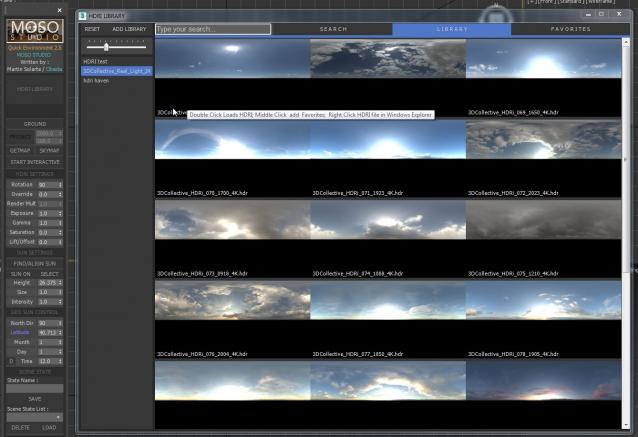
The purpose of QES is to streamline the process of working with HDRI files.

It will allow you to browse through all your HDRI, generating thumbnails first for quick access and setting up the scenes automatically.

It is meant to work only with VRAY and CORONA renderers... and has been tried with 3dsmax 2016 to 2020.

This version was written with the collaboration of Obaida Lofti, who developed the new interface and browser library system

There are a lot of improvements on this new version, including a completely new interface and some new functionality. (Auto Sun Locator, is one of the new highlights)

Please watch the video to understand the functionality and to learn about the new features and new interface:

https://vimeo.com/423410818

This is a real production tool, used daily in our studio.


Comments (16)

short_cirkuit · 2022-03-28

i cant get this to work if someone can share the updated MS script that would be much aprpeciated.

D0br0 · 2022-03-22

The problem with launching in the new Corona render 8. Afternoon Chaos campaign changed the name of the renderer to Chaos Corona and it does not allow to run the script and use it. Can you add the ability to run this script on the new corona render?

obaida · 2022-03-26

Hi , you can open the script (Moso_Quick Environment.ms) in MaxScript Editor or any text editor
press (CTRL+H) and replace (pattern:"Corona*") with (pattern:"*Corona*")
I think by this way it should work .

white-out error window with corona interactive

mathos · 2020-10-05

Hi - first of all would like to say that the script is amazing and really saves a lot of work and makes setting up light much faster and immersive. Also great way to create an HDRI database.

That being said I have one problem which happens randomly while the Corona Interactive window is running - basically imagine the typical 3ds max error when it crashes, but let's you save the recovery file - but in this case the whole error window that popped up is white and you cannot click on anything, the only solution is to hard crash via task manager. It happens really randomly, it can be changing parameters with the script or changing values within materials, even selecting/deselecting elements within the scene. It is practically impossible to reproduce just wanted to see if anyone is getting this error with Corona....

makco · 2020-10-06

Hi Mathos.

This seems very unusual... i would say try to either updated your video card drivers or turn of optix denoiser on interactive... i have the feeling is something related.

Chilavek2007 · 2020-10-02

It doesn't work for me. Doesn't want to insert HDRI in the scene. All other functions work.

makco · 2020-10-06

Hi Chilavek2007 i just DM you. hopefully i can help you sort it out.

themaxxer · 2020-06-29

great script, I use it every Day, thanks for that. But all of my HDRI's are very dark, can I tweak them to appear brighter? or do I have a gamma issue somewhere?

thanks for reply.

best regards
themaxxer

makco · 2020-07-04

Im glad you like it... it depends on how the HDRI was saved.... You can always resave in photoshop changing the exposure first... but you will always encounter HDRI with different exposures...

short_cirkuit · 2020-06-02

working amazingly so far -well done.

May i request for an update? So where the HDRI librarys are, if it is at all possible to rename those libraries (not on hard drive but on the library within the script)?

makco · 2020-06-02

Hi Yes it was something I had on my to-do list.. but decide to release before I added it... Will take a bit but will try to include soon. Thanks for feedback!

Link updated

makco · 2020-06-01

Thanks short_cirkuit. And yes I remembered that request and wanted to included it!

aksmfakt132 · 2020-06-01

page not found pls fix this

Align Sun - YES

short_cirkuit · 2020-06-01

I downloaded your first script - and i was let down that it didnt have the 'findsun' option - it is now included - THANKYOU. Purchased.

great great great - well done.