With this tool is very easy to control UVWMap modifier gizmo transform using
non - incremental randomization process. It means every position rotation or size
offset changes always start from geometry center but not from actual gizmo center.
This tool also use random values from user input but not ranges from one value to another.

Script
Random UVW GizmoTM
 By barigazy · Credited author: Branko Živković · 2013-06-02
- Version
- v.1.0
- Version requirement
- 2010+
- Date updated
- 2013-06-02
- Votes
- 5
Description
Additional Info
How it works:
This tool works only with geometry objects.
Make some selection and use the options described below
 Result after few clicks
 Special thanks to miauuu and DenisT for sugesstions
Result after few clicks
Special thanks to miauuu and DenisT for sugesstionsAttachments
- bga_random_uvw_gizmotm_v1.0.ms — bga_random_uvw_gizmotm_v1.0.ms8.9 KB
- test_scene_max2011.max — test_scene_max2011.max1.8 MB
Tags: UVW Map Random Transform Gizmo
Comments (11)
This was great!
ngluvakov · 2013-08-21
Thank you for this wonderful and simple tool. It was intuitive and I had to learn nothing. I just started it and done my job.
Svaka ti čast, stvarno si dobar!
barigazy · 2013-08-22
Hvala ti Nikola na komentaru :) Ovaj skript sam napisao bas iz tog razloga. Pogledaj ostale skripte, mozda naidjes na nesto zanimljivo
Na ovom sajtu znak "+" treba da se praktikuje :)
Pozdrav!
zahid hasan · 2013-08-20
very useful script.as the script already deals with rotation, would you consider adding an option to rotate the uv depending on longest edge of that polygon. or rotate the gizmo for the whole element along tits longest poly .it will be quite helpful for texturing with bitmaps like wood .
thanks for your effort.
barigazy · 2013-08-20
Hey zahidhasan,
can you post some example and screenshoot what exactly want to achive.
zahid hasan · 2013-08-20
sure.i attached a simple image.similarly for aligning wood texture on hundreds of window frames in different direction.depending on longest edge direction.
Attachments
- wood_texture.jpg — wood_texture.jpg236 KB
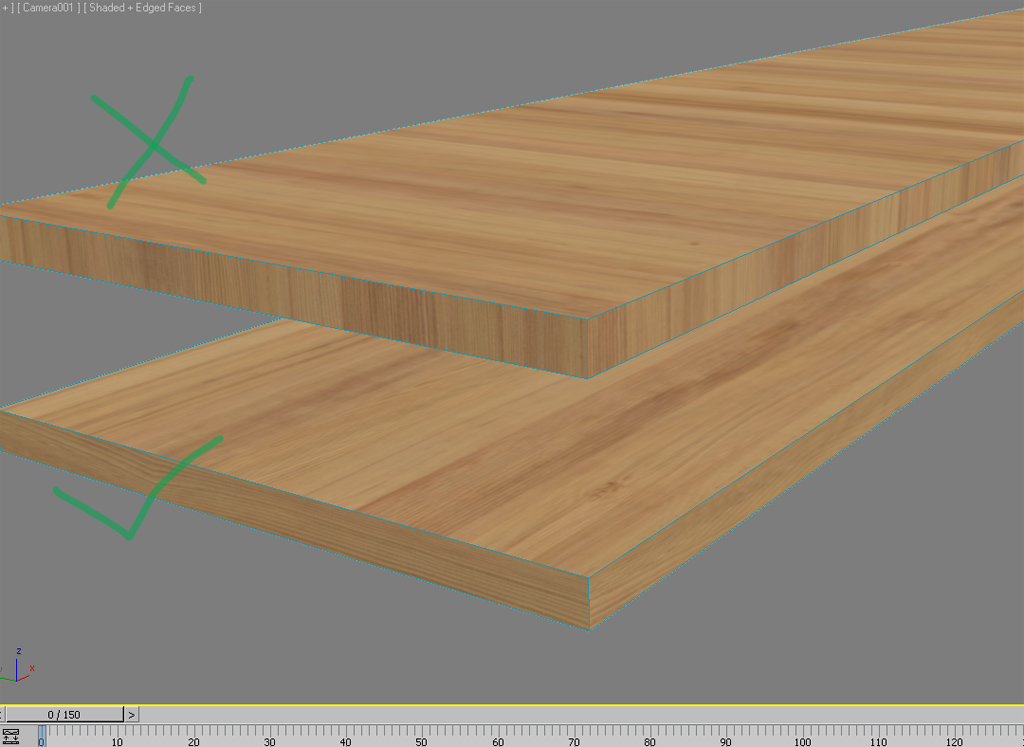
barigazy · 2013-08-20
I saw your problem.
My tool works only at the object level (not sub-object). It's complicated to achive result that you posted because you need to assigne non uniform UVW gizmo.
Then you need to consider the following: object transform, size, form etc.
This tool is not designed for that.
So my suggestion is if you have many copy of window frames (not instances) with same size you can do next:
Select a frame (in this case call it "WinFrame001") and manually add and adjust UVWMap modifier (as in your picture).
Suppose that frame have more then one modifier and we need to copy 2nd modifier (in this case UVW map modifier) to other objects (frames)
Just select theses objects and run next code
fn transfer_UVWmod originalObj: modNo: = if selection.count != 0 do
(
	local modi = originalObj.modifiers[modNo]
	for o in selection where o != originalObj do addModifier o (copy modi)
)
-- as "originalObj" argument you need to add your main object which modifiers need to copy
-- as "modNo" argument add ordinal number of the modifier in modifier stuck
transfer_UVWmod originalObj:$WinFrame001 modNo:2
Now you can use my tool to adjust random position of UVW gizmo.
For rotation use angles 0 180 -180
Hope this can help
Cheers!
zahid hasan · 2013-08-21
thanks for your help. will try it next time.
Thanks man
Andriano · 2013-06-03
I really need this script.
Thanks again!
barigazy · 2013-06-03
I'm glad that u find this useful for your workflow.
Cheers!
oh yesss
artrender.info · 2013-06-02
this is a really nice tool to use! Especially if you have a tiled texture and want to get good results - on a tiled wall then this script is the best option!!!
:)
barigazy · 2013-06-02
Thanks man. That's the reason why I wrote this tool.