ScriptSpot

Script

Render Info Strip

By Swordslayer · 2011-07-07

Version
0.03b
Version requirement
3ds Max 9, VIZ 2008
Date updated
2011-07-11
Votes
13
Description

This script was created upon request as a vray frame stamp replacement, intended for mental ray and scanline rendrers.
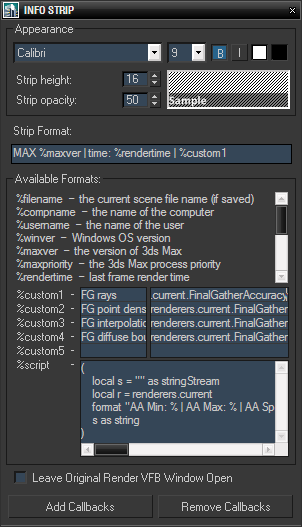
It allows custom information to be displayed in the rendered image, with user defined font size, style, colors and opacity of the strip background. In addition to predefined keywords, there are five custom expressions and one script value. Original render frame buffer can either be closed or kept open. The settings and callbacks are saved in the .max files.

Installation: The .ms file can be run from any location (Maxscript -> Run Script...), if you want to put it in toolbar, menu or quadmenu, place the .ms file to Scripts folder, download the file infostrip.mcr and either drop it in viewport or run it once (NOTE: If you're using the .mcr file, the downloaded .ms file name has to be just

info_strip.ms

, no

_0

,

_1

or anything else at the end). In Customize dialog you will then find the script in category Advanced.

Additional Info

Example of the resulting information strip:

Tutorial: creativescratchpad.blogspot.com/2011/07/render-info-strip-customization.html

Attachments

Tags: render, mental ray, callback, text, information

Comments (14)

Bug?

Shilo · 2013-12-11

This totally broke my framebuffer in max2012 64bit after I added the button in toolbar.
I cannot move rendered frame window at all it gives me an error that points to vfb script in stdscripts.
Too bad, it was nice.

Swordslayer · 2013-12-14

Could you send me a screenshot showing the error or maybe even the stacktrace from the listener if there's any? You can reach me via contact form here, thanks in advance.

Custom

Braiz · 2011-07-13

These custom expressions?? Would I be able to ad, say, photon count and other things related to Global illumination?

Swordslayer · 2011-07-13

Hi, if you mean the Max. Photons per Sample and similar settings, then yes, it's quite easy, just replace any of the custom expression with

renderers.current.GlobalIllumAccuracy

to get this value. To get the complete list of render settings for mental ray, look at http://goo.gl/9W5mA (wherever it says

<mental_ray_renderer>

you'd replace it with

renderers.current

).

For more information follow the tutorial link in script description.

Michele71 · 2011-07-12

Thanks Swordslayer! A plug very ,very useful :) One point to you ;)

Braiz · 2011-07-11

hmm... just downloaded the script again and checked the header, still says version 0.02b...

Swordslayer · 2011-07-11

Okay, no idea what's wrong (when I download it, it's okay, I've tried several times). Anyway, I've attached v0.03 to this comment so hopefully it will work for you.

NOTE: If you're using the .mcr file, the downloaded .ms file name has to be just info_strip.ms, no _0, _1 or anything else at the end.

Attachments

Braiz · 2011-07-12

Tried downloading your attachment, and it works. Thanks again mate :)

Swordslayer · 2011-07-12

My pleasure :)

Rollout Handler Exception

Braiz · 2011-07-10

Hi Vojtech...

I think alot of mr users will be jumping of joy from now on, thanks to your script.

Unfortunately I get a runtime error when trying to add callbacks or just render after I've opened the script:

Runtime error: dotnet runtime exeption: Could not load file or assembly
'file:///C:\user\Braiz\appData\local\temp\paptebn3.dll' or one of its dependencies. The system cannot fine the file specified.

I'm using max 2012.

Dón't really know what to make of this...

Error checking

Swordslayer · 2011-07-11

Hi, my pleasure to contribute. I've added some extra error-checking, try it now, it should at least give a descriptive error message.

Braiz · 2011-07-11

Hi Vojtech...

Tried the script again with no luck.
The error persist, but it just refers to different dll's in the temp folder every time I try to run the script.

Swordslayer · 2011-07-11

All I can tell you is that's the old script, not the new one. The file you have in C:\Program Files\Autodesk\3ds Max 2012\scripts\info_strip.ms should have -- Version: 0.03b in the header.

Braiz · 2011-07-11

I've saved a txt file from the MAXscript listener, I've like to send to you. I'm posting the errors I've come across:

-- Error occurred in createUIAccess(); filename: C:\Program Files\Autodesk\3ds Max 2012\scripts\info_strip.ms; position: 12396; line: 277

-- called in preRenderAction(); filename: C:\Program Files\Autodesk\3ds Max 2012\scripts\info_strip.ms; position: 16086; line: 352

-- called in btnAddCallbacks.pressed(); filename: C:\Program Files\Autodesk\3ds Max 2012\scripts\info_strip.ms; position: 26412; line: 632 >> MAXScript Rollout Handler Exception:

-- Runtime error: dotNet runtime exception: Could not load file or assembly 'file:///C:\Users\Braiz\AppData\Local\Temp\cdcwe10q.dll' or one of its dependencies. The system cannot find the file specified. <<

Attachments