ScriptSpot

Script

Render Node Manager

By pixamoon · Credited author: Pixamoon · 2014-10-06

Version
0.75
Version requirement
Windows 7,8,10 Professional or Ultimate
Other software required
.NET Framework 3.5 or later
Date updated
2022-02-02
Votes
17
Download
Download
Description

.
- NEW - monitor node status: on/off, CPU, Memory and DR status
- NEW - connect with nodes by - RNM Server
- much simpler to setup (RNM Server works without Remote Desktop)
.
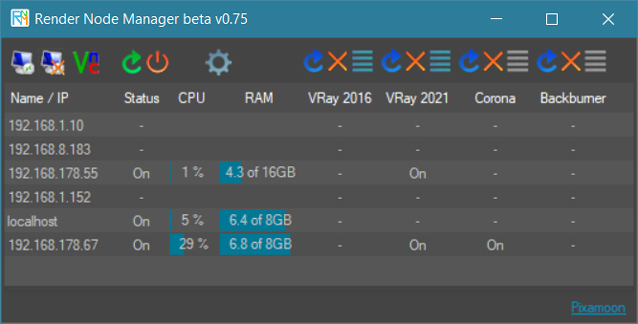
 
Render Nodes Manager is a network tool. It allows to remotely start / restart / stop DR (VRaySpawner, Corona DrServer, Octane Daemon) on selected servers / nodes.

It helps to solve typical problem when user cancel distributed rendering and render nodes don't pick up for some time...

It can also monitor status of the nodes: on/off, CPU, Memory ussage and DR statuses (if they run or now)


New version
 works with RNM Server (small server program to run on each of nodes) or classic Remote Desktop
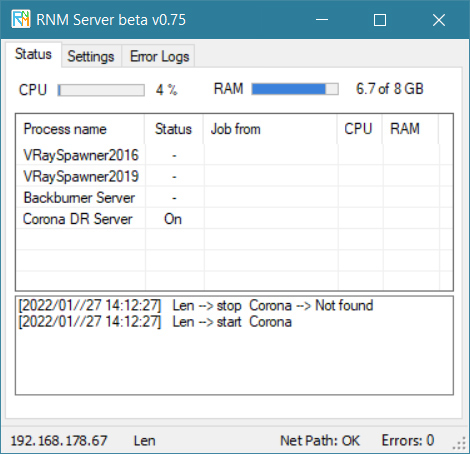

RNM Server method:

Render Node Manager connects to RNM Server by local network.
Very easy to setup - you need to set network exchange path only

____________________________________________

How to set it up with RNM Server:

1. Start RNM Server on nodes
2. set exchange network path in Settings tab (the same path need to be visible and set for all nodes and workstations in network)
____________________________________________
3. Start Render Node Manager at your workstation
4. set Exchange network path in Settings tab
5. add nodes IPs (connection with RNM server works only with IPs on the list)
6. check if paths to VRaySpawner, Corona or Octane are correct
7. select nodes and try to start Test: notepad.exe
8. it notepad works try with VRayspawner, Corona or Octane
9. All should be done

_______________________________________________________________________________________________

Remote Desktop method: (not recomended in the newest RNM version)

It works similar to PSTools but it start VRaySpawner as desktop application with access to all Network Mapped Drives

____________________________________________

How to set it up with Remote Desktop:

1. First you need to setup Remote Desktop on nodes / render servers . There is nice tutorial how to do it on: https://4sysops.com/archives/how-to-setup-remote-desktop-with-windows-7/…; (Remember to choose a user with password)
2. User allowed to remote desktop has to be logged on remote machine. The best will be if this is auto login user (program starts VraySpawner only on that specific user desktop/interface) If you have few users you need to setup one to be auto login. There is a nice article about it: http://www.sevenforums.com/tutorials/377-log-automatically-startup.html
3. Test Remote Desktop button.

------- If  your Remote Desktop Connection works you can start bellow -------------

4. Add Incoming rules too Firewall (instruction images are in zip file)
5. Open Remote Node Manager and go to tab "Settings". Add your nodes to list (IPs or names).
6. Type username and password (the same as for Remote Desktop connection)
7. Now try Restart / Shutdown buttons AND start/refresh / stop "notepad.exe" (from Remote tab)
8. If those buttons work - choose your paths in Setings Tab. (default is VRaySpawner 3.0 for 3ds Max 2014)
9. All should be setup correctly now and ready to remotly start/restart/stop VRAY, Corona and Octane ( just make sure all paths are correct )

_______________________________________________________________________________________________

Changelog:
v0.75
- changed CPU and RAM usage columns to be progress bars
- faster start of RNM Server
- fixed monitoring status of DR (distributed renderers)

v0.73
- fixed monitoring status of DR (distributed renderers)

v0.69
- added possibility to monitor nodes activity in real time: CPU load, RAM Usage, Temp, Status of Vray, Corona, Octane on each node.
- added option to enable VRaySpawner for jobs from specific senders only.
- main window has a list of render nodes and columns for Status, CPU, RAM, and DR (distributed renderers)
- list will auto adjust columns and Start/Stop buttons depending on DR settings
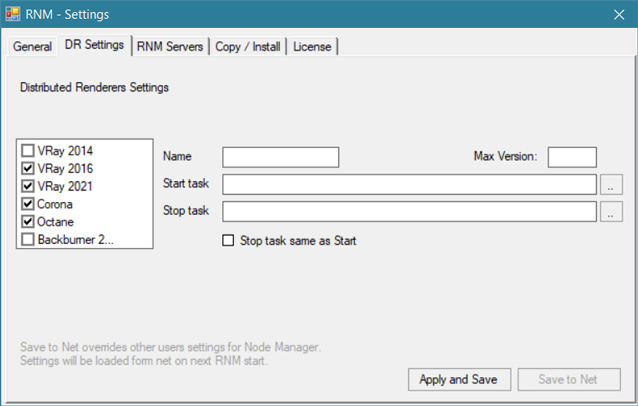
- new settings window with:
  - General tab,
  - DR Settings tab: to set VRay, Corona, Octane paths,
  - RNM Servers tab: to sent new settings to all RNM Servers,
  - Copy/Install tab: not ready yet,
  - License tab: to deactivate license to move to new machine or to upgrade with more nodes
- RNM Server checks and shows now CPU and Memory Status and DR (distributed renderers) status
- node monitoring option is possible with RNM Server method only
v0.55
- 2 connection methods - connects to nods by RNM Server or classic Remote Desktop
v0.50:
- fully customizable 6 tasks (custom names and paths)
- save settings: nods list, paths, etc
v0.40:
- Remote Desktop stop button - to stop remote desktop and return to normal screen
- VNC button and VNC path in settings (VNC is more useful for Octane users because Remote Desktop turns off CUDA drivers)
- Test: re-start / stop buttons  - default "notepad.exe"
_______________________________________________________________________________________________

Requirements:
- RNM Server method works with all windows versions, require only network exchange / shared path

- Remote Resktop method require Windows 7 Professional or Ultimate (doesn't work on Windows Home - this version of Windows does not support Remote Desktop). All nodes have to be ready to be connected by Remote Desktop with one username and password
-.NET Framework 3.5 or later

_______________________________________________________________________________________________

Note:

-This is beta / demo version only.
-Demo version is limited up to 3 nodes on the list only.
-Demo version does not save settings.

_______________________________________________________________________________________________


Full version:
https://www.pixamoon.com/product-page/render-node-manager


_______________________________________________________________________________________________

Let me know what you think.

PIXAMOON

_______________________________________________________________________________________________
New Settings window:
 

Tags: render node nodes slave server free small farm admin tool tools manager organizer utilities utility monitor copy start stop restart remote desktop shutdown vray dr distributed vrayspawner corona maxwell 3ds max

Comments (28)

still the same problem

ivailora4kov · 2015-02-24

I have still the same problem. I have set up everything like in the screenshots. You have asked me some questions:
1. yes the remote desktop user has password.
2. the remote desktop user is logged on, but it is not an auto-login
3. I have manually started "notepad" but RNM doesn't stop it.
4. Our workgroup is standard, not with domain.

remote restart

pixamoon · 2015-02-24

oki, oki lets try this...

1. If I remember you are able to start remote desktop (by RNM) - that's mean IPs or names in RMN are correct.
2. If RNM can't stop notepad its a problem on very beginning of setup. (RNM settings or network settings)

Please try to use RNM to Restart or Shutdown nodes (just make sure you typed username and password in the Settings Tab)
If this works, I explain what can be next problems.

no success again

ivailora4kov · 2015-02-25

The only thing that works here is remote desktop. One thing I didn't mention before is - I use 3ds MAX Design (2013 and 2014) + Vray 2.30.01. I don't know is this a problem that I am using max design, not only max. If this is a problem I don't know how to resolve it, because we have licenses only for max design. But the notepad and the calculator hasn't any relations with 3ds max and vray.

re: remote restart Vray

pixamoon · 2015-02-25

Hey,
Oki... its more clear now. If RNM can start Remote Desktop but can't restart or shutdown nodes try this:

First: Please check if user allowed to remote control is Standard User or Administrator (on node/server machine) - It should be Administrator.
If it's Standard - you need to log in different Administrator user and change remote one to Administrator too.
Only administrator users have access to remote start, restart etc.

Second thing is: User Account Control Settings. (Control Panel -> User Accounts) Try to lower it to the lower settings - Never notify.

After those changes - Restart node/server and login as remote user account.

Let me know if this helps.

PS. 3ds Max Design and vray 2.3 are ok with RNM - you need to just change Vray path in RNM Settings (but this later) first Restart/Shutdown has to work. Then test notepad and the last thing is vray.

already working

ivailora4kov · 2015-02-25

Everything work fine now, and vray spawner and closing notepad, and remote desktop. The problem may be was that the remote user wasn't with administrator rights, but when I logon in it with the admin account, everything is OK. The only problem I don't know how to resolve is that all of the machines in my department are workstations and the users are not allowed to be logged in with admin account, so I still have to ask each one individually to run the spawner.
You asked "if would be easier just to install simple server software on each node" - yes it would be. And if it can communicate with user account without admin rights would be perfect. :)

ok great

pixamoon · 2015-02-25

ok, great, so we know that Standard remote users don't work with RNM

I'll try later to add some extra privileges to Standard user. I'll let you know if this works.

Node/Server software - I'll try to find time to finish it soon. Than it will be very easy - just start it on each node (or install in startup)
Just wonder how many people wants to use it ?

re: standard users

pixamoon · 2015-08-25

Hi,
Finally I had some time to work on Render Node Manager.

I did create RNM Server to run on each node - instead of Remote Desktop

It should definitely work with standard users too.

You just need to specify the same Network exchange path in RNM Server and Render Node Manager

Try and let me know how it works now

Best,
Pixamoon

exactly what I needed!

finalmethod · 2015-01-16

I had some issues with it at first, but not sure what I did and now its working flawlessly! I have 5 nodes, and its a time saver to not have to remote desktop to activate the spawners and shut down them.
Thanks for this script!

By the way, I was wondering if its possible to add cpu temperature to this script, because its the only thing I use remote desktop now, to check the temps of nodes when they are renderings (just in case...). do you think something like that is possible?

Re:

pixamoon · 2015-02-11

Hey,
Thanks man. I'm glad you're happy with custom version.

And yes, RNM is coming with monitor functions. I'll send you testing version soon.
Still working on CPU-Temp function.
Thanks!

problem or not?

ivailora4kov · 2014-11-21

This is a great tool for people like me. I have 15 slave machines. Unfortunately the program doesn't work here for some reasons. Only the button - "remote desktop" works fine.
I have set all "Required Firewall Inbound Rules" as they are in the jpg files...
All computers are with WIN 7 64 bit pro...
What could be the reason not to work?

Re: problem or not?

pixamoon · 2014-11-26

There could be few issues.
Lets check those first:

1. Remote desktop user have to have password.
2. User allowed to remote desktop has to be logged on remote machine. The best will be if this is auto login user (program starts VraySpawner only on that specific user desktop/interface) If you have few users you need to setup one to be auto login. There is a nice article about it: http://www.sevenforums.com/tutorials/377-log-automatically-startup.html
3. Try to start notepad on remote machine and use RNM to stop it. Let me know if this works.

4. Let me know if you have standard home/workgroup network or with domain ?

Full version

zaxis · 2014-11-08

Hi,
Awsome tool!!!
Is possible to make it to works with Octane Render?
There is a similar file like VRaySpawner called run_octane_slave_daemon.
Best!

custom version

pixamoon · 2014-11-09

Hi,
Yes, it should work.
For testing try to change a VraySpawner path in Setting tab to Octane slave daemon path. I'll definitely add Octane in custom and later in full version.
Best,

RE: custom version

zaxis · 2014-11-14

Thanks!

I'll try your sugestion as soon as possible.
I appreciate for that.
I'm looking foward to get the full version.
Best.

Octane render

pixamoon · 2014-11-19

hi zaxis,
can you send me a full path to "run_octane_slave_daemon" ? (eg.: C:\Program Files\.....) I don't use Octane and couldn't find any info about it on their web. I'll add it in next demo version. Will try to find a time next weekend.

Octane render

zaxis · 2014-11-21

Sure!
The file comes with the Octane Standalone version and after install the slave file, you got a ".bat" file named "_run_installed_daemon.bat" but you can put in the same location where you have installed. eg: c:/Octane render v.xxx/
I mean, you can put the slave file where you need.
As v-ray one that keeps working until you close it, but when the max crashes you need to close it and start it again.

You can find more info here:
http://render.otoy.com/forum/viewforum.php?f=27

Re: Octane render

pixamoon · 2014-11-21

Thanks ! I'll try to add this and post new demo next week.

ah, I can download only demo version and don't see here any daemon .bat
Can you send me the .bat file to look what is it starting/stopping ?

Re: Octane render

zaxis · 2014-11-25

I don´t know if this will help you but that´s it!
Regards.
____________________________________________________________
@echo off

set BATCH_FILE="%APPDATA%\Microsoft\Windows\Start Menu\Programs\Startup\run_octane_slave_daemon.bat"

if not exist %BATCH_FILE% (
echo Daemon startup script does not exist. Please install the daemon first.
pause
exit /B 1
)

%BATCH_FILE%

Re: Octane render

pixamoon · 2014-11-26

oki, lets try new one - v0.37 should be ready to restart Octane and Corona.
Let me know if this work for you.

Re: Octane RND 0.37

zaxis · 2014-11-26

Awesome. It works but with some issues:

1- The button (octane path) doesn´t works. I put my path manulally and ok.

2- All the settings are lost after restart RND (add or remove) machines as well.
As you mentioned, because this is a beta version, right?

3- You are right and I had to put a password on user windows and RND as well.

4- IP number didn´t work for me but the name machines eg: "Comp_2" worked very well.

5- (Stop) button doesn´t works and (play) button open many nodes instead of close it. (Octane and v-ray)
Personaly i believe that just one button would make more sense to do it.

6- I have just tested on Octane and v-ray at the moment.

7- I Couldn´t understand what the copy/install does. Can you explain please.

Congratulations! Great tool!

Marcus

Re: Octane RNM 0.37

pixamoon · 2014-11-27

:) Thanks for testing and great report !

1- Can you send me the path you used ?
2- This is beta/testing version only. I'll try to find a time and do final version soon. You can get free for help with testing :)
3- Yes RNM use Remote Desktop with username and password.
4- Thats very strange, I thought IPs will be faster and better than machines name. Are they standard 192.168._._ IPs ?
5- Is this issue with Octane only, right ? Could you please send me the bat file: run_octane_slave_daemon.bat from your startup path ? pixamoon@gmail.com
6- if Vray and test-> calculator works, than there will be only thing to fix octane path.
7- :) copy/install it is just idea to copy/install updates/scripts/plugins to all nodes at one click. It is turn off now, I have to test it more.

Thanks again for great testing!

ah and 5- one button. Actually Play button works already as Refresh. I'll change image in next version. (Play button does: stop process first, wait and start again).
But I think Stop button is still good idea to keep. It can turn off some of render engines. So one node doesn't render few tasks (from different users) at the same time. What do you think?

Re: Octane RNM 0.37

zaxis · 2014-11-27

Hi buddy.
Thanks to exchange opinions and share experiences
Follow...

1- Can you send me the path you used ?
Sure,(C:\OctaneRender_2_13_win64\_run_installed_daemon.bat)

But you should know that the small button above (path) is freezing instead to find a new path. The others are ok (vrayspawner and Corona path button).

2- This is beta/testing version, if there will be good response (still waiting for more + :p) I'll try to find a time and do final version to buy. You will get free for help with testing :)

Thanks buddy, i apreciate it!

4- Thats very strange, I thought IPs will be faster and better than machines name. Are they standard 192.168._._ IPs ?

I have tried again and the IP numbers is working very well but in my case it`s not a standard one (10.0.0.101...)

5- Is this issue with Octane only, right ? Could you please send me the bat file:

ok I`ll send that by e-mail.

*Refhesh I think is a good ideia but, suppose that i have to render and that at some momment, max crashes. You have to start it again but vray continue works, but if you accidently play vray spawnner again, will have 2 vrayspawnners node working at the same time, making a mess and do not works fine! In this case you should make a button (play/stop) together, so when you play it, vrayspawnner starts services again and when you stop it, vrayspawnner can turn off the services.
This way can see which machines are processing, managing by RND display.
The same to the Octane, because is the same issue.
I´m not sure about but i think one node per machine is enough because the both cpu and gpu will be busy during processing. Why should I have more than one?
As I said I´m not sure. Let me know what you or the other guys think about that.

And last but not least, the remote desktop button is working well but when you connect to the machine it goes to the log mode, avoiding the octane node starts.

I have tried to deliver your message, but it was rejected by the recipient domain.
Do u have another e-mail?

That´s all at the moment.
Regards.

Re: Octane RNM 0.37

pixamoon · 2014-11-27

Hey hey, thanks for quick answers !

1,5- Hmm, that's really different line than I found. I though that batch file is located in windows startup folder.
The thing is - Batch file (C:\OctaneRender_2_13_win64\_run_installed_daemon.bat) starts a octane_slave with proper config only, but octane_slave has to be stopped by service name.
I'll need service/process name to stop (something like octane_slave.exe). Can you look for it in Task manager or in bat file?

4- Just to make sure - IPs works now too, right?

*Refresh/Play button - it works already how you described. Try to test it with VRaySpawner or Test->Calculator buttons. VRaySpawner will be still visible in windows system tray. But there is only one instance running. If you move a mouse over icons they will disappear. I have to find a way to refresh tray icons. Only Octane don't stop on "Refresh/Play" at the moment it will be fixed when I update octane_slave service name.

Re: "And last but not least, the remote desktop button is working well but when you connect to the machine it goes to the log mode, avoiding the octane node starts."
hmm do you mean you can't start octane_slave with RND when you connect with Remote Desktop ?

I think gmail doesn't allowed to send bat/exe files. Let me find other way.

Thanks and best regards.

Re: Octane RNM 0.37

zaxis · 2014-11-27

1,5- Hmm, that's really different line than I found. I though that batch file is located in windows startup folder.
The thing is - Batch file (C:\OctaneRender_2_13_win64\_run_installed_daemon.bat) starts a octane_slave with proper config only, but octane_slave has to be stopped by service name.
I'll need service/process name to stop (something like octane_slave.exe). Can you look for it in Task manager or in bat file?

Ok, you are right, I just put it on my start up folder to start it automatically.
I´m not sure what you mean but the octane service we need to stop is "octane_slave_daemon.exe *32" in task manager. That was you looking for?

4- Yes it works fine.

*Refresh/Play button - it works already how you described. Try to test it with VRaySpawner or Test->Calculator buttons. VRaySpawner will be still visible in windows system tray. But there is only one instance running. If you move a mouse over icons they will disappear. I have to find a way to refresh tray icons. Only Octane don't stop on "Refresh/Play" at the moment it will be fixed when I update octane_slave service name.

Understood. Now they´re working exactly as you say (vray and calc) ok.

hmm do you mean you can't start octane_slave with RND when you connect with Remote Desktop ?

That´s right! I think the issue should be something in windows settings because I used to connect with machines with the Teamviwer and after password changes appears the log screen conection with teamviwer as well. That´s make sense!?!

Thanks and regards

new RNM v0.39

pixamoon · 2014-12-02

Oki, here is new one.
It has refresh buttons now.
It works with Corona and Octane now (Octane setting: first blue path: bat file - second red: octane slave exe name)

*Still to find out: why doesn't start Octane when Remote Desktop is on.

Full version

Alex_H · 2014-11-04

Hello,

can I buy a full version ?

Kind regards
ALex

full version

pixamoon · 2014-11-08

Hi Alex,
Thanks for testing.

Right now there are only custom versions available.
If you like it I can create one for you. All custom settings (servers IPs, paths etc) will be saved in the program. For more info please contact me on pixamoon@gmail.com