ScriptSpot

Script

renderSorter

By Marco Brunetta · 2009-06-19

Version
0.2
Version requirement
MAX 9 (I think)
Date updated
2009-06-19
Votes
10
Description


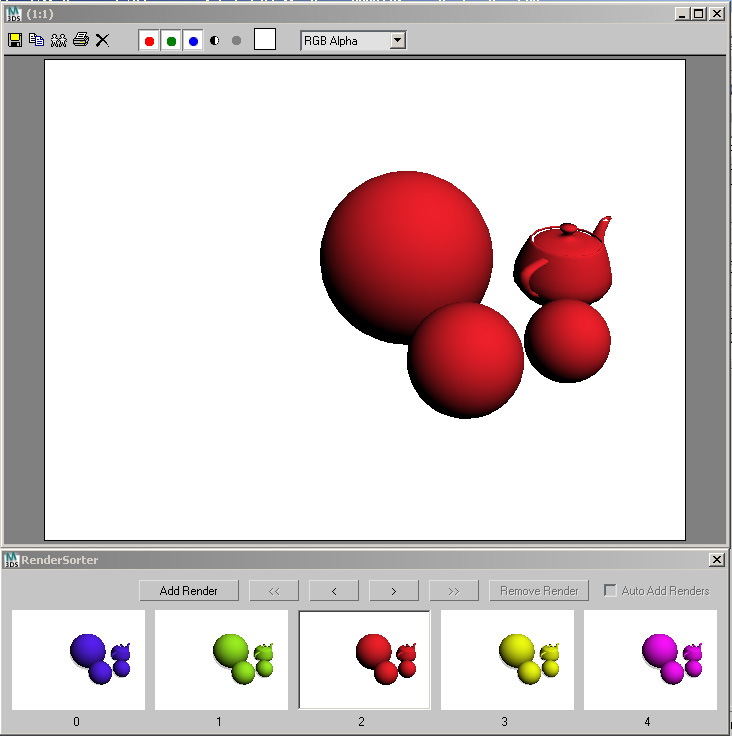
Based on an idea by Dustin Brown to duplicate the ability in Maya to have multiple renders on a bin and scroll trough them to check for differences and whatnot.

Usage should be pretty straightfoward. Use the Add Render button to generate and store a new render. Then use the arrow buttons to move forwards and backwards and add renders whenever necessary. There is no limit to the amount of renders. A few of the controls are not coded in so I've just disabled them for the time being. If anyone feels like completing the script be my guest.

Additional Info

Originally I wanted this to be added directly to the VFB, however while I could do it using the new customization toys in MAX 2009, I found no way of changing the image on the VFB. This script creates it own window, which is not ideal but works.
Attachments

Tags: render, maya, sorter, vfb, render frame

Comments (9)

Marco Brunetta · 2009-06-22

Hehe well thanks a lot I fell all fuzzy inside now.

Marco Brunetta · 2009-06-20

Hehe that would be an interesting and fun project however I'm really busy developing my own scripts at the moment to tackle it. You should try looking for coders at The Area or CG Talk.

jinj · 2009-06-20

per Marco Brunetta
ciao,
non è il luogo questo ma ne approffitto per parlartene.
cosa ne pensi dei motori di rendering unbiased? e di luxrender http://www.luxrender.net/? di certo ne avrai sentito parlare, un motore veramente bello che resterà gratuito per sempre a differenza di indigo render, l'unica pecca è che non esiste un exporter per 3ds max. io purtroppo non saprei da dove cominciare e volevo chiederti se magari te la sentiresti di provarci....comunque grazie
jinj

Anubis · 2009-06-20

Hi Marco, i use Max RAMplayer for comparing shots, sequences and movies. I hope I was helpful.

Marco Brunetta · 2009-06-19

Hehe, cool I did not know about this (and luckily I can speak italian). However it requires vray to be installed... which not everybody uses (me for instance). And the whole having to add a system variable to windows it's a bit messy. The system on your link is probably a lot more powerful if you have vray.

BTW, the link was wrong, here's the proper one:
http://www.francescolegrenzi.com/forum/viewtopic.php?f=25&t=26

jinj · 2009-06-19

hi,
I'm not sure to understand wath do you mean to do with the vfb, but by the way the vfb have it's own thumbnailer, but it is more than a simpler thumbnailer. you have to activate the vray frame buffer history, it's a hidden feature of vray.
you can save any render in vray image format, and you can recal to any time your immage and tweak the render from the vfb.
http://www.francescolegrenzi.com/forum/viewtopic.php?f=25&t=26
this link is in italian, there are image and you will understand wath I mean and wath you have to do.
jinj