 By rauquenrol · 2015-11-06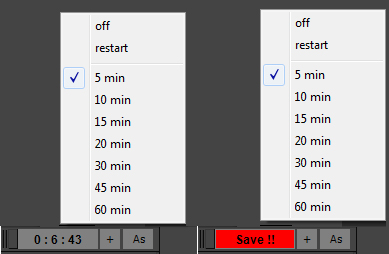
If you're tired of 3dsmax Auto-saving and freezing when you are working, this script is for you.
It's based on an idea of Vincent Lacour.
installation :
Put the file in the Scripts/startup folder of your 3dsmax installation.
Restart 3dsmax How it works :
When you start 3dsmax you'll notice a new tool at the bottom left of your UI.
If you right clic on the biggest button, you'll see a few options :
– off to turn it off,
– restart to restart the countdown
– and a few timing options
If you choose a time interval the button starts to count the time.
It doesn't save automatically your file. When the chosen time interval is reached, the button starts to blink in red, so you know you should save.
To save your file, just clic on the big button to replace the file, use the + to increment or “As” to save as.
Each time you save with these buttons the countdown is restarted.
Updates :
03/08/2016 : now resetting a scene reset the counter
 jsrocha · 2017-10-10
 3dwannab · 2015-11-09