ScriptSpot

Script

Show DotNet Properties

By Kstudio · Credited author: Alexander Kramer (Track) · 2009-12-19

Version
2.20
Version requirement
3ds Max 2008 and above
Date updated
2010-07-23
Votes
47
Download
Download
Description


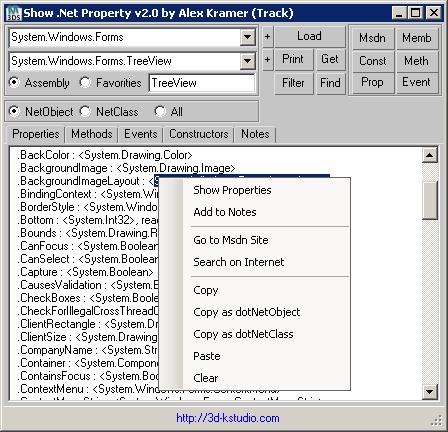
Utility for Developer. Main Features:

  • Loading the .Net Objects from .NET Framework Class Library.
  • Search for .Net Objects with the desired properties.
  • Load to the list of dependent .Net Objects.
  • Fiilter the list by name the .Net Object.
  • Convenient copying.
  • The built-in note-book.

v2.04
Adds support for 3ds Max 2008

v2.08
Adds Search TextBox
Fixes issues with garbage collection (only in max 2010)

v2.10
Replacing the Combobox to DataGridCombobox for solving issues with garbage collection (including 2008 and 2009 3dsMax)

v2.20

Fixes issues the"Combobox" with Garbage collector - now you can use one version in any 3ds Max Version (See more on cgsociety.org)

Adds the ability to show properties for global variables (for example: you can make global variable MyListView in your script and check then properties in utility)

Adds the ability to dynamically search for text

Adds the ability to Execute selected text (You can found this in right-click menu)

----------------

3d-kstudio.com
3d models
FilePathFinder-for search, relink, collect, sort and rename asset filles...

Additional Info

Archive include two version of script: "Show.NetProperty.2010+.ms" for 3dsmax 2010 "Show.NetProperty.ms" for 3dsmax 2008 and 2009

Tags: script, Track, DotNet, development

Comments (25)

Nevil · 2014-06-29

Cool script, thank you.

Kstudio · 2013-01-25

Links are now working.
thanks for feedback.

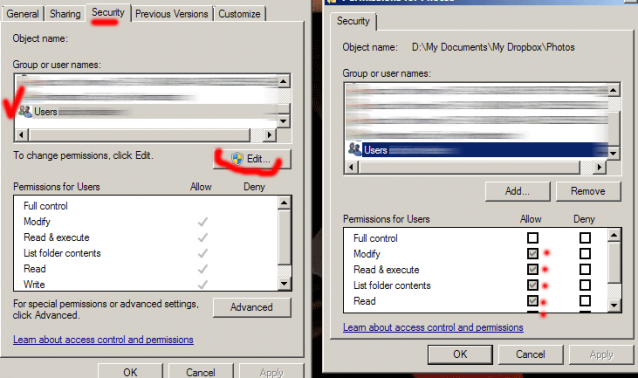
You can change permission for directory from menu.

Thanks Alexander,now it

barigazy · 2013-01-25

Thanks Alexander,
now it works like before.
I also add a few line for the DevXpress assembly reads. max2012 and max2013 use devX version 10.1 and i think max2011 use v7.1. Anyway
CODE for max2012-2013>>>

if not doesFileExist iniFile then
(
new_ini = createFile iniFile
format "[Assembly]\n" to:new_ini
format "system.xml.dll=\n" to:new_ini
format "System=\n" to:new_ini
format "System.Data=\n" to:new_ini
format "System.Windows.Forms=\n" to:new_ini
format "System.Drawing=\n" to:new_ini
format "System.Management=\n" to:new_ini
format "DevExpress.Utils.v10.1=\n" to:new_ini
format "DevExpress.Data.v10.1=\n" to:new_ini
format "DevExpress.XtraEditors.v10.1=\n" to:new_ini
format "DevExpress.XtraTreeList.v10.1=\n" to:new_ini
format "[FavoritObject]\n" to:new_ini
format "System.Windows.Forms.Form=\n" to:new_ini
format "[Interface]\n" to:new_ini
format "Size=[448,172]\n" to:new_ini
format "Location=[50, 100]\n" to:new_ini
format "AssemblySaveText=System.Windows.Forms\n" to:new_ini
format "AssemblyObjectSaveText=System.Windows.Forms.TreeView\n" to:new_ini
format "FavorObjectSaveText=System.Windows.Forms.DataGridView\n" to:new_ini
format "SearchSaveText=\n" to:new_ini
close new_ini
)

br0t · 2013-01-25

thanks for fixing the link and sharing this super useful thing :) +1!

Nik · 2013-01-24

Cool!!!

+1

barigazy · 2013-01-24

Not cool but a superior tool :)
I use this script for some time and I can say that a better tool does not currently exist in terms of revealing the secrets of the DotNet and DevXpress integration with MXS.
On Win8Pro systems the *.ini and *.rtf filet that script create on the startup in maxscript folder can't be saved because maxroot folder is locked (AdminRights). How can i unlock maxroot folder? (my UAC is turned off)

br0t · 2013-01-24

the download link gives me a broken archive file, CRC error when trying to unpack?

JokerMartini · 2012-12-04

Great tool!

Link Broken

reform · 2012-12-04

Hey Track.
This looks like a very handy script, but the link is broken. Can you relink me up?
Thanks
p.

Directions?

JokerMartini · 2011-02-18

Are there any directions on how to use this. I ran the script and the dialog popped up. I selected System.windows.Forms in the first drop down. Then selected System.Windows.Forms.Button in the second drop down and nothing shows or happened.....?

Kstudio · 2011-02-20

The first drop down - it the list of .Net Framework assemblies.

Type assembly name and press button "Load"

The second dropdown will be filled from all classes from assembly

Choose the class from second list and press button "Print"

Kstudio · 2010-07-23

Hi!

Maybe you mean this

contextMenu = dotNetObject "System.Windows.Forms.ContextMenuStrip"
contextMenu.RenderMode = contextMenu.RenderMode.Professional
contextMenu.ShowCheckMargin=true
contextMenu.ShowImageMargin=false

fajar · 2010-07-23

I just want to ask alex, is max 9 posible doing right click using dotNet like in your screen shoot, I mean like white background and grey space like ?

TecArt252 · 2010-04-16

NICE SCRIPT,

Thanks much!

MarTroYx · 2010-02-09

"Nice windows Theme :)"
it's not mine but I like it very much and it's one of the few that work well with 3dsmax, so I keep it preciously :-)

Thank for the update, I'll check this out,
Martin

Kstudio · 2010-02-09

Fixes - now your can download latest version from above link.
Thanks for screen shot.
Nice windows Theme :)

MarTroYx · 2010-02-08

I wasn't able to reproduce it until I hit the save button ... every time you hit save a new copy is added to the combobox ... but that's no big deal :-)

Attachments

Kstudio · 2010-02-08

Thank for bug-report Martin.

I fixes issue with LinkLabel, but i can not find error with Combobox.

Please post screenshot with this error.

MarTroYx · 2010-02-08

Thank track, yes there's not that many tool for .net in maxscript ...now there's some :-)

I started a tool like your sometime ago but my goal was more some kind of reflector ... don't know if it's possible from maxscript but I certainly give it some more try when I get some time :-P

Martin

MarTroYx · 2010-02-08

Great update :-)

here's two little glitch I noticed while testing it :

-sometime I get duplicate from the assembly combobox ... I'm still not sure under which circumstance it happen through!
-the link at the bottom appear centered at bottom and only half visible with white background ... maybe it's my skin causing that through :-)

regard,
Martin

Kstudio · 2010-02-08

Thanks Martin.

Your "Net Property Inspector" also very useful and power utility for development dotNet scripts.

Best regards Alex

MarTroYx · 2010-02-06

This is a very useful script, I just noticed an error when pressing the up arrow with nothing in the list but it seam you removed those button :-)
maybe an option to populate the list with class from a specific assembly would be nice too!

Thank,
Martin

Kstudio · 2010-02-05

Thanks guys!

Interface in the future🙂

Royal Ghost · 2010-02-05

Useful script! What about to add "search" feature? As example. Searching criteria is "beep", it returns classes containing property/methods/etc. - System.Media.SystemSounds ; System.Console

kilad · 2010-02-04

Very nice, i was looking for something like this yesterday. What are the odds. Thanks!