ScriptSpot

Script

Spline FFD

By luisllamas · 2012-07-23

Version
1.1
Votes
19
Download
Download
Description

Spline FFD is a tool that allows you to move multiple vertices at once, moving the points of a spline.

New 1.1: Added mode that preserves the original distance between vertex.
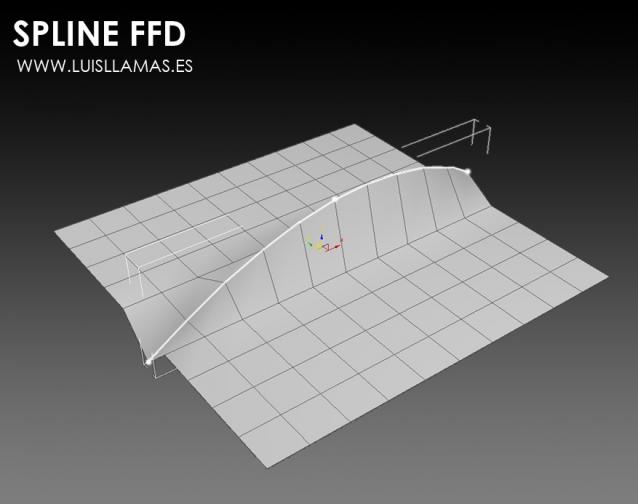
With Spline FFD you can select a number of points on a mesh and creates a spline that passes through these points. By moving the points of the spline, the original mesh vertices move properly.

You can change the number of segments that divide the spline. For example, a single segment points move in a straight line. A greater number of points needed to adjust to the original mesh as this increases the complexity.

Spline FFD can also be used in closed contours, making it a useful tool for generating seams and joints. In these cases we recommend a minimum of 6 segments to achieve a proper fit.

Finally, remember that you can change the type of vertex at any time, from smooth to beizer or corner vertex, and use the handles to change the shape of the spline./p>
Changelog:

  • Spline FFD 1.1: Added two modes. One that preserves the original distance between vertex and another that homogeneously distributed vertices
  • Spline FFD 1.0: Initial release.
Videos

Tags: spline, move, vertex, edit poly

Comments (24)

Link is dead

vitalquaD · 2025-08-03

Any chance this could come alive?

Link is dead

vitalquaD · 2025-08-03

Any chance this could come alive?

hi miauu.

ostia · 2017-04-18

Your written "Spline Deformer" is a so handy script.

I Wish.dont need to collapse Multiple modifier

 →[Edit Poly]
  [Edit Poly]
  [Editable Poly]

technically difficult to reproduce it?
thank.

Thanks

Yusuf_ES · 2017-04-15

Very helpfull script.
Works on 3ds max 2017

please help

hanolll · 2014-04-26

doesn't work on windows 8 or what ?! every time i drag it to 3dmax nothing happens,any help??!

Problem not at window

ghostpro278 · 2017-09-22

Go to toolbar --> Category ---> LuisLLams, you will see :))

soft selection?

ttus · 2014-03-17

so nice script that.
want use softselection.

Large Scale

bcavett · 2013-10-31

Now that I think about it Ive only used version 1.1 with large scale buildings. So I guess my "works on any model" comment was wrong and the scale of mesh is the issue...

.

miauu · 2013-10-31

I think that the solution is pretty simple, but since the script is encrypted the author have to fix it.

bcavett · 2013-10-30

It happens on any model i use it on. I am using open edges and I have been using this script for a while ( on previous versions) I am on the subscription advantage pack for 2014 and SP3 so I dont know if something was changed with those updates.

.

miauu · 2013-10-31

I have only max2014 SP3(no AP). Tested on open edges and there are no errors. I assume that the problem is because the interpolation parameter is bigger than 1.0 - 1.00021. May be this is another usual problem - 1.000 is not exactly 1.000, but 1.00021 and the error is ready to pops up.

Crashes in max 2014

bcavett · 2013-10-30

Im getting pretty consistent crashes in max 2014. It doesnt happen every time but it does the majority of the time... version 1.1

-Run the script

-Select your object with the button

-Select some edges

-Activate and then this crash shows up:

-- Error occurred in j loop; filename: C:\Program Files\Autodesk\3ds Max 2014\scripts\LuisLlamas\SplineFFD.mse; position: 1327; line: 49
-- Defined in encrypted script
-- called in mover_sinsoft(); filename: C:\Program Files\Autodesk\3ds Max 2014\scripts\LuisLlamas\SplineFFD.mse; position: 1596; line: 58
-- Defined in encrypted script
-- called in whenmodified(); filename: C:\Program Files\Autodesk\3ds Max 2014\scripts\LuisLlamas\SplineFFD.mse; position: 1669; line: 63
-- Defined in encrypted script
-- called in create.changed(); filename: C:\Program Files\Autodesk\3ds Max 2014\scripts\LuisLlamas\SplineFFD.mse; position: 4209; line: 172
-- Defined in encrypted script
>> MAXScript Rollout Handler Exception:
-- Runtime error: Invalid interpolation parameter: 1.00021 <<

.

miauu · 2013-10-30

How to reproduce the error?
I tested it on max2014 and there are no crashes. The test object was simple Sphere, converted to editable poly object. Bt tut script not works properly with closed edge loops.

Download link

carlosanima3d · 2013-08-09

I can't see the download link, plese help.

.

miauu · 2013-08-09

On the website go to :

Installation instructions:

     Download file Spline FFD 1.1.


Hover your mouse cursor over the Spline FFD 1.1 - this is the download link.

tofoaso · 2013-06-16

I second bcavett's request.

+ Edit Poly Modifier support :)

Nik · 2013-01-26

Thank you! Cool! Cool!

luisllamas · 2012-11-29

Argyl, The installation is made that way to make it easier to install for most people.
If you have any problems with the permissions of the folder you should ask your system administrator, or contact me to try to find a solution to your particular case.

Installation

Argyll · 2015-05-17

I am the administrator. This is the only script I've come across that generates this error.

Looks good on the demo but doesn't seem to work

Argyll · 2012-11-17

File Exception - runtime error while trying to copy into scripts/LuisLlamas folder/. Why the need to be so specific and why not let the script run from any location where permissions are not an issue?

bcavett · 2012-09-30

Any chance you could get this working without needing a collapsed stack? I would like to use this tool with symmetry and other modifiers above editable poly. Right now I have to remove those modifiers, use spline FFD, and then reapply the modifiers. It would be nice to not have to do that.

jos · 2012-09-24

Looks very nice. Good job

undo cause crash and suggest for closed contours

wdw89 · 2012-09-23

Hi, this is a good idea to control edge, but I have some problems, hope you can fix them.
I'm using 3ds max 2013 x64, every time after turning off active then undo, 3ds max will crash.
And for closed contours, the spline vertices don't have average distance, which is not good.