ScriptSpot

Script

TeaCup

By Marco Brunetta · Credited author: Francisco Facioni & Marco Brunetta · 2009-09-16

Version
0.45
Version requirement
MAX 9 sp2 and up
Date updated
2010-02-28
Votes
100
Description


+WHAT IS IT?

TeaCup is a free online asset sharing platform for 3D Studio MAX, that is fully integrated with the program. It allows 3D Studio to connect to an online database giving you the ability to upload and download materials and objects directly from/to your scene very easily. The objective is to create a common pool of resources where everyone can contribute and everyone can benefit. Think Google Warehouse, but directly inside MAX.


+WHAT CAN I DO WITH IT?

It works like any of the dozens of webpages with downloadable content, but by being a part of the program it makes the process infinitely more streamlined. Once you've found a result you want, just double clicking it can import it into your scene, and uploading it's just a matter of selecting what you want to upload, everything else is taken care of automatically. Plus on this version we've added several "community tools" like a ratings and comments system.


+HOW DOES IT WORK?

After the installation has been completed, the first step will be to register an account from the Configuration panel. Once this is done you will get a confirmation email in the email you used for registration. After that you are all set. There are basically 4 sections in the TeaCup panel:


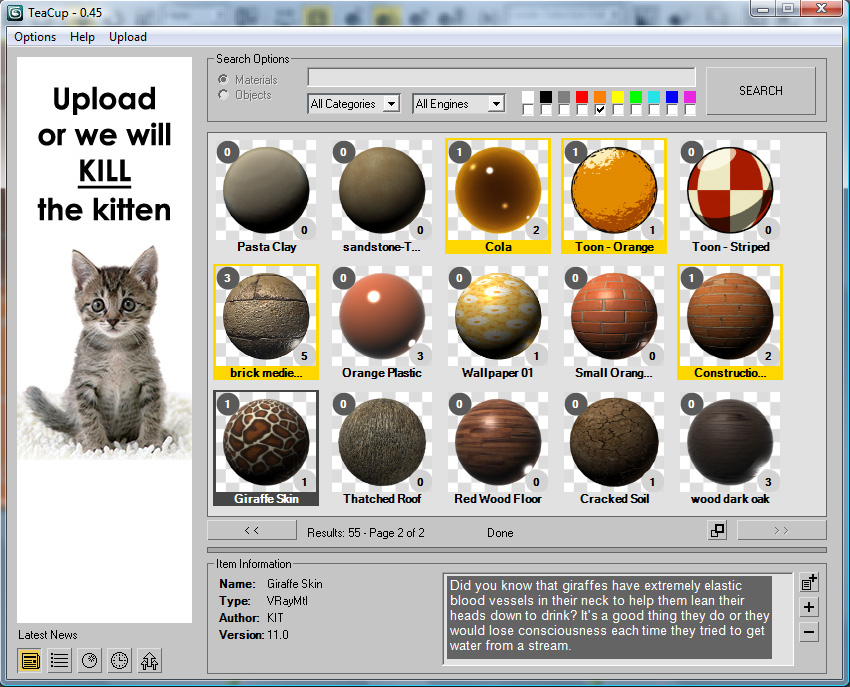
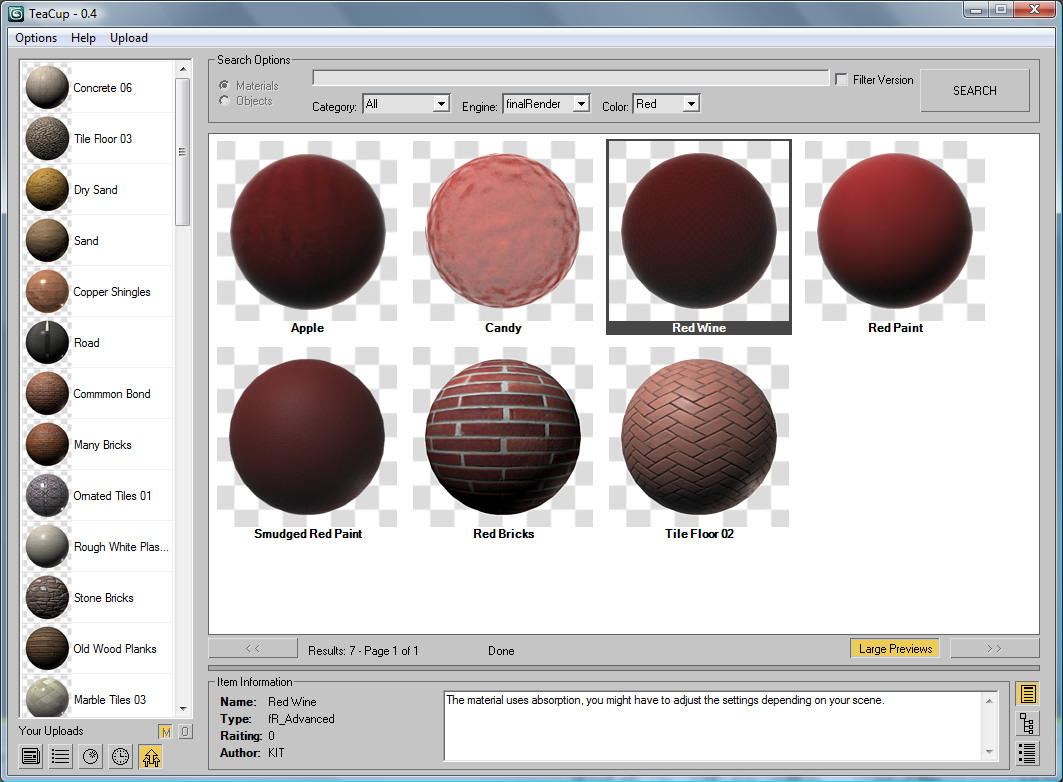
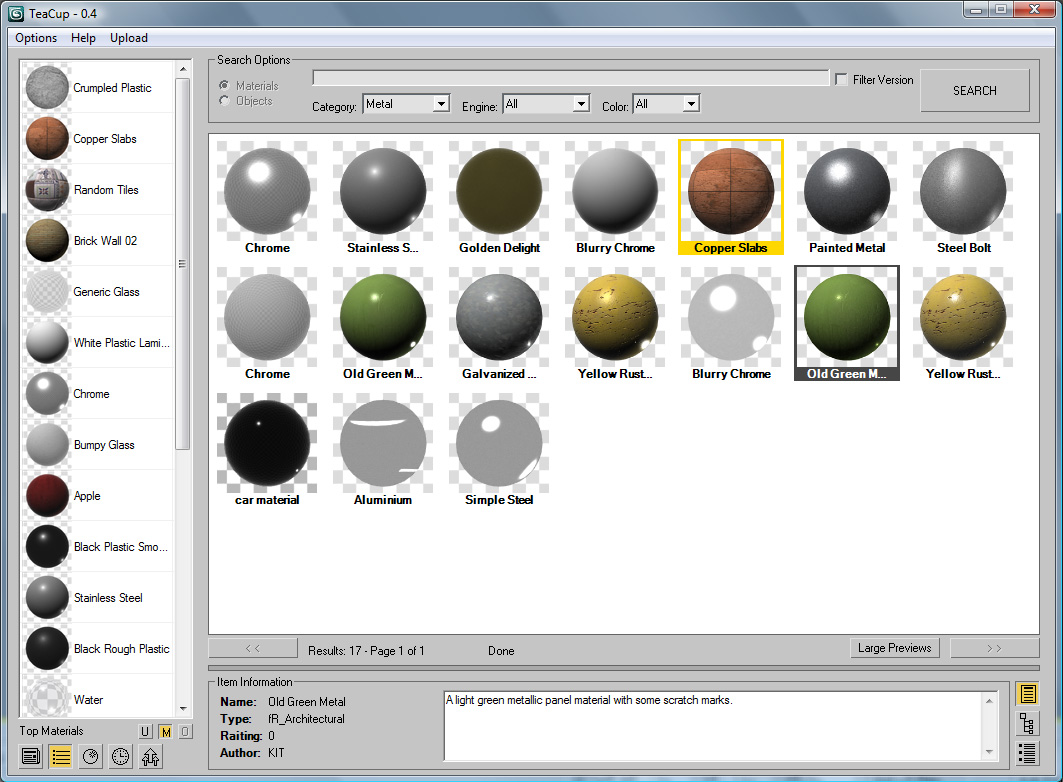
SEARCH OPTIONS: At the top of the panel you will see all the controls used for searching the database. You can filter the results depending on your needs.

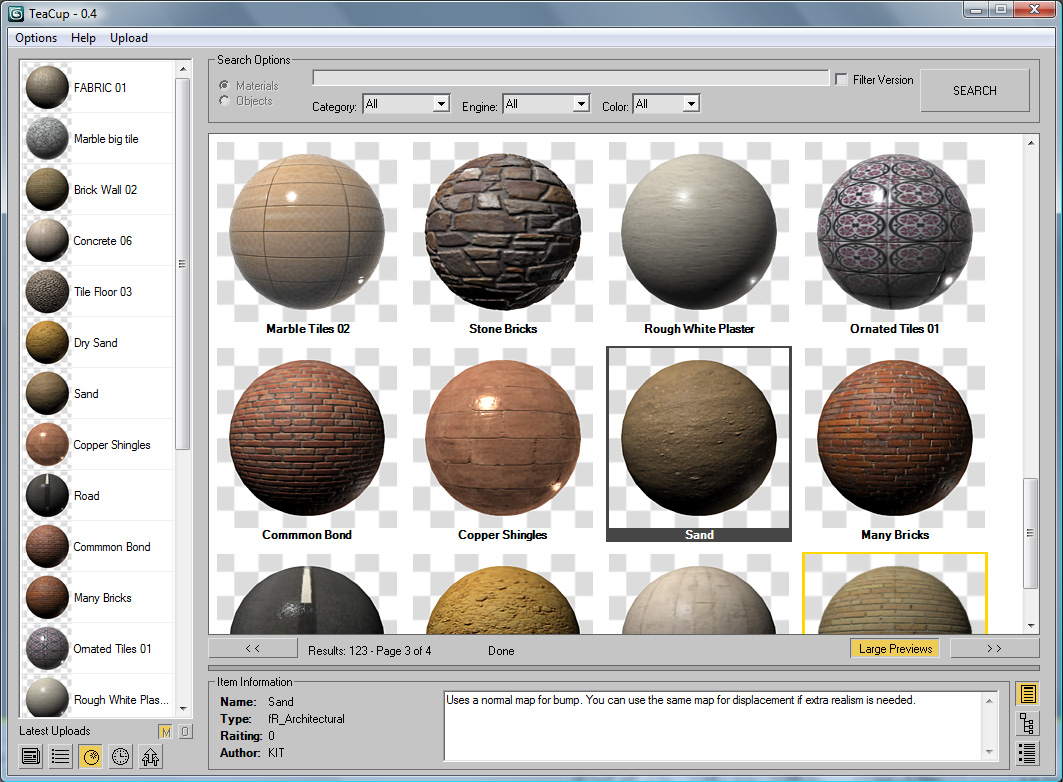
SEARCH RESULTS: The big white box will display the search results after a search has been started. From here you can select any item and either apply it to your scene. Right clicking an item reveals some extra options.

INFO PANEL: The bottom section displays info on the selected item in the search results. Using the buttons on the bottom right you can see the general info, the item details, or the comments and rating for the chosen item.

NEWS & RANKING: The section on the left can be used to see the latest info on TeaCup, check the ranking, see the latest uploads, check your download history or quickly see the assets you have uploaded.


+HOW DO I INSTALL IT?

On this page you will find the TeaCup installer inside a rar file, after downloading and executing it, all you have to do is follow the instructions (make sure you choose the 3d Studio folder!). Once this is done, run 3d Studio and go to Customize>Customize User Interface. Now find the TeaCup category, and either add a button to a toolbar (in the Toolbars tab) or to create a keyboard shortcut (on the Keyboard tab). All done!


+ANYTHING ELSE?

Yes, TeaCup is still growing, so not everything is done. For instance sharing Meshes is not done yet. And you might find some bugs or things that just don't work like you'd expect. Feel free to comment here or email us at mbrunetta@gmail.com if that happens. And also, if you use the tool, make sure you share as much as you can!


DOWNLOAD LINK: http://www.scriptspot.com/files/Install_TeaCup_0.45.rar
 

Additional Info

------------ VERSION 0.45 ------------ This release of TeaCup is aimed at polishing up the interface and "completing" the material sharing system with a few features that where missing on the last release. Most notably you will see that the info panel at the bottom has been polished up: now it will display the description and comments together on the same box, and it's now easier to vote and comment. It's also now possible to edit and delete uploaded materials. Be right clicking an item on the search results, or the My Uploads list, you can enter the edit window and modify or remove the material from the database. Finally you will also see that search results now have two small numbers on the edges. The one in the top left is the material's rating, while the one on the bottom left displays the amount of times the material has been downloaded. Here's the full list of changes: -FIXED: A bug in the function that finds the material's average color that resulted in some materials being labeled incorrectly -FIXED: TeaCup now check if the maps in the materials use Real World Scale, and creates the preview accordingly (the sphere's radius is 1m btw) -FIXED: Slightly improved the behavior of the resize bar between search results panel and item info panel -FIXED: Distributed Render is temporarily turned off when rendering previews in VRay, finalRender and Mental Ray. -FIXED: "Assign Material to Selection" and "Send to Material Editor" options in the material ranking now work correctly -FIXED: Improved the Prev and Next Page button's behavior so they are no longer affected by changes to the search options -FIXED: A bug in MAX 2010 kept TeaCup from correctly reassigning bitmap paths after downloading a material -ADDED: Search results display ranking on the top left -ADDED: Items on Top Materials, Latest Materials and My Uploads lists display ranking on the top left -ADDED: Pressing the return key while the focus in on the input text control begins a database search -ADDED: Refresh Preview button to the Upload Material rollout -ADDED: TeaCup includes material bitmaps using the BitmapHDR class when uploading -ADDED: Users can now edit the properties and previews on already uploaded materials -ADDED: Comments are now cached after being downloaded -ADDED: Selecting an item from the Ranking, Latest, History or My Uploads lists displays the item's info in the Item Information panel -ADDED: Double clicking an user name on the user ranking retrives the user's materials -ADDED: Double clicking a material on the material assigns that material to the current selection -ADDED: Items on the download history list remain after closing the TeaCup window (within the same MAX session) -ADDED: Vray gamma options are disabled when rendering previews -CHANGED: Restructured code to make it easier to read and faster loading -CHANGED: Small redesign of the Search Options GUI -CHANGED: Redesigned the Item Info panel. Description and comments are now displayed together -CHANGED: Control background and text color now take into acount 3D Studio GUI settings -CHANGED: Minor GUI improvements
Videos
Attachments

Tags: Objects, materials, asset, sharing, database, online, upload, download, asset sharing, meshes

Comments (63)

Marco Brunetta · 2013-04-15

Hum, correct me if I'm wrong, but I don't think there's a 3d Studio version for Linux, so no...

3delbrus · 2011-07-26

Thank that have answered! It is impossible to be connected TeaCup. My actions. 1 Has established скрипт. 2 In 3д the move has opened TeaCup. 3 Create Account has registered. 4 E-Mail прошол acknowledgement(confirmation). 5 3д the move - TeaCup - Confiquration - User info - Email is - Password is. I can not be connected ERROR 401. The help! Can because I from Russia?

Marco Brunetta · 2011-08-01

Well if you used russian characters I'd immmagine it's possible, however I'm not sure.

Marco Brunetta · 2011-07-25

Well the answer is the same: make sure you registred correctly without using any strange characters or spaces, and double check the user and password is correctly setup. If this fails try registering again. If that ALSO fails send me an email. Good luck.

Help!!

3delbrus · 2011-07-25

The help error 401 Beforehand thank!

Marco Brunetta · 2010-08-30

Hey guys, sorry for the delay in answering.

@mannybmanago:
Sorry but no. For different reasons we just don't have the time right now to keep updating this project. Real life can be a bitch some times =/. If and when we can give this another whack I'll be sure to let you guys know. The database should keep working normally however since it's hosted by Google.

@aselim01:
The register process can sometimes be a bit stupid and will occasionally confirm a registration that just didn't work. I'd recommend you try registering again making sure you don't have any spaces or strange characters in your email or password. If it still doesn't work feel free to drop me a line.

aselim01 · 2010-08-29

I have recently registered with tea cup and have followed the directions provided.

I keep getting an error message..."runtime error:donet runtime exemption.the remote server returned an error: 401 unauthorized"

Can anyone help me fix this problem

Thanks

mannybmanago · 2010-08-14

Hello,

Any update on running this through proxy server?

Regards,
Manny

manvelarz · 2010-06-04

Thanks for answer. I remembered my password . It's a good idea have the option for password recover.

manvelarz · 2010-06-04

hello Marco.
I reinstalled my pc and can't access to my acount of Teacup
I not sure what i remember my password correctly ( "error 401 : Unautorized"), have you a any sistem for forgotten passwords.
Thank You

Attachments

Marco Brunetta · 2010-06-04

Hi, there is no password recovery in place for now (and the system is set up so that even I can't get the password). What I can do is delete you user account and let you re-register if you wish to keep your username.

Marco Brunetta · 2010-04-06

We started to work on it, but it turned out to be harder than we expected. I'll post it as soon as we got it working.

mannybmanago · 2010-04-06

Any news with the proxy?

jinj · 2010-03-24

hi marco...
sorry but I can't say nice script ..... because I can't connect to server.
I create my new account.... I follow the link from email to activate account... but
an dotnet error pop up any time I push the search botton:
--runtime error: dotnet runtime exception: Error remote server:(401)no authorization
3ds max have access to internet, I installed tea-cup on max 2010
thank's for any help

Marco Brunetta · 2010-03-22

@othoap:
hehe thanks! hopefully future versions will work on your system too

@Track:
Good to hear! =D

Also, about half-way done with the proxy configuration options. Just have to add the options to the configuration panel and do some testing. Should be done this week.

mannybmanago · 2010-03-22

Thanks a lot for fixing the proxy issue, it will be of great help for everyone who works behind the proxy and hopefully more uploads of materials can be shared.

Kstudio · 2010-03-21

Hello,Marco!
With latest version of TeaCup all other DotNet scripts work is fine!

othoap · 2010-12-01

;

othoap · 2010-03-18

Sorry no .ini file anywhere in the installed TeaCup Folder. I even made a different folder to due a new install.

Marco Brunetta · 2010-03-18

If you move the window, close it and then re-open it, does it "remember" the previous location?

Marco Brunetta · 2010-03-17

@othoap:
On the TeaCup folder there should be a TeaCup.ini file. If you open it you can manually set the values for the window's dimension and position.

@mannybmanago:
We think we've found a way of doing it, but we still have to implement it. Will post when it's done.

othoap · 2010-12-01

;

othoap · 2010-03-17

Marco,

I followed your instruction, and double check my work. Yes now I get the "Teacup" category, BUT! When I click the tool bar icon I get a small dialog box that states "User name and password are incorrectly setup. Please check the setup". But no browser window if I click "OK".

I remember reading some ware I would need to register from with in the browser interface - Right?

biscuits? FYI Love the icon design

Marco Brunetta · 2010-03-15

@mannybmanago:
Yes, I've managed to try TeaCup on a system behind a proxy, and indeed it seems like it's not working. We'll try to do a small update to include proxy settings in the configuration options.

@othoap:

Most of the TeaCup files should go to 3d Studio Folder\Scripts\TeaCup\. The only exceptions are TeaCup-LOADER.ms that should go to 3d Studio Folder\Scripts\Startup\, and the files TeaCup_16i.bmp, TeaCup_16a.bmp, TeaCup_24i.bmp and TeaCup_24a.bmp that go to 3d Studio Folder\ui\Icons\

Milk and two sugars please. =D

mannybmanago · 2010-03-17

Any update on running TeaCup behind the proxy?

othoap · 2010-12-01

;

othoap · 2010-03-13

Running Max2010 on win7pro: Has anyone installed, only to fine it did NOT install? I did a search of the max program folder and NO teacup!

Marco Brunetta · 2010-03-13

Haven't tried the installer on win7 myself, but I see no reason why it shouldn't work. You can try installing to a different "temp" folder instead of the MAX folder to see if the files are being extracted ok. If you still have problems I can send you the files with instructions on how to do a manual install.

mannybmanago · 2010-03-07

Dear Marco,

I am trying to run Teacup in our office but have an error (below) when I try to search for materials.

"--Runtime error:dotNet runtime error: The remote server returned and error: (407) Proxy Authentication Required."

What should I do? I can access the internet with our proxy. No authentication or login ask me when I try to run the program and search.

Regards,
Manny

Marco Brunetta · 2010-03-08

Supposedly, TeaCup should inherit proxy settings from your Internet Explorer Local Area Network settings. Not having a proxy I have not really tested this. We'll work on adding real proxy support for the next version, since after all nobody really likes IE =P.

mannybmanago · 2010-03-14

My proxy setting is fine with IE and other web browsers, somehow TeaCup is not inheriting or authenticating the proxy.

48design · 2010-03-01

poor kitten... ;o)

Marco Brunetta · 2010-03-02

Hehe... there's actually been a notable increase in uploads since we uploaded the kitten banner =P

Also I've changed the installer with a fixed version, so anyone who was having trouble downloading materials, show re-install. Sorry for the inconvenience.

draging · 2010-02-28

if my computer error, i will kill the kitten ... heheh

great script

thanks

veneta · 2010-02-28

Haha..., strangely sense of humor but its funny... and don't kill the kitten :-)

Marco Brunetta · 2010-02-14

I'm getting no error here.
I run TeaCup, go to page 3, run your script and everything works fine, no hangs or error messages.

Also the lines that are being highlighted don't belong to my script, and it shouldn't show any highlighted lines anyways, as it's encrypted.

Marco Brunetta · 2010-02-28

Version 0.45 is out...
Next up, mesh sharing!

Kstudio · 2010-02-13

Thanks

Nice utility, Marco

But i have big troubles

1.I open "Tea Cup"

2.Press "Search" button

3.Go to third page

And then i start any other dotNet script the 3ds Max is hang!

P.S. 3dsMax 2009x64

Marco Brunetta · 2010-02-13

That's odd, does it only happen on the third page? Could you send me the script you run when max hangs?

curmeiste · 2010-01-19

thanks it suits me very well

Marco Brunetta · 2010-01-26

Hehe I'm glad =D

Marco Brunetta · 2010-02-12

I've added a help file to the attachments above. It's a bit bare right now, but I'll make it into a nice html page with images and whatnot soon. We are almost ready for the next release, here's what TeaCup is looking like now:

Marco Brunetta · 2010-01-14

I'm attaching the fix I uploaded for harumscarum, since apparently it got lost in the website update. Future versions should work fine.

Install the script using the installer, if you have any problems like the one reported below, replace TeaCup.mse with the one in the attachments. Also make sure you are running Windows as administrator.

Attachments

danpool · 2009-12-21

Very original and useful concept. This could be a totally new way of working and colaberating. A new paradigm.

Are you in anyway interested in allowing the connection to databases on other websites/servers or releasing the server side scripts?

Congratulations and thank you for your work. I hope this is as much a boon to the community as it appears it will be.

edit: I just discovered a small issue: I uploaded a MentalRay material, and the preview generated doesn't represent the material very well. What was a brick pattern ended up looking like a solid (dark) color. I believe it is due to enabling "Use Real-World Scale" on a Tiles procedural map. If you download the material, it shows up correctly in the material editor and in renders.

edit2: It appears the major issue was having "Use Real-World Scale" enabled, however the previews are still quite dark.

Marco Brunetta · 2009-12-21

Thanks! Those are very kind words. Putting together a way for everyone to be able to share there assets quickly and easily was exactly our intention.

As for connecting to other databases, yes, we'd like to be able to do that very much, however I'm not entirely sure if the owners would agree to that. The problem is that those webpages subsist thanks to the traffic they receive from people downloading materials/meshes/whatever, which would be reduced if those assets where to be found on TeaCup... so it might be tricky.

On the plus side we were contacted by the owner of MR Materials recently, to see if we could work something out... so there might still be hope. =P

On a side note, I noticed you uploaded a procedural brick and the preview did not look right. The problem is that you used the "Real World Scale" option. Right now, when TeaCup renders the preview sphere, it uses a sphere with no Real World Scale, to keep "regular" materials from looking wrong. I'm planning to make the preview render a bit smarter, so it will render using the RWS option when appropriate. MAX has so many options, variables and material types that some times little issues like these arise... sorry.

Marco Brunetta · 2009-12-03

I included a simple video showing how easy it is to access the material database.

takada · 2009-12-02

thanks ^^

holycause · 2009-11-30

nice script, I ll try it asap

mannybmanago · 2009-11-29

Thanks for this great script.  I hope there will be more materials uploaded soon.

Manny

harumscarum · 2009-11-29

no success with it :( 

harumscarum · 2009-11-29

not working in 2009 under XP64 


Marco Brunetta · 2009-11-29

Try replacing TeaCup.mse with the one attached. This uses a different background worker class. The SynchronizingBackgroundWorker SHOULD be available in max2009 and up, maybe your .net is not up to date?

In any case, let me know if this works for you.

Attachments

kurson · 2009-11-28

amazing!!

animo luego existo

Anubis · 2009-09-20

I would not say that anyone would put malicious code deliberate. Years ago I using free scripts without MXS knowledge. Now I always first read the code, and I'm sure now, so most of the data's losses are occur over time, not in the moment. Maybe if I had seen a more complete open codes from you, now I would know your code style and I'll know what to expect. However, dotNet is enough risk in itself. Never mind. Go ahead.

regards, Anubis

Anubis · 2009-09-16

Hi Marco, did you plan to add web access through web browser? I like the base idea, but as other of your scripts I havn't test it because beta testing encrypted files is too risky for me. Thanks

Marco Brunetta · 2009-09-17

Maybe sometime in the future but not at the moment. I can understand your doubts, however I assure you it's been tested by several people and their computers are still intact and there is no malicious code included.

I have every intention to open as much of the code as possible once it's correctly organized and polished. However is't likely that some chunks will remain encrypted to limit "improper" use of the database.

Marco Brunetta · 2009-09-16

finalRender actually...since that's my engine of choice. And please go ahead, let me know if you have any issues with it. Make sure you set the material editor render engine to vray, or else the previews will look wrong. I'll fix this on a future release.

I have man plans for this, hopefully if we manage to get enough people on board it will become a great community building tool.

peprgb · 2009-09-16

Great!! this is the cool thing you were talking about ;)

Really nice, but the are only fry render materials, arent?¿ so i am going to upload Vray ones!!

best regards

Marco Brunetta · 2009-09-16

Materials that are not compatible with your 3d Studio install, either because you don't have the necessary plugin or were created with a newer version of MAX will be displayed with a red border.