The Man Scene Lister
Switching scenes is just 1- click away..
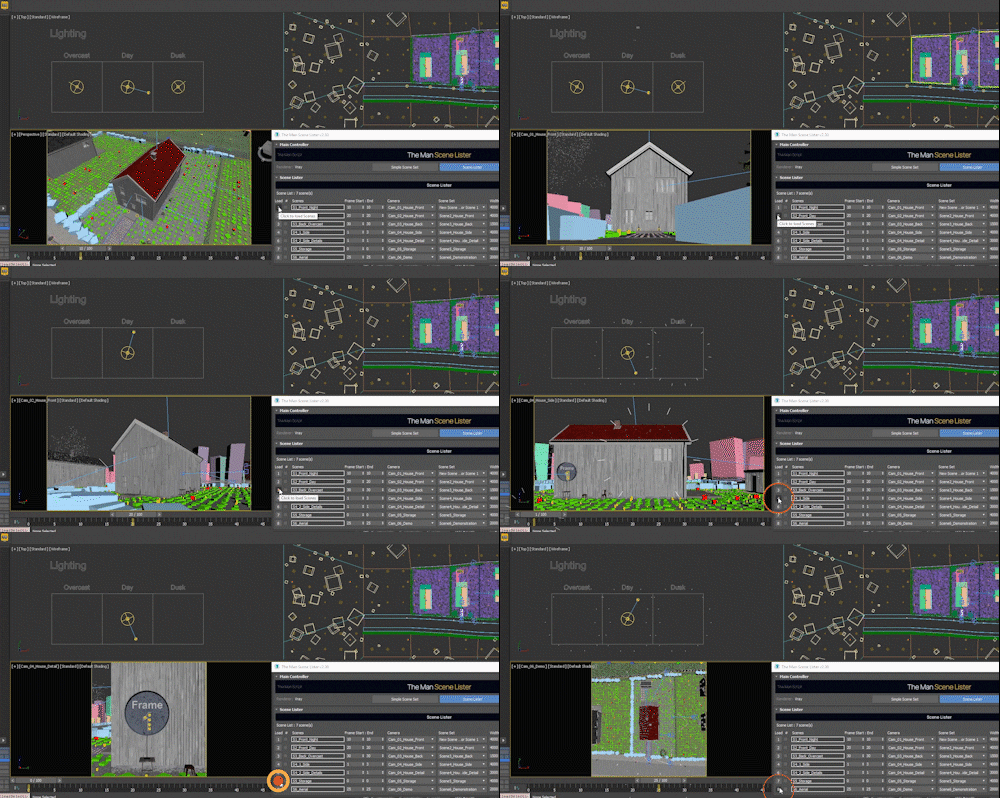

Scene Lister
Switching scenes have never been this easy!
Script
 By TheMan · 2019-10-05
Tags: manage, Batch Render, The Man, Scene Lister, Scene Loader
The Man Scene Lister
Switching scenes is just 1- click away..
Scene Lister
Switching scenes have never been this easy!
How to use:
1. Add a new scene by clicking '+' sign.
2. Add a scene name to the scene in the text box.
3. Set the Frame Number. If the Frame Start and Frame End are the same value, it will render still image, if not, the script will automatically switch to animation render.
4. Choose a camera
5. Choose a Scene Set (more on that in Youtube video below).
6. Set the Render Output.
7. Done! Ready to go. Hit the load button to load the scene (the left square button with a number).
8. Do you want more settings? check out the advance settings at the arrow button at the right of each scene. (Tutorial on that in the Youtube video below).
Note! The script runs significantly faster with the Render Settings dialog CLOSED
Features:
Things you might need to know:
Compatibility: 3Ds Max 2017+
The script is tested with 3Ds Max 2017, Vray 4.1, and Corona.
For other renderers, you'll enter the 'Experimental' mode, which means that everything is universal, It should work fine, however, if it doesn't, please email me the issue with some screenshot of the problem.
It hasn't been backtested with the previous version of 3Ds Max, so, no promise, it might work, but probably won't work.
Feedback:
Any issue using the script, bug, crash, please feel free to contact me directly at ManniiChannel@gmail.com
Credits:
The Man Scene Lister script is created entirely by me, TheMan.
Artwork used
- about by Dika Darma from the Noun Project
- rename by Kawalan Icon from the Noun Project
- Refresh by Gregor Cresnar from the Noun Project
- tools by Marie Van den Broeck from the Noun Project
- teapot by Creative Stall from the Noun Project
- mask by Travis Beckham from the Noun Project
- elements by Ralf Schmitzer from the Noun Project
Better!
tyler1988 · 2020-08-21
I used since v1
Back then, when I change the file name, script lose data.
You fixed it in this one, very good!
Oh nice!
TheMan · 2020-10-02
Thank you. Yes, I updated that part.
Glad you like it!
Thank You
tekilhax · 2020-07-10
It's working fine with Max 2019 and Vray 3.6 this is a really time saver!
Ah yes, Nice to know!
TheMan · 2020-07-15
You're welcome for the script and also thank you for telling me the version of 3ds max and vray that you're using. Good to know that it works fine :)
Amazing
moopreedee · 2020-07-01
This is a big time saver!
@moopreedee Thank you!
TheMan · 2020-07-06
I hope you have a good time using it.
Error?
dmitrybelonosov · 2020-06-29
Hello! An error occurs in 3ds max 2014: "-- Unknown property: Choogpr" in Label Control: Current Renderer Options". Is this normal? Should I close the window and work with the script?
@dmitrybelonosov
TheMan · 2020-06-29
Hello dmitrybelonosov, I suspect that the problem is that my script was written with some newer features that only exist on 3Ds Max 2017 and newer.
I don't think there's any other way to fix it other than updating 3Ds Max.
Error?
dmitrybelonosov · 2020-06-29
Hello! An error occurs in 3ds max 2014: "-- Unknown property: Choogpr" in Label Control: Current Renderer Options". Is this normal? Should I close the window and work with the script?
This is excellent....Can i request a feature?
short_cirkuit · 2020-06-28
This is fantastic - however i would like to request a feature that would make this perfect. That is if it could do the same thing it does, however with different MAX scene files... will that be possible?
@short_cirkuit Please explain a bit more
TheMan · 2020-06-29
@short_cirkuit
I'd like to help you, but I'm not entirely sure what you mean. Could you please explain more about that?
Do you mean that you want to do some batch render from many files?
short_cirkuit · 2020-06-29
yes precicely - batch render scenes from different scenes/files.....
@short_cirkuit
TheMan · 2020-07-01
That's definitely in the plan. When you use the script, it'll create the folder called '_TheManSceneLister'. Currently, you can just delete the folder, BUT, the point of it is that the script store data of the scenes in the INI file inside and the plan for the future is to pull those data from the INI, so that we can just order the render without even opening those files!
The idea is cool, but it's still far from finish. It's coming some day :)
Thank you for your interest.
Spacelord · 2020-01-24
Will there be any support for other renderers? Corona Fstorm? This looks very handy, I'm using Vexus at the moment and it can get complicated fast for what I need.
It's here!
TheMan · 2020-06-28
Yes, thank you for your comments. Corona support is here! moreover, There's the Experimental mode which is universal, so any renderers should be fine with it. Cheers!
Thank you!
dmitrybelonosov · 2019-11-07
Thank you very much! Your tool was very necessary!
You're welcome!
TheMan · 2019-11-18
@dmitrybelonosov
Have fun! if there's any feedback, please feel free to give it to me. :D