Two simple scripts for simplifying work with spline vertices.
-
Connect Two Vertices - connects two ending vertices with new segment.
-
Select First Vertex - selects first vertex in selected spline sub-object.
Script
By sergo · Credited author: Sergo Pogosyan · 2010-01-20
Two simple scripts for simplifying work with spline vertices.
Connect Two Vertices - connects two ending vertices with new segment.
Select First Vertex - selects first vertex in selected spline sub-object.
Unpack archive and run script install_tools.ms with the Maxscript -> Run Script command. This script installs two script that you could find in 'Sergo Pogosyan' category. Alternatively you can install script separately, by running each script with same command.
Tags: spline editing, vertex, vertices
 fox2sky · 2010-12-14
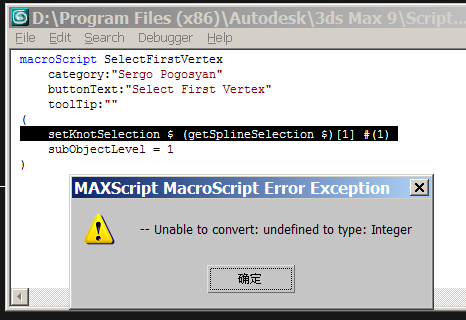
when i use "select first vertex" it show me an error ....why?
sergo · 2010-12-14
Make sure you have at least one spline sub-object selected.
When there is no spline selected script just does nothing without error.
Can you reproduce the error? If yes, please, describe the steps of the process so that I could get the same error message.
 Nafetsu · 2010-06-21
I tried your script "Connect two vertices", but only one of the two vertex weld properly. I tried to changed the threshold inside the script but without success...
By the way, very useful script, thanks and i let you know if i find from where came my problem.
veneta · 2010-01-24
Now works, thanks!
veneta · 2010-01-23
I cannot download the script... would you reupload? Thanks!
sergo · 2010-01-23
right click this link (similar to one given at the end of description) http://sergepogosyan.com/media/scripts/VertexTools/VertexTools.7z and choose save as command
sergo · 2010-01-20
install_tools.ms script fails. It doesn't copy scripts to the user's script folder. I will work on this to make some useful installer.
Now just run the scripts separately to install scripts correctly.
Sorry.