My collection scripts (more then 70) for 3dsMax version 7 to 2010. Some script need for install additional my plugins.
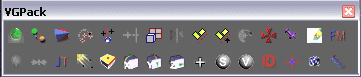
AVAILABLE SCRIPTS:
- Add icons: render scene for icons and add render bitmap to specific position of exist icons files
- Add Std Maps: show browse dialog for select image file, create bitmap texmap, add to diffuse slot and apply to selected object (if sub object state==0) or to selected faces
- Advanced rotate: rotate object about first click mouse point by angle between next two click mouse point
- Advansed outline: add AdvOutline modifier
- Align between points: align object between two mouse click points
- Align viewport from 3 points: create Grid help object, rotate the Grid object as X-axis - 1st to 2nd mouse click, Y-axis - 1st to 3nd mouse click, Z-axis look for you
- Aling to point: move object or sub-objects selected elements to mouse click by current viewport axis
- Angle point rotate: rotate object or sub-objects selected elements by value
- AsimmetricScaleShamfer: add AssimScaleChamfer modifier
- Attach Selection: attach selection object to one, condicate materials
- Change texture down
- Change texture up
- Collapse node: collapse selected object, like as X-Form modifier but more functionally and condensate materials
- Collapse to mesh: collapse and convert object to mesh
- Collect Maps:
- Copy materialface: copy material from picked face to selected face
- Create instanses to selection transform
- Create Plane from bitmap: create Plane from brouse bitmap where you setup dimension pixels/maxunits and set size of plane by image aspect
- Create Plane from Diffuse slot: create Plane from diffuse textere slot where you setup dimension pixels/maxunits and set size of plane by image aspect
- CutPolygons: find polygon intersection for selected polygons and cut both by line intersection
- Detach and instance: detach by elements, find similar elements and replace its as instances
- Discrete object position by 3DPoint
- Edge Chamfer-Extrude: add EdgeChEx modifier
- EditMaps: start Photoshop program and open textures for selected faces or all in scene if not any selecded
- Free bitmap memory
- Hide layer by selected object
- IESView: preview photometric lights
- Interactive slice: see comments in VGInteractiveSlice.ms
- Join terrains:
- Layer on/off box mode
- Lights control: setup some parameters for selected lights objects
- Mapping beton:
- Mapping selection faces: add PolygonMap modifier for selecded object
- MegaBevel: add PolygonMap modifier for selecded object
- Move to dist: move object or sub-objects selected elements by vector of two mouse clicks by current viewport axis
- MultyConvertor maps: convert ANY materials or texture maps to any materials or texture maps with additional parameters or funtions. Needs data base for convertios. You can setup link same salf.
- Num faces: show num faces in selected object
- Open texture in Asset Browser
- Put object to terrain
- Random mapping
- Remove dublicate materials
- Remove dublicate materials by name
- Remove spline knot tangent
- Rename materials and objects, copy bitmaps (modeling)
- Replace bitmaps
- Rotate 90x
- Rotate 90y
- Rotate 90z
- SeeThrough
- Select bad verts: select vert in poly object where point have only two edges
- Select Horizontal faces
- Select instances objects
- Select open verts
- Set active grid and view top
- Set blur: set blur parameter of texture map to 0.01
- Set default StdMat: add standard material to selected object
- Set default VrayMat: add Vray material to selected object
- Set Face Id=1
- Set fallof meddit slots
- Set instance materials
- Set instance position
- Set pivot to point: set pivot object position to muse click
- Set random ID to element
- Set random wire color multimaterial slot
- Set standard meddit slots
- Set verts Z position
- Set vray meddit slots
- Show Diffuse Maps
- Show only selected layer
- Triangulation functions: show triangulate functions dialog
- Unhide all layers
- VGCollectMaps
- VGDistance
- VGExpertMode
- VGSetZPointPosByTerrain
- Zoom Perspective
- Add icons: render scene for icons and add render bitmap to specific position of exist icons files
- Add Std Maps: show browse dialog for select image file, create bitmap texmap, add to diffuse slot and apply to selected object (if sub object state==0) or to selected faces
- Advanced rotate: rotate object about first click mouse point by angle between next two click mouse point
- Advansed outline: add AdvOutline modifier
- Align between points: align object between two mouse click points
- Align viewport from 3 points: create Grid help object, rotate the Grid object as X-axis - 1st to 2nd mouse click, Y-axis - 1st to 3nd mouse click, Z-axis look for you
- Aling to point: move object or sub-objects selected elements to mouse click by current viewport axis
- Angle point rotate: rotate object or sub-objects selected elements by value
- AsimmetricScaleShamfer: add AssimScaleChamfer modifier
- Attach Selection: attach selection object to one, condicate materials
- Change texture down
- Change texture up
- Collapse node: collapse selected object, like as X-Form modifier but more functionally and condensate materials
- Collapse to mesh: collapse and convert object to mesh
- Collect Maps:
- Copy materialface: copy material from picked face to selected face
- Create instanses to selection transform
- Create Plane from bitmap: create Plane from brouse bitmap where you setup dimension pixels/maxunits and set size of plane by image aspect
- Create Plane from Diffuse slot: create Plane from diffuse textere slot where you setup dimension pixels/maxunits and set size of plane by image aspect
- CutPolygons: find polygon intersection for selected polygons and cut both by line intersection
- Detach and instance: detach by elements, find similar elements and replace its as instances
- Discrete object position by 3DPoint
- Edge Chamfer-Extrude: add EdgeChEx modifier
- EditMaps: start Photoshop program and open textures for selected faces or all in scene if not any selecded
- Free bitmap memory
- Hide layer by selected object
- IESView: preview photometric lights
- Interactive slice: see comments in VGInteractiveSlice.ms
- Join terrains:
- Layer on/off box mode
- Lights control: setup some parameters for selected lights objects
- Mapping beton:
- Mapping selection faces: add PolygonMap modifier for selecded object
- MegaBevel: add PolygonMap modifier for selecded object
- Move to dist: move object or sub-objects selected elements by vector of two mouse clicks by current viewport axis
- MultyConvertor maps: convert ANY materials or texture maps to any materials or texture maps with additional parameters or funtions. Needs data base for convertios. You can setup link same salf.
- Num faces: show num faces in selected object
- Open texture in Asset Browser
- Put object to terrain
- Random mapping
- Remove dublicate materials
- Remove dublicate materials by name
- Remove spline knot tangent
- Rename materials and objects, copy bitmaps (modeling)
- Replace bitmaps
- Rotate 90x
- Rotate 90y
- Rotate 90z
- SeeThrough
- Select bad verts: select vert in poly object where point have only two edges
- Select Horizontal faces
- Select instances objects
- Select open verts
- Set active grid and view top
- Set blur: set blur parameter of texture map to 0.01
- Set default StdMat: add standard material to selected object
- Set default VrayMat: add Vray material to selected object
- Set Face Id=1
- Set fallof meddit slots
- Set instance materials
- Set instance position
- Set pivot to point: set pivot object position to muse click
- Set random ID to element
- Set random wire color multimaterial slot
- Set standard meddit slots
- Set verts Z position
- Set vray meddit slots
- Show Diffuse Maps
- Show only selected layer
- Triangulation functions: show triangulate functions dialog
- Unhide all layers
- VGCollectMaps
- VGDistance
- VGExpertMode
- VGSetZPointPosByTerrain
- Zoom Perspective
P.S. Sorry for small info and my English, but write full help for me it is more difficult then write any script :-)
 Kstudio · 2010-02-01
 frnkcrnk · 2009-08-28
 Vitus · 2009-07-27