ScriptSpot

Script

Viewport Align

By real08121985 · Credited author: Andreas Meissner · 2012-07-12

Date updated
2012-07-12
Votes
20
Description

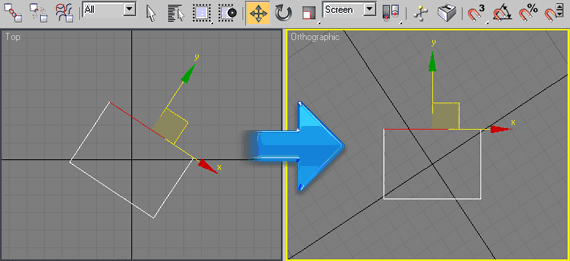
Rotates your top view to your selection. Go to top view, select 1 edge or 2 verts, run the script (and switch to coordinate system "screen" if you like). Click once to align horizontal, click again to align vertical. Good for architectural modeling with non-orthogonal walls.


Additional Info

Drag and drop the file into the viewport for install. Category: # Scripts Should work with Editable Poly Object, Edit Poly Modifier, Editable Mesh Object, Edit Mesh Modifier.
Attachments
Comments (24)

sampei · 2021-02-25

this is really great, thanks for sharing!

Awesome!

Bare · 2021-01-14

This is genious!

Thank you

todor · 2020-01-04

Very helpful script! Thank you ! :)

Nancy Moreno · 2020-01-03

Excellent!

Erwinfernando · 2017-12-04

Excelente gracias

asymptote · 2017-07-07

Ahahah, that's very cool, love the animated rotate

not working

tomy3d · 2017-03-27

Would be an excellent option, please could you

real08121985

n0name · 2013-12-20

Very useful script. Please update.

Nik · 2013-01-11

Works only in the top :(

kimarotta · 2012-08-24

Very nice script... +1... but try add work with spline...

thanks man...

k2000 · 2012-08-24

+1

yes, real08121985 please add more functionality.

we need to be able to draw using this new aligned view 

k2000 · 2012-08-23

problems...
I aligned the view using the script - good!
But it made no sense - all new geometry I'm trying to make (box, etc) is glued to original coordinate system. View rotation doesn't help... (((

+1

barigazy · 2012-08-23

Hi k2000,
this script don't roteate default max grid, only active view.
This may be new to-do task for the author.
For this you can use grid helper and align it to selected edge (position and orientation)when view is rotated.
By the way, this is very nice tool.
Thanks!

tangjunqiangqq · 2012-07-20

max9 can not use this plug-in hope of change to change it Thank you

real08121985 · 2012-07-20

Not possible, the necessary maxscript function is only available in 3ds Max 2008 and higher.


<boolean>viewport.rotate <quat> [center:<Point3>] 
Available in 3ds Max 2008 and higher. 

Ačiū!

bronius · 2012-07-16

Thank You! Спасибо! Danke! Gratias!

nice script!

harumscarum · 2012-07-16

very useful tool, here i have some suggestions:
1 - switch to Screen coordinates automatically on script run
2 - support for edit / editable spline if it possible
3 - 3rd click - revert from Orthogonal view

thanks a lot

Thanks

n0name · 2012-07-16

Спасибо. Очень полезный скрипт.

real08121985 · 2012-07-16

пожалуйста

Cool script.

milie · 2012-07-13

One suggestion, or better yet, feature:

It is possible to rotate the object to world space by selecting the rotated face? Like in your example the face would point to +Y. If yes, could you make a script that does that? :)

Just a thought :)

That takes the idea out of

real08121985 · 2012-07-13

I think the 3ds max normal align tool is doing that.

NikkoN · 2012-07-13

Hi. Thanks for the script. Have a question:
At me the script only works in a top view of the ..
Is it possible to make it work in other orthographic species?
Thanks

real08121985 · 2012-07-13

I'm sure that is possible, but did not had the time yet to look into other viewports.

kimarotta · 2012-07-12

Good idea... thanks for share....