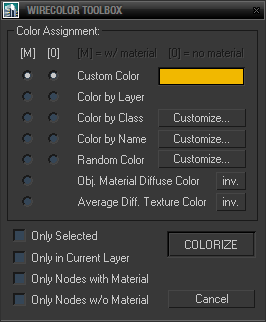
Simple toolbox for working with wirecolors based on various criteria including material diffuse color, average texture color and filters for node names and classes (for nodes wildcards and hierarchies are supported and encouraged).
Script
 By Swordslayer · 2010-11-07
Simple toolbox for working with wirecolors based on various criteria including material diffuse color, average texture color and filters for node names and classes (for nodes wildcards and hierarchies are supported and encouraged).
Useful mainly for working with large scenes when you for example turn off material display in viewport. Of course you can use it as kind of a replacement for selection sets as well, feel free to use it in any way you want. Let me know if you find it useful.

Limitations: Getting average texturemap colors doesn't work with multisubobject materials, procedural and composite maps. I took it away because of some speed issues I've experienced. If you really need to have it there, all it takes is just rendering the 1x1 px texture and getting its color – for multisub you'd obviously have to render it for each object separately.
Installation: Drop the MZP file in viewport. After doing that, you can always go to the Maxscript -> Run Script... and run wireclr_toolbox.ms. If you instead want to put it in toolbar, menu or quadmenu, download th file wireclr.mcr and either drop it in viewport or run it once. In Customize dialog you will find the script in category Advanced.
v0.02b: Repaired hierarchies not working properly. Corrected one stupid omission in code resulting in inability to edit Name Filters directly.
v0.03b: Added automatic settings saving on window close.
Tags: layers, Color, texture, diffuse, WireColor, scripts
The script is very useful
 nnq2603 · 2016-01-05
Easily belongs top 5 most useful scripts regarding 3ds max scene management. Make life easier.
Great work! Thanks for sharing.
error
anajarus · 2015-01-06
Hi there,
thanks for the script, it is very helpul! I used it in some other Workstation, and now i'm trying to use it again: installation process went ok, but went i try to customize the names in the COLOR BY NAME function i get this message: unknown property: “count“ in undefined
could you help me with that?
thanks
Ana
 jsrocha · 2010-11-19
hey man, thanks for the script, is very good. Is there a way to make the "only selected" option on by default. I tried to find this option in the code, but i could not do it...
thanks,
Jsrocha - Brasil
Swordslayer · 2010-11-20
Sure, why not. I'll add .ini settings for the whole dialog and post the updated version asap. Glad that you like it.
Regards
Swordslayer
Update
Swordslayer · 2010-11-20
Jsrocha: Updated the script, all the settings should be now stored.
Plain MS
 JokerMartini · 2010-11-17
Hey SwordSlayer you mentioned on the Autodesk forums that the play .ms for this script would be available to look at here on this page and it is not here?
Could you post the .ms please?
Thanks
JokerMartini
Swordslayer · 2010-11-20
Hi, just unpack the .mzp file (every .mzp file is just a zip file with other stuff inside, sometimes .ms, sometimes encrypted .mse). Hope it will help.
Regards
Swordslayer