Hi all,
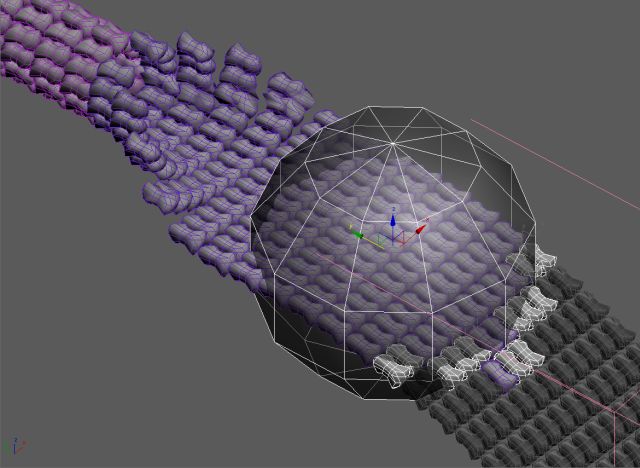
Is there a way to connect an object´s transform (M/R/S)to other object´s visibility and modifiers? In the attached image, a sphere moves (-Y axis)in an array of objects. 1- As it touches each object, they became visible (those in white). 2- Then, some rows behind, each row begins to fold into a ring (those in magenta). In 1-, the simple (and draft) way is to link the sphere movement to each object, by comparing their Y position (in natural language: if Y of sphere is greather than obj Y, then obj is visible). This is without checking surface intersections ofcourse, but never used script before and seems I cannot script even that simple rule.
In 2-, all the row has a parametric bend modifier that could be set in the same way (as the sphere passes), but for now is animated by hand. So, I thanks in advance those who are kind enough to spare some time and help me in this matters (and excuse my english).
Thanks,
Forum topic · General Scripting
Movement controls visibility
 By maxmad · 2012-06-15
Description
Attachments
- sceenshot1.jpg — sceenshot1.jpg43 KB
Comments (15)
animate bend modifier
 jos · 2012-06-22
I have finished the script to animate the bend modifiers. Its the same as the unhide script, but with the bend modifiers. Can you send me in private, this is a script that will only works in your scene. So we can handle this in private.
Attachments
- bendbymovement.ms — bendbymovement.ms5.3 KB
 JokerMartini · 2012-06-21
cool concept here. You should share what your final product is when your finished.
new update
jos · 2012-06-19
the error should be fixed now. if appendIfUnique is not working on your system it doesnt check for duplicates.
It also works a hundred times faster.
you can delete the visibility animation, so you can change it easily.
thank you barigazi for the tips, I've add them
I have tested with your file and it works. If I find the time I'll look make a version that animates the bend modifiers.
Attachments
- unhidebymovement.ms — unhidebymovement.ms5.1 KB
Works like a charm!
maxmad · 2012-06-19
Jos, U rock man!
Thank you very much! Simple UI, efficient, and spare several minutes of tweaking. (Where is the worship emoticon when u need it?) ^:)^
kimarotta · 2012-06-18
good job guys ...
I'll give a study on top of the script that you guys wrote ...
This is also interesting example
 barigazy · 2012-06-16
This is also interestin example by Bobo
Maybe you'll get some idea for the next update
delete objects
with redraw off
(
theBox = Box width:10 height:10 length:10 wirecolor:(random black white)
for y = 0 to 9 do for x = 0 to 9 do ((copy theBox).pos = [20*x, 20*y, 0])
delete theBox
)
max views redraw
cb = Sphere name:(uniquename "CtrlBall")radius:100.0 pos:($Box*.center+[0,0,100]) isSelected:on xray:on
for o in $Box* do
(
o.wirecolor=(random black white)
o.height.controller = float_script()
txt = "dependsOn $CtrlBall001.pos.controller\n"
txt +="theInt = IntersectRay $CtrlBall001 (Ray $" + o.name +".pos [0,0,1])\n"
txt +="if theInt != undefined then \n"
txt +="if (theDist = length (theInt.pos - $" + o.name +".pos)) > 100 then 100 else theDist\n"
txt +="else 100\n"
o.height.controller.script = txt
)
fade in
jos · 2012-06-16
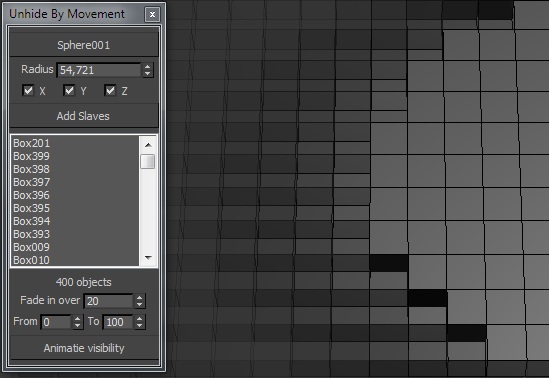
"Fade in over .. frames" added. this is the number of frames it takes before it's totally visible. So you can create a fade-in effect.
So how it works:
- pick control object. can be any object. If you pick a sphere the radius will be autotaken
- set radius.
- choose axes
- choose over how much frames it has to fade in. If you dont want this, just set this to 0
- choose time range
- press Animate visibility
I'll will expand this script later and post it. future plans. (hide or unhide, fade back out over a choosen time, center visibility so in the center total visible and at the ends less visible, ...) hope for user requests!
Attachments
- unhidebymovement.ms — unhidebymovement.ms3.3 KB
barigazy · 2012-06-16
Hi Jos,
I have some suggestions if you don't mind
When you use *Ctrl Object* pick button you can set filter fn
fn filterObj obj = hasProperty obj #radius
pickbutton pcbControlObject "Pick Control Object" autoDisplay:true width:150 height:25 align:#center filter:filterObj
on pcbControlObject picked arg do
(
	ControlObject = arg ; ControlObject.xray = on
	if filterObj ControlObject do spnRadius.value = ControlObject.radius
)
on spnRadius changed val do
(
	if isValidNode ControlObject and filterObj ControlObject do ControlObject.radius = val
)
on btnAddObjects pressed do
(
	if selection.count == 0 then (messageBox "Pick some objects first!" title:"NOTE" beep:false) else
	(
		for obj in selection where obj != ControlObject do
		(
			appendIfUnique ListOfObjects obj
			appendIfUnique ListOfNames obj.name
		)
		mlbObjects.items = ListOfNames
		lblNumberOfObjects.text = ListOfObjects.count as string + " objects"
	)
)
Also is better to add buttons, something like "Remove List Item" and
"Clear List" than use doubleclick, because some users don't read the code (script) to find out how to do that. :)
By the way, nice work.
thanks
jos · 2012-06-17
thanx for feedback. Yeah I hadn't much time, so this is far from finished. For the filter I had in mind you dont need a sphere, so you could also take a helper or something as control object. And yeah, thank for pointing that out, I had forgotten for the clear list button and remove list item. (I had to hurry, my break wasnt that long :p )
Awesome!
maxmad · 2012-06-18
Thank you very much, Jos!
I`ll give it a try. Here is the file you requested. http://www.sendspace.com/file/rg953w
Update:
maxmad · 2012-06-18
Hi Jos,
Thanks again for your time. Options and parameters usefull, as the wishlist to expand it ;)
Howerer, it seems to be something uncompatible (could be the 3dsMax v.9?) When I click "Add Slaves" (having selected objects),
got an exception:
"Type error: Call needs function or class, got undefined"
at this line:
"for obj in selection do appendIfUnique ListOfObjects obj"
When none is selected, clicking the "add slaves" button have no action.
jos · 2012-06-18
hmm I guess the appendIfUnique method isnt supported in max9. I'll make an update tommorow.
barigazy · 2012-06-18
just look your mail
first version
jos · 2012-06-16

So this is the first version (no error checking, and if the sphere passes it sets one keyframe). Check out if this is what you need. If you need additional features (fade in over a certain frames for example, just ask). For the addition of the bend modifier i'll make a version just for you, can you provide me with a max scene as example? it's difficult to know which angle I have to animate an over how much frames. So if you give me a max file and specific info I'll do the job for you.
Attachments
- unhideobjects.ms — unhideobjects.ms2.7 KB
jos · 2012-06-15
Almost finished the script that will animate the visibility of the objects. I'll will post a first version tomorrow!